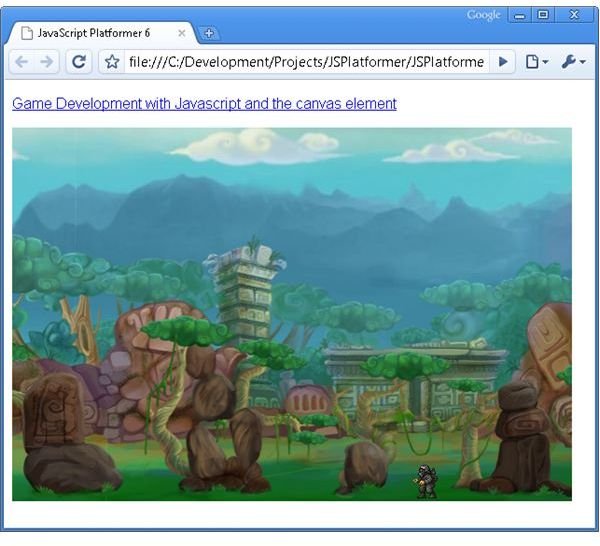
Now that we have seen how to create some of the individual elements that make up the platformer game, like animations, parallax scrolling backgrounds and keyboard input, lets put it all together so we can get an idea of what the final game will look like.
First we need to initialize the elements that will make up the game. Up until now the ApplicationManager has consisted of just a few lines of code. Now that we need to start creating more than one or two objects the ApplicationManager starts to take on some significance as the location where the individual classes that make up the game are created and managed. Here we create threeRepeatingGameObjects to represent the background and a Player to represent the player in the game. The RepeatingGameObject class was covered in this article, and the player was covered in this article. [code ]
One new feature that we need to add to the AnimatedGameObject class (which is extended by the Player class) is the ability to change the animation that is being played. Previously once the animation was set by calling startAnimatedGameObject it couldn’t be easily modified. In order to accommodate changing the animation we need to add a new function called setAnimation. This allows us to redefine the image, fps and frameCount variables that make up the animation. [code ]
The last change we have to make is to the Player class. In the last article the Player class moved an animation around the screen. Here we want to have our player running along the ground, and have the animations change to refelct the direction that the player is running as well as introducing an idle animation.
First we need to modify the keyDown function slightly. In the last article I mentioned that the keyDown function is called repeatedly if a key is held down. I also said that it didn’t matter too much. Well, now it does.
Because we are changing the animation being played in response to a key being pressed (because the player might be moving in a new direction) we need to know if the player is actually being asked to move in a new direction (for example changing from being idle to running right), so we can change the animation to reflect that change, as opposed to the keyDown function being called again because the key has been held down. In order to do this we simply check to see if the player is already moving in the requested direction by checking the this.left and this.right variables.
If the player is not moving the updateRequired variable is set to true, which causes the updateAnimation function to be called. Otherwise we assume that the call to keyDown is because of the fact that it is called repeatedly when a key is held down, and no change to the animation is done. [code ].
Unlike the keyDown function, the keyUp function doesn’t get called repeatedly, and so we can modify the current animation back to the idle animation directly. We do still make a call to the updateAnimation function in keyUp because both the left and right arrow keys can be held down at the same time, and releasing one may still mean that the other is held down, meaning that we can’t assume that releasing one key will necessarily drop the player back to the idle animation. [code ]
Then there is the updateAnimation function itself, which sets the appropriate animation if the player is moving left, right, or standing still because (as mentioned above) both left and right arrow keys can be held down at the same time. [code ]
The last change we need to make is to modify the xScroll value when the player reaches the edge of the screen. The xScroll and yScroll values represent how far the camera has moved left and right across the level. As the player moves right across the level the xScroll value needs to increase to keep the player on the screen. And conversely as the player moves left the xScroll value needs to decrease. The background images, represented by the RepeatingGameObjects created by the ApplicationManager, also use the xScroll values to scroll themselves, so by modifying the xScroll we get the illusion that the player is moving through the level. [code ]
Check out the demo here , download the source code here , and browse the code documentation here .
Read more in the Game Development with JavaScript and the Canvas element series.


