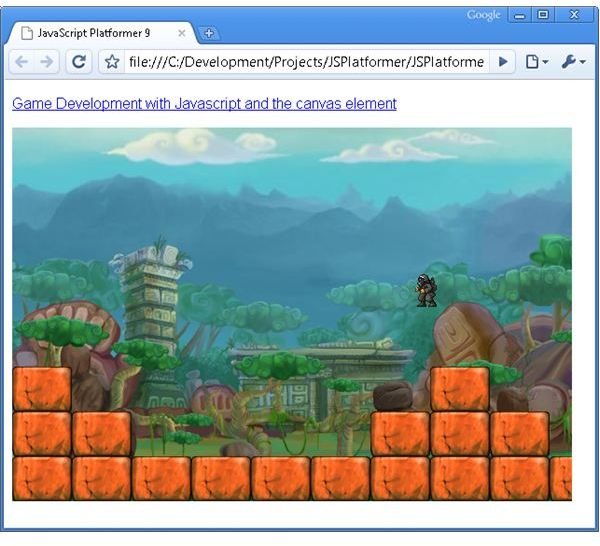
Now that we have a player that can run and collide with the level, we give the player the ability to jump and fall.
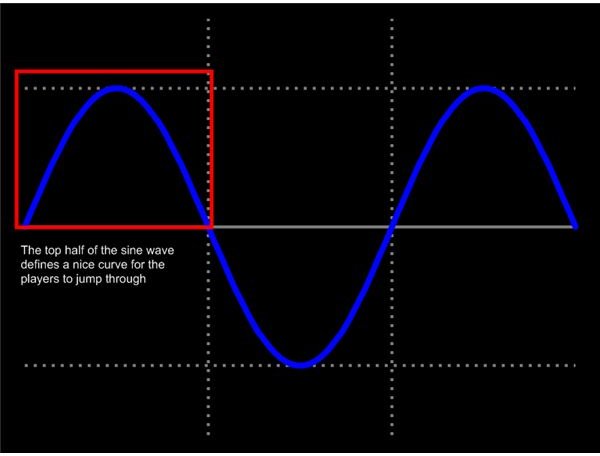
First up we add the ability to jump. The players jump will follow an arc in the air, jumping up quickly to begin with, slowing until the apex of the jump, and then falling back down again. This arc is nicely defined by a sine wave with the formula y = jumpHeight * sin(jumpSinWavePos). In this case y is the height of the player as he jumps, jumpHeight is a constant that defines the maximum height of the jump, and jumpSineWavePos is a variable that will be incremented over time as the player moves through the jump.
The benefit of using a sine wave to define the height of the jump is that the player will follow a smooth arc regardless of the frame rate.
First we need to define the variables that were mentioned in the formula above. You notice that we also define the grounded Boolean property, which is true when the player is on the ground, and false when he is in the air (either jumping or falling). [code ]
Next we need to watch for the space bar being pressed, at which point we start the players jump. Notice that we first check to see if the player is on the ground, because the player can only jump if he is currently grounded. We set grounded to false (to indicate that the player is no longer on the ground), and set the jumpSinWavePos variable to 0. [code ]
The jumpSinWavePos is the value that will increase over time to push the player along the sine wave. Because the Math.sin function works on radians we want jumpSinWavePos to start at 0 (sin(0) = 0), move to PI / 2 at the top of the jump (sin(PI / 2) = 1), and then through to PI at the bottom of the jump (sin(PI) = 0). This range takes us through the top half of the sine wave, and therefor the arc that we want to follow for the jump. The jumpHangTime variable defines how quickly jumpSinWavePos moves through the range of 0 to PI, which has the effect of defining how long the player spends in the air.
The players interaction with the level is done in two steps. The first is that the player is moved along the x axis, and then pushed out of any blocks he collides with, which is what we did in the last article. The second is that the players position along the y axis is modified, and he is then pushed up out of any block he might collide with.
If grounded is false (i.e. the player is in the air) his height will be modified as it moves along the sine wave. [code ]
First we make a note of the last position on the sine wave that the player was at, and then progress the jumpSinWavePos to the new point on the sine wave. [code ]
Next we check to see if the player has fallen off the top half of the sine wave. Since we are only interested in following the top half of the sine wave we simply continue to move downwards at a predetermined speed once the player followed that arc. The speed is determined by the fallMultiplyer property. I set it to 1.5 times the average speed of the jump (the average speed being determined by jumpHeight / jumpHangTime), which seems to give the player a smooth fall rate. [code ]
If the player is still on the sine wave we move him to the new height. [code ]
Once the players height has been modified we need to see if the player has fallen through the ground. Much like before when we pushed the player back out of any block he collided with, here we do the same and push the player up out of any block he has fallen into. When checking the height of the player it is important to check if both the left and right side of the player is colliding with the ground. [code ]
If there is a collision with the ground, the player is considered to be grounded (so grounded is set to true), and the height of the player is modified so he is sitting on top of the stack of blocks. [code ]
If there is no collision with the ground, and the player was previously grounded, the player must be falling. At this point we set the jumpSinWavePos to PI / 2, which means that we start modifying the players height from the top of the sine wave (i.e. the player starts to fall), and set grounded to false to indicate that the player is in the air. [code ]
Check out the demo here , download the source code here , and browse the source code documentation here .
Read more in the Game Development with JavaScript and the Canvas element series.
Images