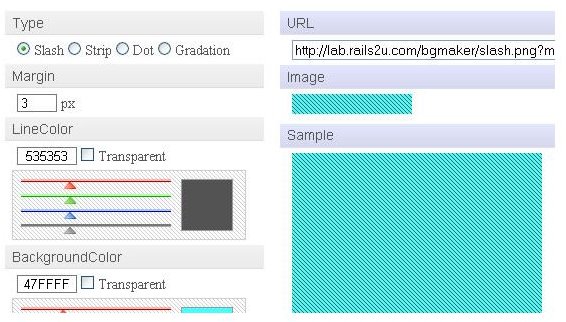
Background Image Maker is a tool that you can use to quickly create backgrounds for your website.
What is Background Image Maker?
Background Image Maker is a very useful tool to use to create backgrounds. This tool makes creating your website background a breeze. You have the choice of four types of backgrounds; Slash, Strip, Dot, and Gradation. Then you have the choice of background color and type color. Once you have created your background, you will be provided with the link you will need to use for your website background.
How Do You Use the Background Image Maker?
To begin, you will need to visit the Background Image Maker website. On the background tool page, you will see a lot of fields for creating the background. Start by selecting the type of background you want to use. Then you will need to enter the size for the margin. By default it is set at 3, you can leave this at 3 or change it. The next step is to select the color for your lines in the background. You can adjust the color bars to create the look you are going for or you can enter the hex code in the box if you know the code of the color you want to use. Next, you will need to select the color of the background. Again, adjust the bars or enter the hex code for the color. The next option is the size of your background. Enter the size in this field and you will be finished. Click the Make button to see your new background. If the background is like you want it, copy the URL at the top of the Background Image Maker box. This is the URL you will need to insert into your website.
How Does the Background Image Maker Help Web Designers?
The Background Image Maker will save web designers time. By using this tool, you can quickly create a nice background for your website. The tool will also help web designers who are just starting out and don’t have much experience with creating backgrounds. By using this tool, you don’t have to open a graphics program, create your background, save it, upload it, and add it to your website. This tool simply provides you with the URL you need to use the background you created.
Is the Background Image Maker Free to Use?
The Background Image Maker tool is free to use. You are not required to sign up for anything or create an account. You simply load the tool page, create your background, and copy the URL provided.


