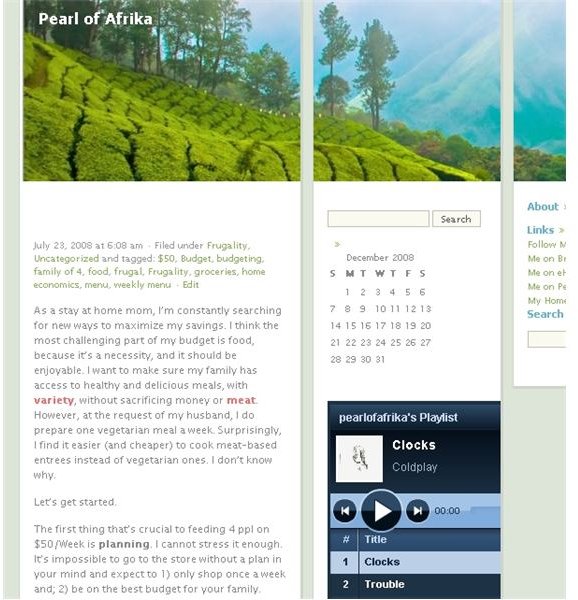
If you have a WordPress blog, you may be interested in sprucing it up. What better way to make your blog inviting then adding music? It shares your personal taste with your visitors, and reveals another side of your personality. Here’s how to do it.
For this tutorial, you will need a WordPress blog and a Playlist.com account. Don’t worry, both are free. This tutorial discusses the WordPress.org blog. In case you’re unfamiliar, the main difference between the .com and .org versions of WordPress is that .com is hosted through WordPress, and the .org is a software that you download, and host through your own web host. The reason you need a WordPress.org blog to add a playlist is because you will need to download and install a special software to host your playlist.
Start off by going to Playlist.com. You will need to click the “Sign Up” button on the home page. From there, you will need to enter in your registration details. You may be asked to sign up for a sponsor, but you’re not obligated to do so. After that, you’ll be asked to login and immediately, you can begin adding music to your playlist. Type in the name of the song or the artist.
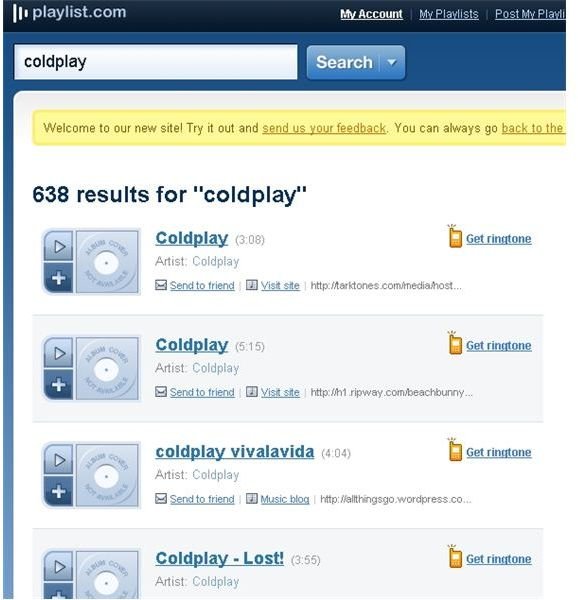


The results page will display all the songs that fit your input criteria. When you see the song you’d like to add to your playlist, click on the “+” button to add to your playlist. Also, you can click the “>” button to play the song from the site.
As soon as you click the “+” button, the song track will deposit on your playlist. Continue adding more tracks until you have created your desired playlist. The playlist is automatically saved, with each song addition. To delete a song, double click on the “x” to the right of the track.
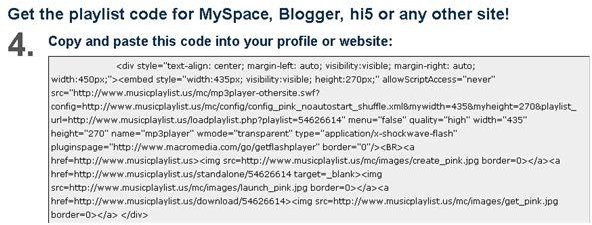
After the playlist is final, click on the “embed” button at the bottom of the playlist. You will be taken to a page that gives you multiple options on where to embed your playlist. For WordPress, choose the last option (E). Select the playlist you just created. Now, personalize your playlist. It’s preferable to not AutoStart, and give visitors the option on whether or not to listen to the playlist. In the instance that a visitor is in a professional setting, or is playing their own music, it would be disruptive to open a site that automatically starts playing music.
Click on the “get code” button, and select and copy the code displayed on the following page.
Copy & paste the code into your a text editor, like WordPad. Then, go edit it to look similar to the following:
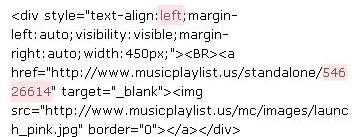
You will need to replace the “54626614” number shown in the example with your unique playlist ID. Notice the align has also changed to “left”.
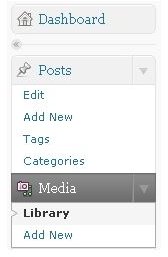
After making those changes, copy the URL “https://www.musicplaylist.us/standalone/54626614" , changing the ending from 54622614 to your unique ID, as above. Enter the URL into your browser. Copy the screen shot of the browser, using the Print Screen key on your keyboard. Paste the file in your photo editing software, and save the file as a .jpg. Next, go to your dashboard in WordPress, and select “add new” under Media.
Upload the .jpg of the screenshot, and then select “view”. You will be taken to a page showing your newly uploaded jpg. Right click the image and select “copy image URL”, if that is an option. If not, click “properties”, and select the imagine URL from there. You will have an image URL that looks similar to: https://pearlofafrika.files.wordpress.com/2008/12/standalone-54626614-screen.jpg .
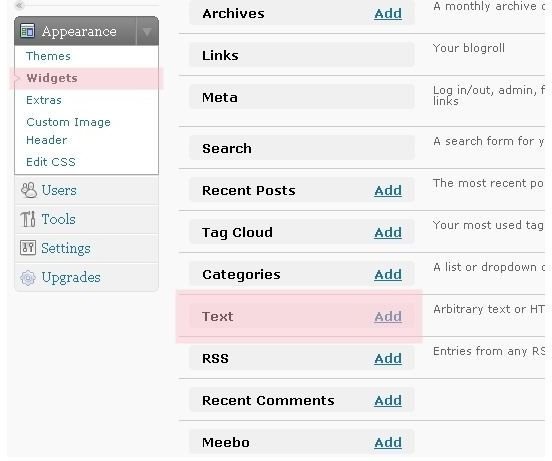
Return to your text editor, and change “https://www.musicplaylist.us/mc/images/launch _pink.jpg” to the above image URL. Now, copy the text. Go back to the widgets section in WordPress, and add “Text”. In the text box, paste the html code, and save. Visit your URL to see the final image.