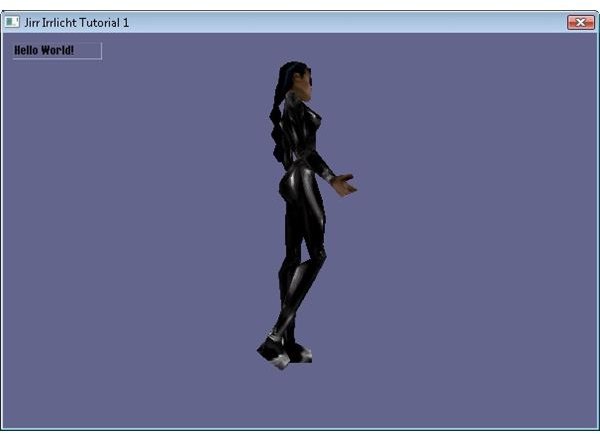
This tutorial shows you how to create fully fledged 3D applications that integrate seamlessly with a web browser using Java, WebStart and Irrlicht.
WebStart
So you want to distribute your new application over the web? There was a time when, for the end user, this simply meant clicking on your link which would download and run the installer. Lately though Microsoft have decided that this was an insecure solution. So instead of being able to download the file, Internet Explorer now brings up a helpful yellow bar across the top of the screen telling you that it has blocked the download, along with a prompt to tell you that you have to click on the yellow bar (plus 2 clicks). The user can then start the download, but will receive a prompt about running the file (plus 1 click). Once run they may even be lucky enough to receive yet another Vista UAC warning (plus 1 click). So what used to be a simple process now involves at least 4 security warnings, and while most users will click through these with about as much thought as they would put into changing gears in a car (which frankly defeats the whole purpose of having the warnings anyway, but that’s another topic) it does still pose an unnecessary complication.
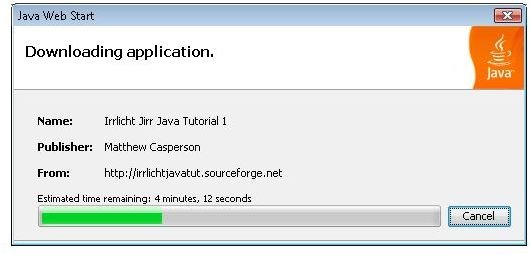
WebStart is Suns deployment solution for Java applications, which addresses some of these issues. With a one or two clicks a user can download, update, install and run a Java application.
For the Java developer creating an application that can be launched with WebStart only involves creating one JNLP file, which is an XML document used to define a description of the Java application, where it is downloaded from and how it should be installed and run. The Java application itself doesn’t need to be modified or prepared in any way. WebStart not only makes it easy for the end user to run a Java application, but it is also easy to implement for the developer too.
WebStart also has the advantage of letting users run fully fledged Java applications without the limitations imposed by Java applets (as an example an applet can not use more than around 100MB of memory without the user specifically allowing it). From the end users point of view though they simply click a link, watch WebStart install the application, and then have the application open up in a new window. Few users would realize, or care, that they are no longer working in a web browser.
In previous articles I showed you how to add 3D to a web page using the Papervision 3D Flash engine. It’s a neat solution, and because it uses the Flash plugin the 3D can be inserted right into the web page. Papervision does have some performance limitations though; it can only display a few simple 3D models at a decent frame rate. Here I will show you how to use WebStart to provide an (almost) seamless way to launch a fully fledged 3D application from the web using the Irrlicht 3D engine and the Jirr Java language bindings.
Irrlicht with Java
Irrlicht is a C++ open source 3D engine that has significantly grown in popularity since its inception. Because it is written in C++ Irrlicht has all the speed benefits that compiling to native code can provide. The Jirr project has used JNI to allow Java to interface with Irrlicht, giving Java developers the same access to the Irrlicht engine that their C++ brethren enjoy. I will take advantage of this to create a 3D Java application that will be launched by WebStart.
As an introduction to Jirr and Irrlicht I will create a simple application that will display an animated 3D model. I will use the pattern established in the Flash and Silverlight development tutorials by creating a class called EngineManager, which will contain the code necessary to manage the underlying 3D engine, and ApplicationManager, which will control the logic of the application itself.
EngineManager.java Source Code
As you can see the EngineManager class is quite straight forward, maybe with the exception of the loadResources function. We initialize the Irrlicht engine in the startupEngineManager function, enter the game loop in the enterGameLoop function, and finally clean everything up in the shutdown function.
The loadResources function is used to overcome a limitation that was recently imposed with Java 1.6. In previous versions the developer could get the filename of the local cached JAR file saved by WebStart. Since JAR files are just ZIP files, and Irrlicht can access the contents foa ZIP file directly, it would have been possible to allow Irrlict to access resources (like meshes, textures etc) directly from the same JAR file that was used by WebStart to launch the application.
Unfortunately this is no longer possible with Java 1.6. Instead the getResourcesAsStream fuction can be used to get access to a file included in the JAR archive. The loadReasources function makes use of this to get access to the media.zip file included in the JAR archive, extract it to a temporary location, and then point Irrlicht to the temporary ZIP file. The file is then deleted in the shutdown function.
ApplicationManager.java Source Code
The startApplicationManager function in ApplicationManager is called to create a GUI label and load, texture and animate a 3D model.
The Start class hosts the main entry point function, and is used to startup and shutdown the EngineManager and ApplicationManager classes. Note that we also make a few calls to **System.**loadLibrary, which load the native Irrlicht and Jirr DLL’s.
Create the JAR file
In order to package this application in a JAR files that can be launched with WebStart you first need to extract the jirr142.jar file, which is part of the Jirr package. Jar files use the standard zip compression, and a free tool like 7-ZIP can be used to extract them. You then need to call the jar.exe file from you Java SDK directory to create the JAR file that will be distributed with WebStart. The command I use is shown below. It assumes that the manifest file and the media.zip file (which will include all the models, textures and fonts used by Irrlicht) are in the current directory, the compiled Java class files are in a subdirectory called bin, and that the extracted jirr142.jar files are located in C:\Development\Libraries\jirr_1_4_2\1.4.2\lib\jirr142.
“C:\Program Files\Java\jdk1.6.0_07\bin\jar.exe” cfm output.jar manifest.txt media.zip -C bin . -C C:\Development\Libraries\jirr_1_4_2\1.4.2\lib\jirr142 net
The manifest.txt file has one line, Main-Class: Start, which tells Java to look for the main function in the Start class.
(Note: you could publish the jirr142.jar file separately - WebStart does have the ability to download multiple JAR files. However I prefer to keep everything in one JAR file for convenience.)
The DLL files that are supplied with the Jirr package will be placed in their own JAR file called native.jar. The reason for this is that these DLL files need to be extracted in a location where System.loadLobrary can load them. WebStart has this functionality built in, as you will see later on.
The Sun website has detailed information regarding the use of the jar.exe application here .
Signing the JAR file
Once the JAR files have been created they needs to be signed. This is because a signed JAR file is a requirement for the security permissions needed to load a native library (i.e. any call to System.loadLibrary, which is excatly what the Start class does). The keytool.exe and jarsigner.exe tools are used to create the key and use it to sign the JAR file.
First we create a keystore (a location to hold the keys) using the following command:
keytool -genkey -keystore myKeystore -alias myself
Then we create a self-signed certificate with the following command:
keytool -selfcert -alias myself -keystore myKeystore
Finally we sign the JAR file with the command:
jarsigner -keystore myKeystore myjarfile.jar myself
Creating the JNLP file
The last step is to create the WebStart JNLP file.
The JNLP file is self describing, and you can find more detailed information on the format here . However there are two sections that I will point out.
The first is the
Second is the
The end result
Developing a WebStart application does require jumping through a few hoops, but for the most part it allows a Java application to be distributed, downloaded, installed and executed on a client PC with a minimum of fuss for the end user.
Check out the online demo here , browse the source code here , and download the source code in a TAR file here .
Images
Related Articles

Learn how to add 3D effects to web pages using the Away3D Flash 3D engine with these free tutorials.
This post is part of the series: 3D on the web with Java and Irrlicht
Learn how to use the Irrlicht 3D engine with Java to deliver 3D application via the web.
- 3D on the web with Java and Irrlicht - Getting Started
- 3D on the web with Java and Irrlicht - Lighting
- 3D on the web with Java and Irrlicht - Displaying 2D textures
- 3D on the web with Java and Irrlicht - Keyboard Input
- 3D on the web with Java and Irrlicht - 2D Collision Detection
- 3D on the web with Java and Irrlicht - Effects


