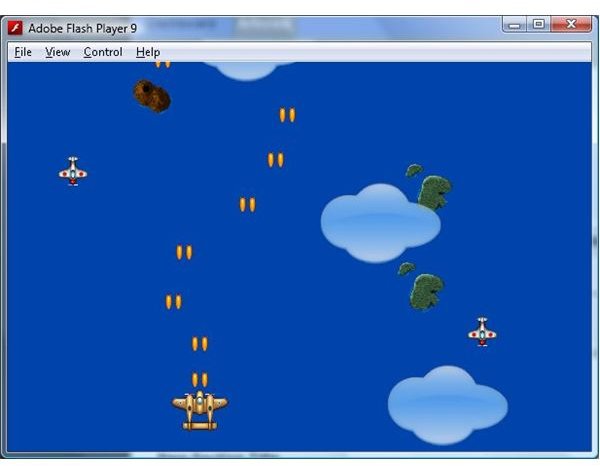
In part 4 of the series we added user input, and created a scrolling background to simulate flying over an ocean. In part 5 we will add some enemy fighters and player weapons.
At this point in the series we have implemented enough underlying code to make adding new elements to the game quite easy. With GameObjectManager and GameObject classes handling the work of drawing and updating the game elements and the Level in place to actually create the new elements, there is only a minimal amount of code required to implement new game elements. We will take advantage of this to add some enemy fighters to the game, and give the player some weapons to fight them with.
First, let’s take a look at the changes that have been made to the Level class.
Some More Action
package
{
import flash.events.*;
import flash.geom.*;
import flash.media.*;
import flash.net.*;
import flash.utils.*;
import mx.collections.ArrayCollection;
import mx.core.*;
public class Level
{
protected static var instance:Level = null;
protected static const TimeBetweenLevelElements:Number = 2;
protected static const TimeBetweenEnemies:Number = 3;
protected static const TimeBetweenClouds:Number = 2.5;
protected var timeToNextLevelElement:Number = 0;
protected var levelElementGraphics:ArrayCollection = new ArrayCollection();
protected var timeToNextEnemy:Number = 0;
protected var enemyElementGraphics:ArrayCollection = new ArrayCollection();
protected var timeToNextCloud:Number = 0;
static public function get Instance():Level
{
if ( instance == null )
instance = new Level();
return instance;
}
public function Level(caller:Function = null )
{
if ( Level.instance != null )
throw new Error( “Only one Singleton instance should be instantiated” );
levelElementGraphics.addItem( ResourceManager.SmallIslandGraphics);
levelElementGraphics.addItem( ResourceManager.BigIslandGraphics);
levelElementGraphics.addItem( ResourceManager.VolcanoIslandGraphics);
enemyElementGraphics.addItem( ResourceManager.SmallBluePlaneGraphics);
enemyElementGraphics.addItem( ResourceManager.SmallGreenPlaneGraphics);
enemyElementGraphics.addItem( ResourceManager.SmallWhitePlaneGraphics);
}
public function startup():void
{
timeToNextLevelElement = 0;
new Player().startupPlayer();
}
public function shutdown():void
{
}
public function enterFrame(dt:Number):void
{
// add a background element
timeToNextLevelElement -= dt;
if (timeToNextLevelElement <= 0)
{
timeToNextLevelElement = TimeBetweenLevelElements;
var graphics:GraphicsResource = levelElementGraphics.getItemAt( MathUtils.randomInteger(0, levelElementGraphics.length)) as GraphicsResource;
var backgroundLevelElement:BackgroundLevelElement = BackgroundLevelElement.pool.ItemFromPool as BackgroundLevelElement;
backgroundLevelElement.startupBackgroundLevelElement(
graphics,
new Point(Math.random() * Application.application.width, -graphics.bitmap.height),
ZOrders.BackgoundZOrder,
50);
}
// add an enemy
timeToNextEnemy -= dt;
if (timeToNextEnemy <= 0)
{
timeToNextEnemy = TimeBetweenEnemies;
var enemygraphics:GraphicsResource = enemyElementGraphics.getItemAt( MathUtils.randomInteger(0, enemyElementGraphics.length)) as GraphicsResource;
var enemy:Enemy = Enemy.pool.ItemFromPool as Enemy;
enemy.startupBasicEnemy(
enemygraphics,
new Point(Math.random() * Application.application.width, -enemygraphics.bitmap.height),
55);
}
// add cloud
timeToNextCloud -= dt;
if (timeToNextCloud <= dt)
{
timeToNextCloud = TimeBetweenClouds;
var cloudBackgroundLevelElement:BackgroundLevelElement = BackgroundLevelElement.pool.ItemFromPool as BackgroundLevelElement;
cloudBackgroundLevelElement. startupBackgroundLevelElement(
ResourceManager.CloudGraphics,
new Point(Math.random() * Application.application.width, -ResourceManager.CloudGraphics.bitmap.height),
ZOrders.CloudsBelowZOrder,
75);
}
}
}
}
The timeToNextEnemy / TimeBetweenEnemies and timeToNextCloud / TimeBetweenClouds pair of properties serve the same function as the timeToNextLevelElement / TimeBetweenLevelElements pair of properties (which was detailed in part 4) except they are used to add enemies and clouds respectively. The enemyElementGraphics property is used for the same purpose as the levelElementGraphics (which was also detailed in part 4) except here is it used to provide GraphicsResource’s when creating new enemies.
We have also added two new blocks of code in the enterFrame function to create the enemies and the clouds. This code is almost exactly the same as the block of code that is used to create the BackgroundLevelElement’s.
The clouds are implemented as a BackgroundLevelElement, except with a slightly faster scroll rate and a higher zOrder. This gives them the appearance of being at a higher altitude.
A new class, Enemy, has been created to represent the enemy fighters. Let’s look at that code now.
Enemy.as
package
{
import flash.geom.Point;
import mx.core.*;
public class Enemy extends GameObject
{
static public var pool:ResourcePool = new ResourcePool(NewEnemy);
protected var logic:Function = null;
protected var speed:Number = 0;
static public function NewEnemy():Enemy
{
return new Enemy();
}
public function Enemy()
{
super();
}
public function startupBasicEnemy(graphics:GraphicsResource, position:Point, speed:Number):void
{
super.startupGameObject(graphics, position, ZOrders.PlayerZOrder);
logic = basicEnemyLogic;
this.speed = speed;
}
override public function shutdown():void
{
super.shutdown();
logic = null;
}
override public function enterFrame(dt:Number):void
{
if (logic != null)
logic(dt);
}
protected function basicEnemyLogic(dt:Number):void
{
if (position.y > Application.application.height + graphics.bitmap.height )
this.shutdown();
position.y += speed * dt;
}
}
}
This code is very similar to the BackgroundLevelElement code. In fact the only difference is that we have separated the enemy logic into its own function called basicEnemyLogic. We save a reference to the basicEnemyLogic function in the logic property (much like we reference the NewEnemy function in the ResourcePool). This may seem redundant, but will later on allow us to implement new types of enemies by creating new logic functions. The startupBasicEnemy function is used to initialise the underlying GameObject and setup point the logic property to the basicEnemyLogic function, which will n turn be called during the render loop (i.e. the enterFrame function).
With those few simple changes we now have enemies created at specific intervals during the game. The next step is to create some weapons so the player can shoot them. To do this we need to create a Weapon class. Let’s look at the code for that.
Weapon.as
package
{
import flash.geom.*;
public class Weapon extends GameObject
{
static public var pool:ResourcePool = new ResourcePool(NewWeapon);
protected var logic:Function = null;
protected var speed:Number = 0;
static public function NewWeapon():Weapon
{
return new Weapon();
}
public function Weapon()
{
super();
}
public function startupBasicWeapon(graphics:GraphicsResource, position:Point, speed:Number):void
{
super.startupGameObject(graphics, position, ZOrders.PlayerZOrder);
logic = basicWeaponLogic;
this.speed = speed;
}
override public function shutdown():void
{
super.shutdown();
logic = null;
}
override public function enterFrame(dt:Number):void
{
if (logic != null)
logic(dt);
}
protected function basicWeaponLogic(dt:Number):void
{
if (position.y < -graphics.bitmap.height)
this.shutdown();
position.y -= speed * dt;
}
}
}
This code is exactly the same as the Enemy class, except that the basicWeaponLogic function moves the object up the screen instead of down. At this point you might be wondering why we need to separate classes that are almost exact copies of each other. We do this because eventually the enemies and the weapons will have a number of specialised logic routines. While the two could conceivably be integrated into one class, keeping them in separate classes makes the code easier to read. The last change is to the Player class, which will have to watch for a mouse click to start firing the weapons.
Player.as
package
{
import flash.events.*;
import flash.geom.*;
import mx.core.*;
public class Player extends GameObject
{
protected static const TimeBetweenShots:Number = 0.25;
protected var shooting:Boolean = false;
protected var timeToNextShot:Number = 0;
public function Player()
{
}
public function startupPlayer():void
{
startupGameObject(ResourceManager.BrownPlaneGraphics, new Point(Application.application.width / 2, Application.application.height / 2), ZOrders.PlayerZOrder);
shooting = false;
timeToNextShot = 0;
}
override public function shutdown():void
{
super.shutdown();
}
override public function enterFrame(dt:Number):void
{
super.enterFrame(dt);
timeToNextShot -= dt;
if (timeToNextShot <= 0 && shooting)
{
timeToNextShot = TimeBetweenShots;
var weapon:Weapon = Weapon.pool.ItemFromPool as Weapon;
weapon.startupBasicWeapon(
ResourceManager.TwoBulletsGraphics,
new Point(
position.x + graphics.bitmap.width / 2 - ResourceManager.TwoBulletsGraphics.bitmap.width / 2,
position.y - graphics.bitmap.height + ResourceManager.TwoBulletsGraphics.bitmap.height * 2),
150);
}
}
override public function mouseMove(event:MouseEvent):void
{
// move player to mouse position
position.x = event.stageX;
position.y = event.stageY;
// keep player on the screen
if (position.x < 0)
position.x = 0;
if (position.x > Application.application.width - graphics.bitmap.width)
position.x = Application.application.width - graphics.bitmap.width;
if (position.y < 0)
position.y = 0;
if (position.y > Application.application.height - graphics.bitmap.height )
position.y = Application.application.height - graphics.bitmap.height ;
}
override public function mouseDown(event:MouseEvent):void
{
shooting = true;
}
override public function mouseUp(event:MouseEvent):void
{
shooting = false;
}
}
}
We have added the shooting property. When set to true (in the mouseDown function, which is called when the left mouse button is pressed down) the Player will periodically add create new instances of the Weapon class. The mouseUp (which is called when the left mouse button is released) sets shooting to false, and the Player stops creating new Weapons. The timeToNextShot / TimeBetweenShots pair of properties are used in the timing of the creation of the new Weapon objects.
By creating two new classes (Weapon and Enemy), and adding some slight changes to the Level and Player classes we are almost at the point where we have a playable game. You will notice that you can’t actually shoot the enemies though. That requires something that we will add in part 6: collision detection.
Back to Flash Game Development with Flex and ActionScript
Related Files
Images
This post is part of the series: Game programming with Flex
Learn how to create a Flash game using Flex with this step by step series.
- Flash Game Development with Flex and Actionscript - Getting Started
- States & Double Buffer Rendering in Flex 4.0
- Flex & Actionscript Tutorial: Adding Game Actions
- Creating an Interactive Animated Background With Flex and Actionscript
- Adding Weapons to Your Game: Flex & Actionscript Tutorial
- Collision Detection With Actionscript
- Adding Bitmap Animations With Flex and Actionscript
- Adding Music and Sound FX With Flex and Actionscript
- Defining Levels: Game Design With Flex and Actionscript
- Actionscript Tutorial: Add a Scrolling Tiled Background


