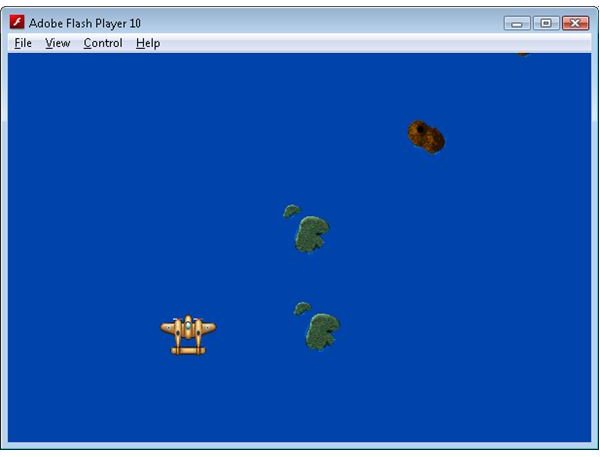
In part 3 of the series we finally got to draw some graphics to the screen. In part 4 we will take this one step further and make the game object interactive. We will also create a background level that the player can fly over.
The majority of Flash games tend to be quite simple in nature. They are 5 – 10 minute distractions that are played during lunch, or when the boss isn’t looking. This simplicity is also reflected in the typical control scheme employed by Flash games: mouse input with a single left click. It’s intuitive (someone who will only devote a few minutes of their time to playing the game isn’t going to want to read a help page with a complicated control scheme), and Flash doesn’t let you (easily) work with the right mouse button anyway.
Thankfully our top down shooter style of game play lends itself nicely to this simple control scheme. The player will simply move the mouse around the screen to move the players ship and click the left mouse button to fire weapons. But before we can create a game object that represents the players ship we first need a way of detecting where the mouse has been moved to, and when the mouse button has been clicked. Lets look at what changes have to be made to the main.mxml file to accommodate this.
Detecting Mouse Movement
<mx:Application
xmlns:mx="https://www.adobe.com/2006/mxml "
layout=“absolute”
width=“600”
height=“400”
frameRate=“100”
creationComplete=“creationComplete()”
enterFrame=“enterFrame(event)”
click=“click(event)”
mouseDown=“mouseDown(event)”
mouseUp=“mouseUp(event)”
mouseMove=“mouseMove(event)”
currentState=“MainMenu”>
<mx:State
name=“Game”
enterState=“enterGame(event)”
exitState=“exitGame(event)">
</mx:State>
<mx:State name=“MainMenu”>
<mx:AddChild relativeTo="{myCanvas}” position=“lastChild”>
<mx:Button x=“525” y=“368” label=“Start” id=“btnStart” click=“startGameClicked(event)”/>
</mx:AddChild>
</mx:State>
</mx:states>
<mx:Canvas x=“0” y=“0” width=“100%” height=“100%” id=“myCanvas”/>
<![CDATA[
protected var inGame:Boolean = false;
public function creationComplete():void
{
}
public function enterFrame(event:Event):void
{
if (inGame)
{
GameObjectManager.Instance.enterFrame();
myCanvas.graphics.clear();
myCanvas.graphics.beginBitmapFill(GameObjectManager.Instance.backBuffer, null, false, false);
myCanvas.graphics.drawRect(0, 0, this.width, this.height);
myCanvas.graphics.endFill();
}
}
private function click(event:MouseEvent):void
{
GameObjectManager.Instance.click(event);
}
private function mouseDown(event:MouseEvent):void
{
GameObjectManager.Instance.mouseDown(event);
}
private function mouseUp(event:MouseEvent):void
{
GameObjectManager.Instance.mouseUp(event);
}
private function mouseMove(event:MouseEvent):void
{
GameObjectManager.Instance.mouseMove(event);
}
protected function startGameClicked(event:Event):void
{
currentState = “Game”
}
protected function enterGame(event:Event):void
{
Mouse.hide();
GameObjectManager.Instance.startup();
Level.Instance.startup();
inGame = true;
}
protected function exitGame(event:Event):void
{
Mouse.show();
Level.Instance.shutdown();
GameObjectManager.Instance.shutdown();
inGame = false;
}
]]>
</mx:Script>
</mx:Application>
We have added functions to listen to 4 new events: mouseMove, click, mouseDown and mouseUp. MouseMove is, as you would expect, called when the mouse has been moved. It allows us to monitor the position of the mouse cursor over the flash player window. Similarly click monitors when the mouse button has been clicked (i.e. pressed and released). When the mouse button is pressed mouseDown is fired, and when it is released mouseUp is fired. We need the ability to monitor the mouseDown and mouseUp events individually (as opposed to the click event which fired after the mouse has been pressed and then released) because eventually we want the player to fire weapons when the mouse button is pressed and stop when it is released.
The four new functions have the same name as the event as their respective event, and simply pass the message along to the GameObjectManager.
GameObjectManager.as
package
{
import flash.display.*;
import flash.events.*;
import mx.collections.*;
import mx.core.*;
public class GameObjectManager
{
// double buffer
public var backBuffer:BitmapData;
// colour to use to clear backbuffer with
public var clearColor:uint = 0xFF0043AB;
// static instance
protected static var instance:GameObjectManager = null;
// the last frame time
protected var lastFrame:Date;
// a collection of the GameObjects
protected var gameObjects:ArrayCollection = new ArrayCollection();
// a collection where new GameObjects are placed, to avoid adding items
// to gameObjects while in the gameObjects collection while it is in a loop
protected var newGameObjects:ArrayCollection = new ArrayCollection();
// a collection where removed GameObjects are placed, to avoid removing items
// to gameObjects while in the gameObjects collection while it is in a loop
protected var removedGameObjects:ArrayCollection = new ArrayCollection();
static public function get Instance():GameObjectManager
{
if ( instance == null )
instance = new GameObjectManager();
return instance;
}
public function GameObjectManager()
{
if ( instance != null )
throw new Error( “Only one Singleton instance should be instantiated” );
backBuffer = new BitmapData(Application.application.width, Application.application.height, false);
}
public function startup():void
{
lastFrame = new Date();
}
public function shutdown():void
{
shutdownAll();
}
public function enterFrame():void
{
// Calculate the time since the last frame
var thisFrame:Date = new Date();
var seconds:Number = (thisFrame.getTime() - lastFrame.getTime())/1000.0;
lastFrame = thisFrame;
removeDeletedGameObjects();
insertNewGameObjects();
Level.Instance.enterFrame(seconds);
// now allow objects to update themselves
for each (var gameObject:GameObject in gameObjects)
{
if (gameObject.inuse)
gameObject.enterFrame(seconds);
}
drawObjects();
}
public function click(event:MouseEvent):void
{
for each (var gameObject:GameObject in gameObjects)
{
if (gameObject.inuse) gameObject.click(event);
}
}
public function mouseDown(event:MouseEvent):void
{
for each (var gameObject:GameObject in gameObjects)
{
if (gameObject.inuse) gameObject.mouseDown(event);
}
}
public function mouseUp(event:MouseEvent):void
{
for each (var gameObject:GameObject in gameObjects)
{
if (gameObject.inuse) gameObject.mouseUp(event);
}
}
public function mouseMove(event:MouseEvent):void
{
for each (var gameObject:GameObject in gameObjects)
{
if (gameObject.inuse) gameObject.mouseMove(event);
}
}
protected function drawObjects():void
{
backBuffer.fillRect(backBuffer.rect, clearColor);
// draw the objects
for each (var gameObject:GameObject in gameObjects)
{
if (gameObject.inuse)
gameObject.copyToBackBuffer(backBuffer);
}
}
public function addGameObject(gameObject:GameObject):void
{
newGameObjects.addItem(gameObject);
}
public function removeGameObject(gameObject:GameObject):void
{
removedGameObjects.addItem(gameObject);
}
protected function shutdownAll():void
{
// don’t dispose objects twice
for each (var gameObject:GameObject in gameObjects)
{
var found:Boolean = false;
for each (var removedObject:GameObject in removedGameObjects)
{
if (removedObject == gameObject)
{
found = true;
break;
}
}
if (!found)
gameObject.shutdown();
}
}
protected function insertNewGameObjects():void
{
for each (var gameObject:GameObject in newGameObjects)
{
for (var i:int = 0; i < gameObjects.length; ++i)
{
if (gameObjects.getItemAt(i).zOrder > gameObject.zOrder ||
gameObjects.getItemAt(i).zOrder == -1)
break;
}
gameObjects.addItemAt(gameObject, i);
}
newGameObjects.removeAll();
}
protected function removeDeletedGameObjects():void
{
// insert the object accordng to it’s z position
for each (var removedObject:GameObject in removedGameObjects)
{
var i:int = 0;
for (i = 0; i < gameObjects.length; ++i)
{
if (gameObjects.getItemAt(i) == removedObject)
{
gameObjects.removeItemAt(i);
break;
}
}
}
removedGameObjects.removeAll();
}
}
}
As you can see GameObjectManager has 4 new functions that reflect the 4 new mouse events in the Application object. The GameObjectManager in turn loops over the gameObjects collection and passes the message to any GameObject that is currently active.
GameObject.as
package
{
import flash.display.*;
import flash.events.*;
import flash.geom.*;
/*
The base class for all objects in the game.
*/
public class GameObject
{
// object position
public var position:Point = new Point(0, 0);
// higher zOrder objects are rendered on top of lower ones
public var zOrder:int = 0;
// the bitmap data to display
public var graphics:GraphicsResource = null;
// true if the object is active in the game
public var inuse:Boolean = false;
public function GameObject()
{
}
public function startupGameObject(graphics:GraphicsResource, position:Point, z:int = 0):void
{
if (!inuse)
{
this.graphics = graphics;
this.zOrder = z;
this.position = position.clone();
this.inuse = true;
GameObjectManager.Instance.addGameObject(this);
}
}
public function shutdown():void
{
if (inuse)
{
graphics = null;
inuse = false;
GameObjectManager.Instance.removeGameObject(this);
}
}
public function copyToBackBuffer(db:BitmapData):void
{
db.copyPixels(graphics.bitmap, graphics.bitmap.rect, position, graphics.bitmapAlpha, new Point(0, 0), true);
}
public function enterFrame(dt:Number):void
{
}
public function click(event:MouseEvent):void
{
}
public function mouseDown(event:MouseEvent):void
{
}
public function mouseUp(event:MouseEvent):void
{
}
public function mouseMove(event:MouseEvent):void
{
}
}
}
And the GameObject class also gains the same new 4 functions. These function are empty because, like the enterFrame function, classes that extend GameObject are expected to place their own logic into them.
So now that we have the ability to respond to mouse events lets look at how this is used to create a player ship that will move around the screen.
Player.as
package
{
import flash.events.*;
import flash.geom.*;
import mx.core.*;
import mx.events.MoveEvent;
public class Player extends GameObject
{
public function Player()
{
}
public function startupPlayer():void
{
startupGameObject(ResourceManager.BrownPlaneGraphics, new Point(Application.application.width / 2, Application.application.height / 2), ZOrders.PlayerZOrder);
}
override public function shutdown():void
{
super.shutdown();
}
override public function enterFrame(dt:Number):void
{
super.enterFrame(dt);
}
override public function mouseMove(event:MouseEvent):void
{
// move player to mouse position
position.x = event.stageX;
position.y = event.stageY;
// keep player on the screen
if (position.x < 0)
position.x = 0;
if (position.x > Application.application.width - graphics.bitmap.width)
position.x = Application.application.width - graphics.bitmap.width;
if (position.y < 0)
position.y = 0;
if (position.y > Application.application.height - graphics.bitmap.height )
position.y = Application.application.height - graphics.bitmap.height ;
}
}
}
In part 3 we created a class called Bounce. It moved in a straight line until hitting the edge of the screen, and which point it bounced back the other way. The Player class is surprisingly similar, except this time instead of moving in a straight line (in the enterFrame function) the Player moves to where the mouse cursor is (in the mouseMove function). And instead of bouncing off the edge of the screen, the Player class moves to the edge and stops.
You may have noticed that startupGameObject makes reference to a ZOrders class. The zOrder defines the depth of the object on the screen, with lower zOrder objects being drawn beneath those with a higher zOrder. The ZOrders class simply holds a few standard zOrder values. This facilitates a level of self documentation: it is immediately obvious what ZOrders.PlayerZOrder refers to, whereas deducing the meaning of a plain value of 10 requires reading the documentation or inspecting the source code directly.
ZOrders.as
package
{
public final class ZOrders
{
public static const PlayerZOrder:int = 10;
public static const BackgoundZOrder:int = 0;
public static const CloudsBelowZOrder:int = 5;
public static const CloudsAboveZOrder:int = 15;
}
}
By listening to the mouse events we are able to replace the Bounce class with a Player class that moves around with the mouse cursor. Lets now give the player the illusion of flying over the ocean.
BackgroundLevelElement.as
package
{
import flash.geom.Point;
import mx.core.*;
import mx.collections.*;
public class BackgroundLevelElement extends GameObject
{
static public var pool:ResourcePool = new ResourcePool(NewBackgroundLevelElement);
protected var scrollRate:Number = 0;
static public function NewBackgroundLevelElement():GameObject
{
return new BackgroundLevelElement();
}
public function BackgroundLevelElement()
{
}
public function startupBackgroundLevelElement(bitmap:GraphicsResource, position:Point, z:int, scrollRate:Number):void
{
startupGameObject(bitmap, position, z);
this.scrollRate = scrollRate;
}
public override function enterFrame(dt:Number):void
{
if (position.y > Application.application.height + graphics.bitmap.height )
this.shutdown();
position.y += scrollRate * dt;
}
}
}
Functionally the BackgroundLevelElement is very similar to the Bounce class from part 3. It extends the GameObject class to display a graphic on the screen, and moves in a straight line in the enterFrame function. Unlike the Bounce object, a BackgroundLevelElement object will eventually move completely off the screen, at which point the shutdown function is called. This returns the object back into a ResourcePool, ready to be reused.
So what is a ResourcePool? To explain that we first need to explain the basic concepts of memory management.
In its simplest form, memory management is the process of creating new objects in memory and then removing them from memory (or destroying them) when they are no longer needed. Languages like C++ expect you to manually keep track of any new object you create, and then later manually destroy them. Failure to do so leads to a memory leak; a situation where objects never get destroyed causing the memory usage of a program to grow continuously. Most modern languages (including ActionScript) employ a garbage collector to destroy objects that are no longer referenced, thus automating the process of destroying objects.
On the surface a garbage collector looks like an ideal solution, but it has its own drawbacks. Whereas C++ would have a memory leak if objects were not manually destroyed, ActionScript can have the same problem if objects are unintentionally referenced after they are no longer required. While the semantics are different the end result is the same: continuously growing memory usage. Another downside to garbage collection is that object destruction in non-deterministic, which is a fancy way of saying that you as the developer have no way to know exactly when an unreferenced object will actually be destroyed. Garbage collection also incures a performance hit. Having the garbage collector trawl through hundreds of objects and destroy those that are no longer referenced takes time, and while it may or may not be noticeable, its doesn’t hurt to be aware that it is happening.
Resource pooling solves many of these problems. Basically it keeps a collection of objects in a pool. As the objects are needed they are taken out of the pool and initialised (note initialised is not the same a being created from scratch with the new function). Once they are no longer needed they are cleaned up and put back in the pool.
By keeping the objects in a pool you avoid having to continuously create new objects. This in turn reduces the number of objects that exist in memory, which reduces the workload for the garbage collector. Also, by creating and destroying resources in a deterministic way (when the object is taken out of the pool, and before it is returned) we gain more control over the memory management process.
ResourcePool.as
package
{
import mx.collections.*;
public class ResourcePool
{
protected var pool:ArrayCollection = new ArrayCollection();
protected var newObject:Function = null;
public function ResourcePool(newObject:Function)
{
this.newObject = newObject;
}
public function get ItemFromPool():GameObject
{
for each (var item:GameObject in pool)
{
if (!item.inuse)
return item;
}
var newItem:GameObject = newObject();
pool.addItem(newItem);
return newItem;
}
}
}
If you found the wordy description of a resource pool a little overwhelming, you’ll find the actual code to be surprisingly simple. There are two properties to the ResourcePool. The pool property contains a collection of the GameObjects that have bee created through the pool object. The newObject property points to a function that is used to create a new GameObject if there are no free objects left in the pool. The ItemFromPool function is used to get an unused GameObject from the pool. It loops through the pool collection looking for the first unused (i.e. where inuse is false) object and returns it. If none can be found it calls the newObject function to create a new GameObject, adds that to the pool, and returns it.
Looking back to the BackgroundLevelElement class you will see that we have created a function called NewBackgroundLevelElement. This function creates a new BackgroundLevelElement, and is the function that is passed to the constructor of the ResourcePool, which allows the ResourcePool to create new BackgroundLevelElements when the pool is exhausted.
Having created the BackgroundLevelElement class we now need some way of adding them to the game. For this we create the Level class. Lets take a look at the code.
Level.as
package
{
import flash.events.*;
import flash.geom.*;
import flash.media.*;
import flash.net.*;
import flash.utils.*;
import mx.collections.ArrayCollection;
import mx.core.*;
public class Level
{
protected static var instance:Level = null;
protected static const TimeBetweenLevelElements:Number = 2;
protected var timeToNextLevelElement:Number = 0;
protected var levelElementGraphics:ArrayCollection = new ArrayCollection();
static public function get Instance():Level
{
if ( instance == null )
instance = new Level();
return instance;
}
public function Level(caller:Function = null )
{
if ( Level.instance != null )
throw new Error( “Only one Singleton instance should be instantiated” );
levelElementGraphics.addItem(ResourceManager.SmallIslandGraphics);
levelElementGraphics.addItem(ResourceManager.BigIslandGraphics);
levelElementGraphics.addItem(ResourceManager.VolcanoIslandGraphics);
}
public function startup():void
{
timeToNextLevelElement = 0;
new Player().startupPlayer();
}
public function shutdown():void
{
}
public function enterFrame(dt:Number):void
{
timeToNextLevelElement -= dt;
if (timeToNextLevelElement <= 0)
{
timeToNextLevelElement = TimeBetweenLevelElements;
var graphics:GraphicsResource = levelElementGraphics.getItemAt(MathUtils.randomInteger(0, levelElementGraphics.length)) as GraphicsResource;
var backgroundLevelElement:BackgroundLevelElement = BackgroundLevelElement.pool.ItemFromPool as BackgroundLevelElement;
backgroundLevelElement.startupBackgroundLevelElement(
graphics,
new Point(Math.random() * Application.application.width, -graphics.bitmap.height),
ZOrders.BackgoundZOrder,
50);
}
}
}
}
Like the GameObjectManager, the Level class implements the Singelton design strategy with an instance property and an Instance function. The TimeBetweenLevelElements property defines how long to wait between adding new BackgroundLevelElements to the screen, while the timeToNextLevelElement property keeps a count of how long is has been since the last BackgroundLevelElement was added. The levelElementGraphics property holds a collection of GraphicResources which we will randomly select from when creating our new BackgroundLevelElements.
Like most classes the Level class has a startup and shutdown function. It is during the startup function (which is called by the Application object when we change into the Game state) that we create the player. We also have an enterFrame function. Just like the GameObject, the Levels enterFrame function is called once per frame by the GameObjectManager. It is here that we periodically pull out an unused BackgroundLevelElement from the resource pool and initialise it through the startupBackgroundLevelElement function.
By adding user input and extending the concepts introduced by the Bounce class in part 3 to create a scrolling background our we have created something that is starting to look like a game. In part 5 of the series we will add some enemies to the screen, and give the player some weapons.
Go back to Flash Game Development with Flex and ActionScript
Related Files
Images
This post is part of the series: Game programming with Flex
Learn how to create a Flash game using Flex with this step by step series.
- Flash Game Development with Flex and Actionscript - Getting Started
- States & Double Buffer Rendering in Flex 4.0
- Flex & Actionscript Tutorial: Adding Game Actions
- Creating an Interactive Animated Background With Flex and Actionscript
- Adding Weapons to Your Game: Flex & Actionscript Tutorial
- Collision Detection With Actionscript
- Adding Bitmap Animations With Flex and Actionscript
- Adding Music and Sound FX With Flex and Actionscript
- Defining Levels: Game Design With Flex and Actionscript
- Actionscript Tutorial: Add a Scrolling Tiled Background


