SpyAgent is computer-monitoring and parental-control software that includes a wide range of features for tracking and logging the activities of children or others who use your PC.
How Does SpyAgent Work?
Every day we see articles about online predators targeting our children by using the Internet to reach them on MySpace, through email, or via instant messenger. Although we may trust our children they may not always know what is safe and what is not. In addition to online predators, there is a lot of other content on the Internet, such as pornography and adult material, that you do not want them exposed to. You want to keep your children safe but at the same time you don’t want to deprive them of the educational and entertainment resources that the Internet provides. If that is the case then you may be looking into some type of parental control software. SpyAgent offers a wide range of features to help parents monitor the activities of anyone using their PCs.
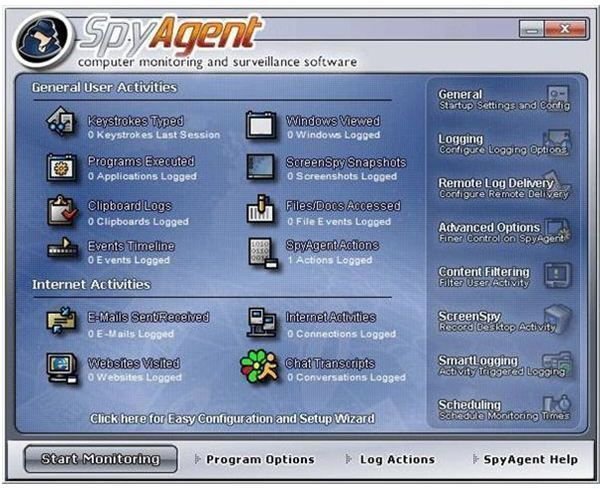
SpyAgent offers a huge assortment of monitoring tools and features as well as extensive options for customizing the way the software works. The user interface is very intuitive and the software makes it easy to find all of the options for modifying and tweaking your setup.
SpyAgent can monitor emails, websites, and chat conversations as well as log user keystrokes. SpyAgent can also monitor which applications are being used and provide built-in content filtering. The program may look like it’s better suited for monitoring employee use of corporate PCs but concerned parents will find it useful as well. You can even keep track of your own activities or, if you’re the suspicious type, your spouse’s activities.
Help & Support (5 out of 5)
What’s Hot:
I have to say that customer support for this product appears to be outstanding. After I finished installing SpyAgent I received an error message about a missing DLL. I tried to un-install and re-install the software but I kept getting the same error. Since I couldn’t get the program to run on my PC I went out to the SpyAgent web site and filled in the support form on their site. The web site says they offer 24/7 support but I really didn’t expect to hear back from them anytime soon. To my surprise, I received an email response to my problem within five minutes and when I checked their web site I found that the support technician had posted the missing DLL that I could download. That is the fastest service I’ve ever received. After that I was able to start the product.
SpyAgent also comes with an extensive help file as well as a number of online resources you can use.
Price to Value (5 out of 5)
What’s Hot:
A single license of SpyAgent is $69.95, which may seem a little steep for most people since there are a number of cheaper parental control programs, such as Net Nanny at half that cost. However, the difference in cost is due to the larger array of features and tools that SpyAgent offers. If you’re looking for a complete monitoring system for your PC, SpyAgent is well worth the price.
There is a free trial version of SpyAgent available but the software trials are limited to 30-minute monitoring sessions.
Installation & Setup (4 out of 5)
What’s Hot:
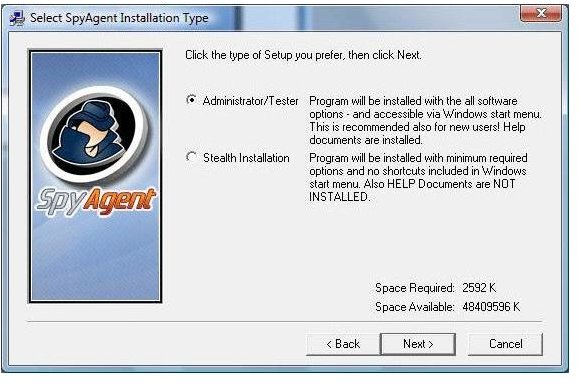
SpyAgent offers two different modes upon installation. You can choose to install it as an Administrator/Tester or use Stealth Installation. Choosing to setup the product as an Administrator/Tester will install all of the software options, including the help files, and place shortcuts in your Windows start menu.
Stealth Installation is a little trickier. This option is designed to allow you to set up SpyAgent on a PC where you don’t want the user to know that it’s installed. The Stealth Installation installs the minimum required options, no help files and no Windows shortcuts. If you choose this type of installation you’ll also need to take a few extra manual steps to ensure that it’s installed undetected. You’ll need to run a configuration utility to display the program files. Once the files are displayed you’ll be asked to rename the sysdiag.exe file to something that conceals its true identity from the user. Finally, you’ll need to configure a password, configure your logging options, and set SpyAgent to run in Stealth-mode.
The first time you run SpyAgent you need choose a password to restrict other users from changing any of your settings. After you’ve selected a password the Easy Configuration Wizard will start. This wizard allows you to quickly configure SpyAgent’s most frequently used features. Once you’ve selected all of your options from the configuration wizard SpyAgent will display the user interface where you can choose more advanced options to configure.
What’s Not:
Installing the program in Stealth-mode may be a little bit confusing for the average user who isn’t confident with running command prompts and renaming files.
I was unable to install SpyAgent on either of my PCs that are running Norton 360 until I disabled all of it’s protection options. Once Norton was disabled SpyAgent worked just fine. However, as soon as I re-enabled Norton it identified SpyAgent as a threat and completely removed the program. This is a serious flaw that needs to be worked out unless you like leaving your PC unprotected from other threats.
Product Features (5 out of 5)
What’s Hot:
SpyAgent offers all of the core features that you’d expect to find in a good parental control software as well as numerous other features for monitoring different types of activity on your PC. In fact, SpyAgent’s web site lists over 46 different features broken out into five different categories; Activity Monitoring and Surveillance Features, Content Filtering Features, Reporting and Log Management Features, Security and Stealth Features, and Ease of Use Features. SpyAgent definitely won’t leave you wishing that it did more.
SpyAgent can monitor an extensive number of PC functions including:
- Monitoring email
- Monitoring instant messages
- Tracking all web sites that have been visited
- Logging and tracking all keystrokes that are typed
- Taking screenshots of your desktop at specified times
- Logging Internet connections
- Watching to see which applications are being used
- Monitoring the clipboard
- Watching which files are being accessed
- Logging all PC activity such as user logins
In addition, there are a number of options that allow you to filter out unsuitable web site content, control which programs can be run, and which chat features can or cannot be used. There is also a great feature that allows you to configure SpyAgent to send you email notifications of different types of PC activity. That way you don’t have to be logged into your child’s computer to see what they’ve been doing. You can monitor them from anywhere that you can access your email.
If you want to make sure that your monitoring activities go un-noticed by other people using your PC, SpyAgent can be configured to run in complete Stealth-mode. It won’t even show up in the Task Manager as a running program.
Compared to many competitive products, SpyAgent is at the higher end as far as the included list of features and adjustable options are concerned.
What’s Not:
When you install SpyAgent on your PC you may run into an unfortunate side effect. Although the program is designed to monitor PC activity, which is what you wanted, it also has many of the same characteristics of harmful programs, such as viruses, key loggers, and other undesirable code. Most PC protection software look for these characteristics. If you’re running Norton AntiVrus, MacAfee or one of the other Norton or popular PC protection tools, you may get regular pop up warnings letting you know that the application is there, even in Stealth-mode. SpyAgent’s web site says that this can be prevented by selecting “Disable Spyware Detectors” in the program’s security settings. The drawback to doing this is that you’ll be disabling a critical form of PC security to allow SpyAgent to work. And there’s no guarantee that it still won’t be detected.
Finally, and this isn’t really a big negative, with such a large number of features configuring all of the different options can be a little complex for the average user. Using this product will take a while to go through all of the features and set them up effectively.
User Interface (4 out of 5)
What’s Hot:
SpyAgent uses a very clean graphical interface to give the user access to all of the different features that are available. I found the user interface to be very friendly and it was easy to find the information I wanted. With 24 different options to choose from it may look overly complicated but it was surprisingly strightforward to use once I started looking at the different features.
In Stealth-mode there are a couple extra steps you’ll need to take to get at the configuration settings but then again, it wouldn’t be “stealth” if it wasn’t.
SpyAgent Screenshots


Suggested Features
Compatibility to run with Norton 360 and other PC protection software.
Conclusion
Overall, SpyAgent is an excellent parental control and monitoring program that offers a large number of features and extensive configuration options. The only downfall is that other PC protection software, such as Norton, categorize SpyAgent as a threat and will prevent you from using it. Until the makers of SpyAgent can solve this serious problem I have to look elsewhere for monitoring software since leaving my PC unprotected from numerous other threats is unacceptable.
Related Products
NetNanny, iSpyNow, SpyBuddy, SentryPC


