Learning how to control Internet access involves use of preloaded Windows security options as well as ancillary software and hardware. Yet even as there are plenty of options open to the consumer, it pays to be mindful of the potential pitfalls.
Why Control Internet Access?
Learning how to control Internet access in the business setting curtails employees’ activities online. It restricts on-the-clock access to inappropriate websites and assists in enforcing set policies for Internet usage.
This kind of public Internet access control generally requires the purchase and installation of software. A good example is BrowseControl(1), an application that restricts online access as well as individual web-based components, such as email, instant messenger programs, news groups and FTP sites.
Blocking Software
One advantage of this Internet access blocker is the administrative feature that lets technology personnel add and delete applications and websites the individual user is permitted to launch from his personal workspace machine.
In addition to limiting time lost due to online game-play and other undesirable Internet activities by employees, this feature enhances corporate security in that it ties application access to passwords and work stations. This protects managerial and quality control programs – as well as human resources records – against tampering and unauthorized view.
How to Control Access to Internet Files around Children
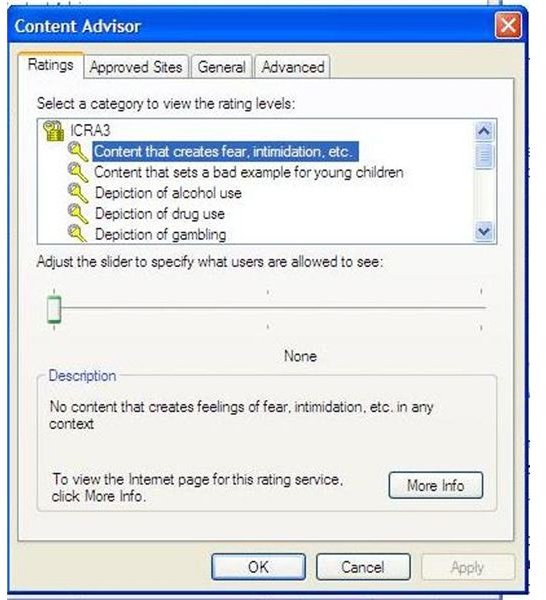
Free parental control of Internet access is already preloaded on many systems. A good example that illustrates this point is the Internet Explorer parental control’s Content Advisor (‘Tools,’ ‘Internet Options,’ ‘Content,’ ‘Enable Content Advisor,’ ‘Ratings’ from the Explorer bar). Although effective, it restricts Internet access for any user of the computer, including the parent.
Dedicated software applications, most notably iNet Protector (2), offer multiple layers of access control that may be easier to enforce. Parents may choose to exercise complete child Internet access control or instead enforce time limits via automatic shutoff. Potentially objectionable applications, such as online games or even chat programs, may be blacklisted.
How to Control Internet Access with a Router
Configuring how to control access to Internet usage is also possible via the hardware. Using a router lets the system administrator choose which home or network computers may launch Internet applications and which may not.
Simply connect a cable modem to a router and access the administrative screen. Identify the machines that will be limited and assign them fixed IP addresses to make governing them a bit easier in the future. Tech Paul(3) crafted a simple to follow tutorial that takes a novice through all the individual steps it takes to enlist the router’s help in controlling Internet access.
Problems Associated with Internet Access Control
Controlling Internet access is not foolproof. Savvy kids routinely learn how to circumnavigate parental blocks. In fact, online tutorials teach the children how to disable the blocks, delete any traces of online activity and then re-enable them at the end of a computing session.
Employees may devise similar methods of getting around Internet blocks. This makes it worthwhile to remember that security measures controlling Internet access are only as good as the supervisor or parent overseeing adherence.
Resources
- BrowseControl (free trial download)
- iNet Protector (free trial download)
- Tech Paul. “More Internet safety–Use your router for access control ” (accessed February 24, 2010)


