Google SketchUp is a free, easy to use 3-D graphics program that helps users to create awesome graphics with ease. Learn how to get started with Google SketchUp.
Using Google SketchUp can save you some time and hassle when it comes to creating your 3D graphics. As with any new program, it can be intimidating. Relax, and by the time you finish reading this, you may not be a Google SketchUp pro, but you will know your way around!
Start by going to Google’s SketchUp page to download the software. There is a Professional version for $495.00, with a trial you can use for 8 hours, counting any time your are running the program on your computer. To save time on your trial, you will need to close the program when you are not using it. Once you download the software, you will need to follow the on screen instructions to install it. You are not required to register the program in order to use it.
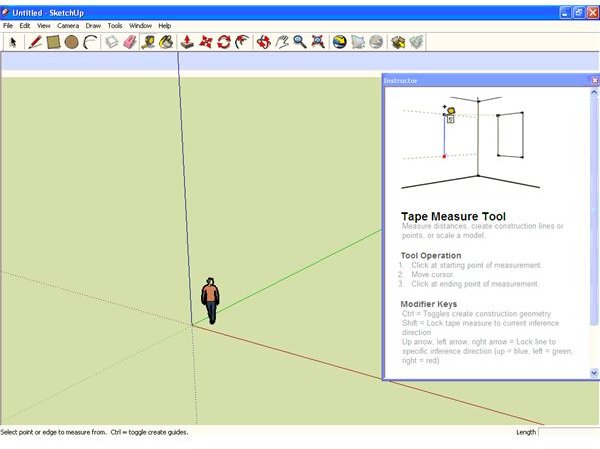
When you open the program for the first time, you’ll see the Learning Center that will show you how to do certain things in the program. You have the option to disable these tips when the program starts, but you should probably read through a few of them to familiarize yourself with the program and its tools.
Here are some of the tools you’ll see in SketchUp.
- Select: This one is obvious, you use it to select elements you want to edit.
- Line: Draw lines.
- Rectangle: Draw rectangles.
- Circle: Draw Circles.
- Arc: Create arcs for doorways and other elements.
- Erase: Fix a mistake.
- Tape Measure: Make sure your shapes are to scale.
- Paint Bucket: Add a finish to your elements.
- Push/Pull: Add or remove volume from your 3-D shapes.
- Offset: Create copies of shapes at a set distance from the first set.
- Rotate: Move elements around on an axis.
- Get Models: Get tons of templates and other elements to use in your projects.
Google has tutorial videos set up by experience level, and a set of self-paced tutorials that you can download and use at your own speed. There is the extensive help library to turn to, so you can surely find what you need. If you need more help, you can also check out YouTube.


