Learn About Google Reader Blogroll - ARCHIVED
Editor’s Note: Google Reader is being shut down on July 1, 2013. Users are encouraged to use Google Takeout in order to transfer their accounts to other RSS feeds. This article was orginally published in 2008 and has been archived but left up for informational purposes.
How to Get it
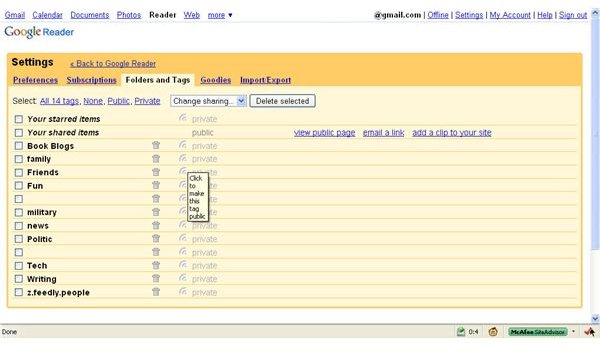
From your Google Reader Home page > Settings > Folders and Tags >Set Tag to Public.
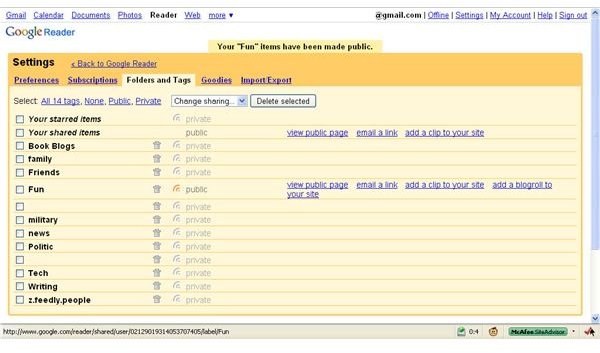
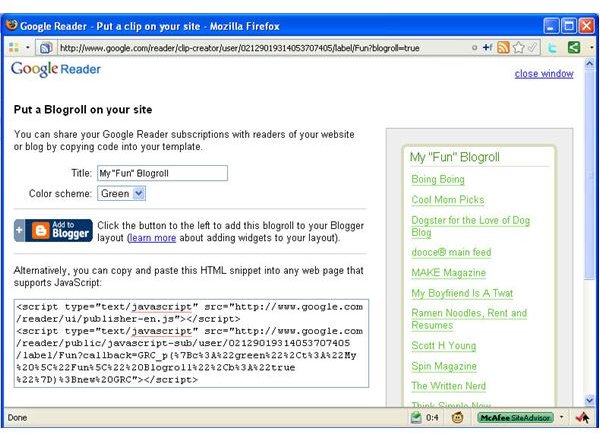
To make a tag public, just click the icon next to the word private. A set of links will show up next public tags. Click add a link to your site. A window will pop up. In that window you can customize the appearance of the blogroll widget. Create a title for the blogroll widget. Select a color scheme. Copy the code in the window, then paste it into your blog. If you use Blogger, just click the Add to Blogger button.
Get It
What to Share
You probably don’t have a single folder already created that you want to share on your blog. A good way to way to separate the subscriptions you want in your blogroll is to create a new folder to put them in. Manage Subscriptions > Change Folders > New Folder > Blogroll > Okay.
Now you have added one subscription to a folder called Blogroll. Add any others that you want to include in the blogroll, then follow the instructions above to make the Blogroll folder public and grab your blogroll widget.
If your organization system just won’t work if you relocate subscriptions to a special blogroll folder, you may want to choose a folder whose theme is similar to the theme of your blog. If you blog about books, then you likely have a folder full of subscriptions involving books. Use that one for your blogroll.
If your blog has no theme or is just a personal blog for friends, you could add a folder for all your friends’ feeds. Making a friend folder for your blogroll widget lends a social networking feel to your blog. It also encourages your friends to check out each other’s blogs and websites.
Overall, blogrolls are a great way to share traffic and “link love.” Consider those points in deciding what you want to include in your own blogroll. Then think about whether your readers will actually be interested in your sister’s knitting website, if your blog is all about html.
Options
If cutting and pasting code annoys you or you don’t like the visual limitations of Google’s widget, there are other options. This Google Reader Blogroll widget for Wordpress supports multiple instances. (Editor’s Note: No longer available!) All you have to do is copy a link, instead of a paragraph of code. The widget links to your public folder.
This article has been placed in our archives.
This post is part of the series: Google Reader
Google Reader is an easy to use, popular web-based feed reader. In this series learn the basics, tips and tricks, and add-ons to enhance your user experience.
- Adding RSS Feeds to Google Reader
- Google Reader for Sharing News With and Without a Gmail Account
- Managing Google Reader Sharing Features
- Take Notes in Google Reader
- Using Google Reader Offline
- Going Mobile with Google Reader
- Google Widget to Display Shared Items on Your Blog
- Themes Change the Look of Google Reader
- How to Turn Google Reader Subscriptions into a Blogroll
