We Explain: Potential Security Problems With Google Calendar and What You Can Do!
The Basics of Protecting Internet Data
When you are a user of Google’s online services, one of the concerns you might have is security. As services such as Gmail and Calendar can carry a lot of your sensitive information, you have to consider whether you are willing to let someone else manage your data. You might wonder if it is safe to use Google Calendar at all. Well, we are here to discuss this issue. Read on to learn about potential security problems with Google Calendar. We discuss what you have to be aware of when using it, considering the plusses and minuses of Google Calendar Security.
The Negative Aspects of Google Calendar Security
Google Calendar is in general an excellent and much appreciated free tool for managing appointments and dates. Even on a corporate level, Google has implemented some excellent collaboration futures that can be accessed by everyone with a browser, no intranet system required. However, besides the obvious perks, there are a few things to consider when filling up Calendar with public and private entries.
First, however strong you password might be you are always providing your details to a third party, which saves it on an external server you cannot access. It is therefore indirectly their security you have to be concerned about. Any breach in Google’s’ systems could lead to a leak of your data, which is what you want to avoid. If your communications with Google’s servers are somehow interfered with, you could not only lose it all, but harmful information can be made available publically.
Considering the recent wave of security breaches at large corporations that lead to the leaking of user data, you can never be too careful when providing your data to a third party. Even Google’s very own Gmail has been prone to hacking, which would potentially open the way to Calendar security breaches as well. From this perspective, Google Calendar seems not to be safe to use at all. However, your username and password do have some credibility and you can go further to ensure the best possible security from your end.
What You Can Do for Better Google Calendar Protection
There are a few things you can do to make sure you did all you could to protect your account from unwanted intruders. As you are probably well aware of, your Google account is by default protected with a login name and password. The very basic step of Calendar protection is therefore to change your password regularly and use a strong one containing both letters and numbers. However, there is a new thing you can do to add an extra layer to your protection.
This new method is called ‘two factor authentication’ or ‘2-step verification’. Whatever it is called, the same thing is meant, namely the installation of a second layer of verification that goes beyond a simple password but starts to resemble security of for instance Internet banking. Even if the password is correctly entered, the person that is logging in must enter a verification code. This code is obtained through a person’s mobile phone and not by simply entering another memorized password. This method applies to all of the Google services and is therefore an excellent uniform method of further securing Google Calendar. To enable it, simply go through the following steps:
- Login to Google Calendar (or any of the other Google service for that matter).
- Click your name in the top right corner and select ‘Account Settings’.
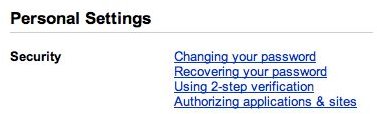
- In the screen that appears, select ‘Using 2-step verification’ under the ‘Personal Settings’ tab.
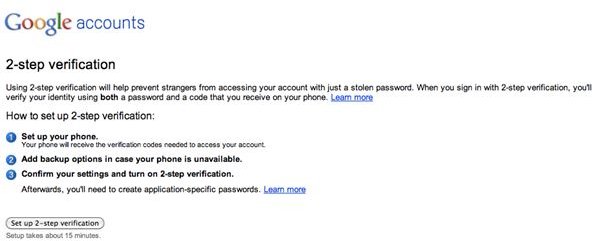
- Sign in to your Google Account again and follow the on-screen self-explanatory steps to finalize the setup for two-factor authentication in Google Calendar. The wizard will help your set up your phone, add backup options in case your phone is unavailable and confirm these new settings to help you increase your security measures.
This method will indeed create a new shell of protection that goes far beyond the normal password layer of accessing your data. 2-step verification has first been available to the professional ‘Apps’-version of Google Calendar and has very recently found its way to free, ‘common’ users. It is not uncommon that paying customers receive earlier updates and therefore it would be wise to upgrade if you are a professional user of Google Calendar.
Although you are not fully in control of your privacy in the case of web apps, Google Calendar seems to have descent security measures in place. The arrival of 2-step verification has brought it up to the level of most Internet banking applications, which in general can be regarded as safe. Nevertheless, changing your password regularly to safeguard your data and always backing up is what’s important!
References
- Neil Turner, 2-Factor Authentication on Google, https://www.neilturner.me.uk/2011/02/19/2-factor_authentication_o.html
- 2-Step Verfication, https://www.google.com/apps/intl/en/business/tsv.html
- All Screenshots by the Author
