Does your business use too much power with many computers running all the time? Check out this affordable program, at just $12 per license for each workstation in your office you could be reducing your power consumption saving yourself money and helping the environment in the long run.
Download and Installation
To download the software for your own trial, please visit: Faronics
Enter your email address. You’ll need the email they send you to help you through the installation process if you are not a technical person. It will walk through everything step by step.
When I went to install the program, I unzipped the file, and saw two .exe programs. Upon referring to the email, I saw that the Core Console had to be installed first. Upon trying to install that, I discovered that I needed Microsoft SQL Server 2005 Express Edition Service Pack 2, before I could do anything else. It took me right to the download page, so after downloading and installing this program, (if you happen to have to do this too, just follow the on screen instructions to help you install it) I came back to installing the Core Console. This is something many businesses already have and understand, so it’s not a big deal at all.
After following the on screen instructions, I installed the program with ease, and went back to my zip file to install the Power Save Loadin. It was a quick and easy installation as I all had to do was follow the on screen instructions.
Because I’m not an IT professional using this program for my business, it was a bit hectic to understand, but the wonderful people at Faronics were nice enough to give me (only for the purpose of this review–a 30 day trial) the console to test out without all the Enterprise stuff that confused me so I’m able to give you a better review of the program.
Program Features
-
Easily set guidelines for each computer
Advertisement -
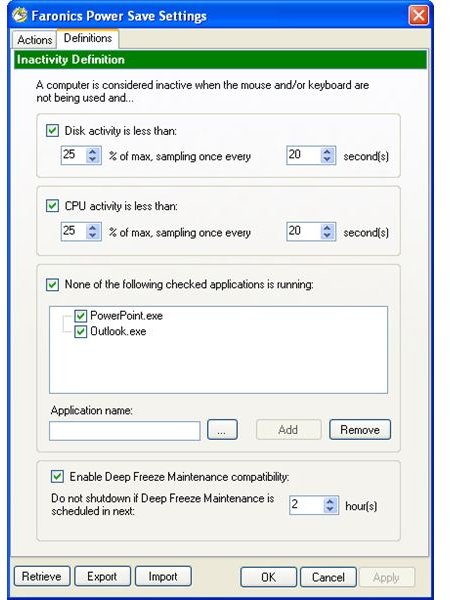
Block the program from following instructions when certain programs are running.
-
Have the program override Windows settings, or choose to let Windows override the program.
Advertisement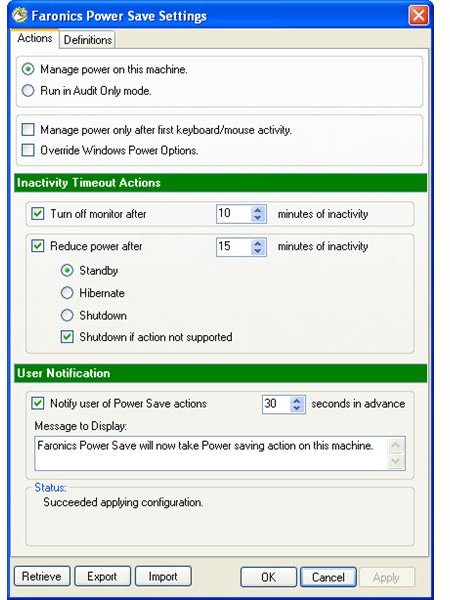
-
Choose when to turn the monitor off after inactivity.
Advertisement -
Choose when to reduce power after inactivity.
-
Choose when to notify the user when Power Save is about to become active.
Advertisement -
Import and Export settings for easy retrieval later.
The photos are screen shots of the actions and definitions tabs where you adjust your settings with the program on each workstation.
Using the Program
Using this p
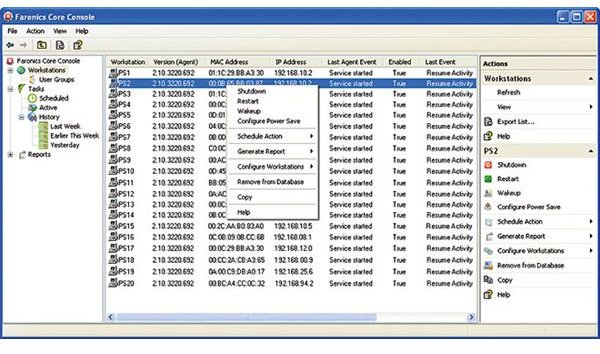
rogram will be a bit different for IT pros than it was for me, but it will be easy for them either way. Here’s a screen shot of what the console looks like that will control all of the workstations the program I’ve used is installed on. This is where you can monitor all the computers in your office.
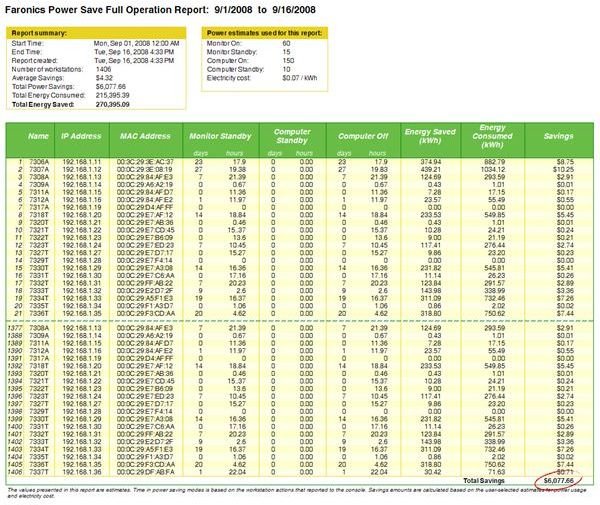
This photo represents a screen shot of the reports you can create and print with the program. This will help business owners see what computers are using the most power to help them figure out if any settings need to be adjusted, and just how much power they are saving.
These screenshots were provided by Faronics and should not be copied without permission.