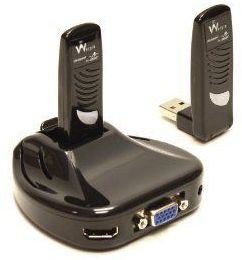
Using Wisair’s Wireless USB Display Adaptor Set you can circumvent additional set-top hardware and you don’t need a games console. You can simply send streamed media to from your PC to your TV for a lot less time and money.
Low Cost Media Sharing Solution
You don’t have to purchase an expensive set-top box or utilise your games console to share content from your PC with your television. There are several alternative, low cost solutions.
One of these is Wisair’s Wireless USB Display Adaptor Set, a useful two-part hardware solution that sends the image from your monitor directly to your VGA or HDMI TV.
Suitable for both domestic and industrial use, the Wireless USB Display Adaptor Set retails around $140. It is considerably cheaper than a set-top box or games console solution and it requires less cabling and organisation than a LAN drive.
Wisair Wireless USB Display Adapter
Set-top boxes and games consoles are both excellent solutions to domestic media streaming but they can require considerable additional cabling, not to mention the installation of the actual set-top device or console.
One solution to this is the Wireless USB Display Adapter from Wisair. This is a lightweight two-part device that basically sends streamed content from your PC to your TV via Wi-Fi. The devices come already paired and it is simple to setup. Both components are already paired which means all you need to do is literally plug and play!
The Wisair Wireless USB Display Adapter comes complete with drivers and software, table or wall mounting options and both HDMI and VGA connectors.
The system reproduces 32-bit True Color depth enabling the reproduction of high quality images on your TV or wall display as well as supporting SXGA+ (1400x1050) resolution.
How It Works
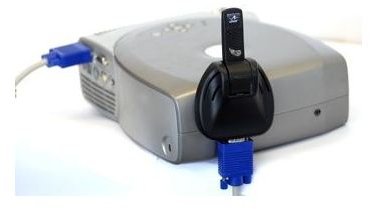
The receiver component plugs into your TV’s HDMI or VGA socket. Any TV without one of these won’t be able to display images from the Wireless USB Display Adapter. The satellite component plugs into your PC’s USB port.
The Wireless USB Display Adapter can also be used in an office setting. The receiver device can also be connected to projectors for big screen viewing.
A drawback of Wireless USB Display Adapter is the fact that by default it displays your entire PC display onto your TV rather than allowing you to directly browse media files, but this is a small drawback for such a great solution.
Find out more about the features of the Wireless USB Display Adapters at www.wisair.com .


