Heading to Thailand this year? Need a GPS map ASAP? Well, learn where you can find Thailand GPS maps here!
Online GPS Sources
Locating maps for your GPS unit can be difficult if they’re not standard maps. For example, it’s rather easy to find street addresses in major cities and major highways. But, you may have a ton of trouble if you’re trying to find information on a lesser-known town or a rural area.
And, finding maps for locations outside of Canada and the United States can take some digging. GPS maps for Thailand are often inaccurate or out of date. Maps for smaller countries and cities almost never come with any of your GPS devices, including the most popular devices: Garmin, Magellan and TomTom.
But, there’s no reason to despair of ever finding these GPS maps. There are, however, some sources that will give you reliable and in-depth GPS maps of Thailand. Plus, they’re constantly being updated so that you know that you have the most accurate information.
Find Thailand GPS Maps
One of those sources is https://RotweilerMaps.com . This site has a variety of maps for Asian and Middle Eastern countries. Best of all, they’re free, but they only work on Garmin devices. To download one of their GPS maps, you need to first have MapSource installed on your Gamin GPS system.
If you do not have this GPS software on your Garmin GPS, you need to do one of the following things:
- Download and install Training Center for Windows: https://www8.garmin.com/support/collection.jsp?product=999-99999-04 .
- Once this is installed, then go to https://www8.garmin.com/support/download_details.jsp?id=209 .
- Update your GPS system with the newest version of MapSource.
If you are having trouble with this, you may also call Garmin Technical Support at 800-800-1020 and have them help you install MapSource on your Garmin GPS device.
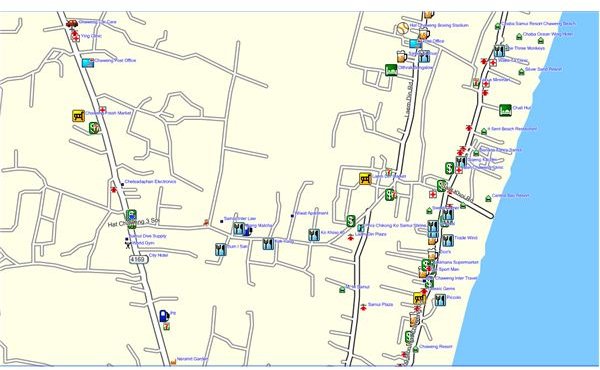
The Rotweiler Thailand South Tourist Edition Version 2.0 map is quite nice. You have all the regular features of a GPS system, including a Points of Interest Database. The POI data base offers you a range of features including local accommodations, attractions, lodging, food and hospitals. The area from the Malaysian Border to Ranong is included in this map.
This GPS website also has a map for all of Thailand known as the All Thailand Routable Version 5.47. This GPS map also comes with a POI database , but there are some glitches with this particular GPS map. It does not work too well with MapSource Version 6.13.1. So, if you have this version of MapSource GPS software, you will have to update your software.
Worldwide GPS Maps
If you happen to need more than just Thailand GPS maps, you’re in luck. There are a number of different websites that cater to international travel using your GPS. For more international GPS map sites, check out the list below:


