What is a memory card reader and do I need one? Will every card reader be able to read my camera’s memory card? What are the advantages of using one? Find answers to all these questions as well as a quick tutorial on how to get your memory card reader up and running.
What is a Memory Card Reader and Why do I Need One?
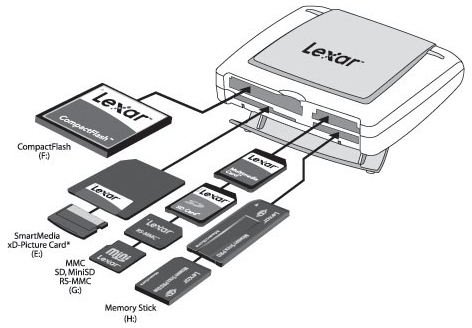
In the last few years, digital technology has proliferated like never before. Film cameras have been replaced by digital cameras, walkmans by MP3 players and regular phones by mobile phones. Data on all these devices are stored in a form of flash memory known as a memory card. But not all memory cards are the same . There are quite a few technologies out there, and not all of them are compatible with each other. So it’s quite possible that your DSLR camera may accept Compact Flash cards whereas your PMP (Personal Media Player, which includes MP3 players like iPods, as well as multi-format audio-video players like Creative Zen Vision) may use SD Cards. This leads to the following issues while connecting to the computer:
1. Each device would occupy a USB port of your computer. If you don’t have a good number of spare USB ports, you’ll have to keep shuffling your devices.
2. It’s messy to attach and detach cords from your device to the computer each time you want to transfer data.
This is where a memory card reader steps in. Think of it as a floppy drive that can read from and write to memory cards. The immediate advantages are:
-
A single card reader can read/write multiple types of memory cards. You don’t have to keep attaching and detaching various devices to the computer.
-
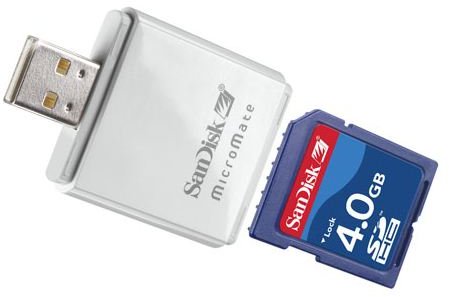
No need to handle multiple messy cables. Some card readers are cable free and directly plug into your USB port like a pen drive .
Advertisement -
Only a single USB port of your computer is occupied for reading up to 4 cards simultaneously (this may vary depending on the exact model of the card reader you have).
-
It’s much faster and safer than directly transferring from your device.
Advertisement -
With a memory card reader, you can also use your memory card as temporary portable memory to transfer images, music or data files.
Are there Different Types of Memory Card Readers?
Now that I’ve established why you should have a memory card reader, let’s talk about the available options you have. There are two variables in a memory card reader:
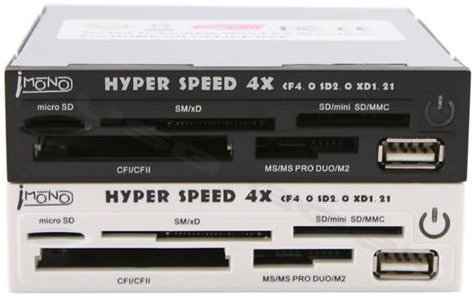
1. The connection port: Your reader can be USB or Firewire (external readers) or an Internal Reader , which is permanently installed in your computer cabinet. In a desktop, its usually where the 3½“ floppy drive sits.
2. The number of cards it can read: From specialized single card (SDHC /CF ) readers to all in one readers that can read every type of card, you can choose one that fits your needs and budget.
Brands include popular ones like Sandisk, Lexar, Kingston as well as lesser known and local brands, which also do a good job.
Please continue on to page 2, where you will learn how to use a memory card reader.
How to Use an External Memory Card Reader
This tutorial assumes you use Windows XP or Vista on your computer. The details may differ for other operating systems, but the gist remains the same.
Step 1: First, find out the connection port of your card reader. Usually it is USB 2.0, though newer readers can have Firewire too. I’ll now talk only about a USB reader, as it’s the most commonly used port. Other connections ports are quite similar to operate.
Step 2: The cable that came with your external memory card reader should have two ports on either end; a smaller mini USB, which plugs into the card reader, and a larger USB, which plugs into a free USB port on your computer. Plug these in.
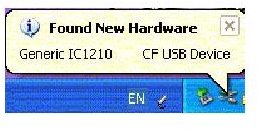
Step 3: If your computer was switched on when you plugged in your device, you should now get a pop-up message saying ‘Found New Hardware’, followed by name and type of device (see left image below - click for larger view). Windows will try to auto-install drivers and, in most cases, it’ll do it without any user intervention. Just wait until the message disappears and a new pop-up message ‘Your device is now installed and ready to use’ appears.
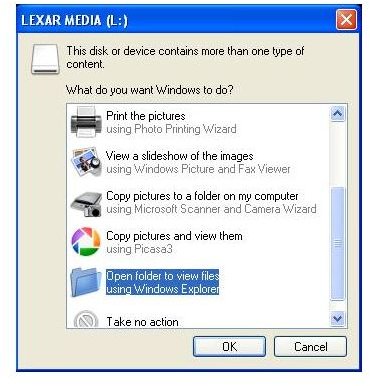
Step 4: Now, insert a memory card into the appropriately labelled slot on your card reader. Another window should open (see right image below) with the message ‘This disk or device contains more than one type of content. What do you want Windows to do?’ followed by a list of options. Choose ‘Open folder to view files using Windows Explorer’, if your aim is to see the contents of the card, or ‘Copy Picture to a Folder on my Computer using Microsoft Scanner and Camera Wizard’ to directly copy images to a particular folder without navigating the folder structure of your card.
Step 5: You may now copy the image files into any folder of your choice on your computer.
Step 6: If, after inserting the memory card, the window mentioned in step 4 doesn’t appear, simply click on Start>My Computer. Your memory card reader should be visible under ‘Devices with Removable Storage’. Each slot on your card reader is recognized as a separate removable drive and is assigned an appropriate drive letter.
How To Use an Internal Memory Card Reader
In most new computers and laptops, the memory card reader comes built-in. So the process of installation is redundant. Simply insert your memory card in the appropriate slot, and continue from step 4 above.
Memory Card Readers