Zoho Review - Free Online Office and Business Software
Overview of Zoho
Zoho is an online software suite, following the SaaS model, which offers a wide range of applications of the office and business variety. The office portion of Zoho is often compared to services like Google Docs and includes all of the standard applications – such as a word processor, spreadsheet program, and presentation creator – plus a whole lot more, making it extremely well-rounded. On the business side, Zoho adds quite a few high-functional tools, including a CRM solution, project management software, and an invoicing application – just to name a few.
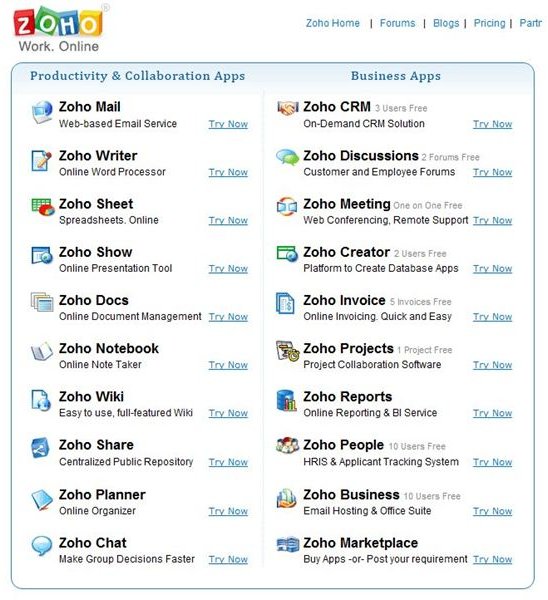
All of the Zoho applications can be managed through a single dashboard or accessed separately, depending on the preference of the user. This makes it easy for each account to integrate activities and, in effect, have access to all regularly-used software products from a centralized location. Moreover, all Zoho applications have extremely intuitive interfaces, making them quite easy to navigate, and many resemble well-known desktop counterparts. For instance, if you have experience with Microsoft Office, the transition to Zoho’s office utilities should be quite natural and easy.
One very nice feature of Zoho is that every application has a free version, and these free services are robust enough that they should serve the needs of individual users and many small businesses. If you do find that you need a bit more than what is included in the free package, you can always add on services, paying only for those features that you require. This is a nice alternative to paying a lot of money upfront for either a desktop or online product, essentially purchasing features that you may never use.
Desktop vs. Online Software
Despite the growing popularity of online software services like Zoho, many people still prefer desktop solutions for a number of reasons. One reason for this is simply habit – if you’re accustomed to using MS Office or some other office suite, then it can take some time and patience to get used to any other application, whether it’s online or not. However, if that application is online, even more adjustment may be called for because the documents and files now being created are stored somewhere “out there” in the cloud by default, rather than on your desktop.
If this is something you’re worried about, Zoho has actually come up with a nice solution – the free Zoho Plugin for Microsoft Office. With this plugin installed, you can pass back and forth almost seamlessly between Microsoft Office and Zoho when creating documents and spreadsheets. This way, you can work offline in Word and Excel and transfer your data to Zoho Writer or Sheet with a single click of a button. Likewise, you can use the plugin to open documents and spreadsheets stored in Zoho as Word or Excel files without having to manually walk through the import/export process. For example, with the plugin installed, you can open a Zoho spreadsheet with Microsoft Excel, make any changes you like, and save again as the same Zoho spreadsheet – the entire process just as quick and easy as editing a file that sits on your local hard drive.
In the next article of this series, we’ll take a closer look at Zoho’s collection of office applications. In particular, we’ll review Writer, Sheet, and Show – Zoho’s word processor, spreadsheet application, and presentation creator – and see how they perform as stand-alone products.
This post is part of the series: Zoho Online Office and Business Software Solutions
This series of articles examines the online offerings of Zoho, a collection of office and business applications operating under the SaaS model. Is Zoho a nice, free alternative to your existing software solutions? Even if you’re happy with current products, would Zoho be a good supplement?
