With the booming popularity of Skype, as well as the desire to use voice communication for online PC gaming, Logitech releases a headset that is supposed to optimize performance as well as a stylish, sleek appearance. Should it be added to any gamer or Skype user’s collection?
Intro
I used to have a really difficult time with headsets. The ones I’ve used in the past were oversized and heavy, while others were light but poorly designed. Logitech’s ClearChat finally offers something that is both light and fairly well-designed. It’s a little bit difficult to get used to at first, but is generally a good piece of hardware to have.
Images
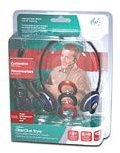
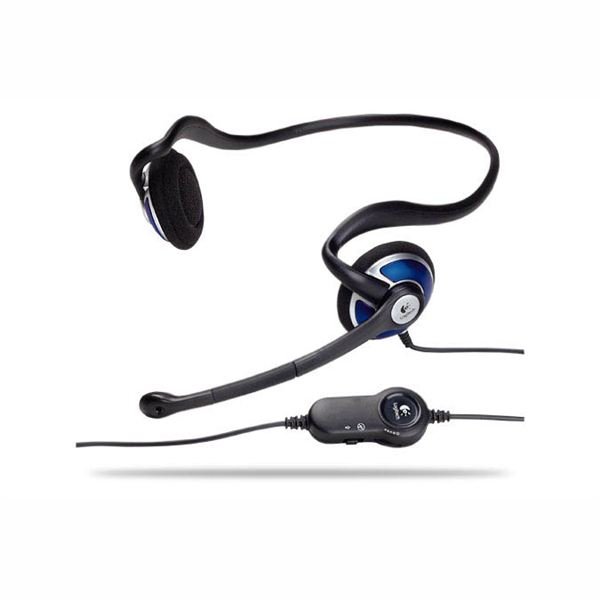
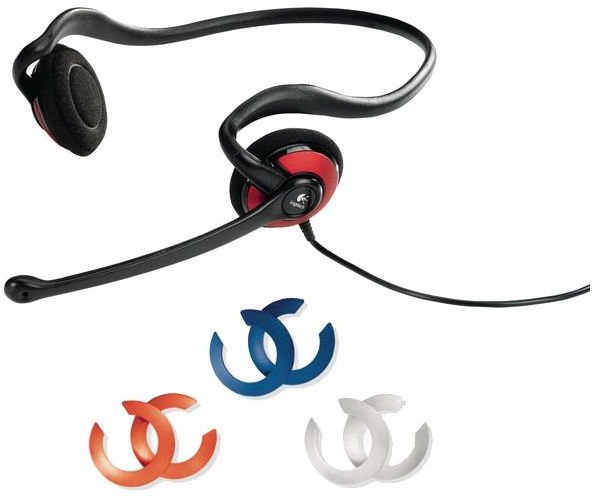
Interface (5 out of 5)
The set is plug-and-play right out of the box. You just need to find the appropriate microphone or headphone jack to plug in, and you’re underway. It’s pretty easy for laptop users to plug and unplug, but is a bit of a hassle for PC users. Certain speaker systems allow for headphones and microphones to be plugged into the subwoofers or other input areas. But if the only area of input is on the tower of the PC, that could be another issue. Having to find the appropriate jacks every time you want to insert the headset or remove it is a bit of an issue, but if the only way of getting sound is through a set of headphones then that won’t be a problem. For users who are looking for a headset that plugs into a USB slot, you will need to check out a different model.
The positioning of the headphones is a bit awkward at first, but that’s due to me not being used to the behind-the-head design. It fits fairly comfortably around the ears, but the design could interfere with those who wear glasses. Its design fits better for those who don’t need glasses, but that doesn’t mean that it’s not useable at all if you need them. All it does is require a little bit of adjustment. Users who wear glasses may not need to make adjustments; the situation is arbitrary.
The headset comes with convenient controls which allow the user to change the volume of the headset, and also enables muting of the microphone whenever necessary. Some users may not care for having controls on the headset, and I don’t really use them much, but it’s good to have in case you’re in the middle of a voice conference and you suddenly need to mute the microphone to make or answer a phone call.
One thing that’s neat is the different casings you can use to colour the headset. It comes with the red colour in the earpieces, but if desired, it can be changed to orange, blue or black. Colours may vary depending on the headset, but these are the colours that came in my package.
Performance (4 out of 5)
The speakers on the headphones produce a pretty good quality sound. It does get a little bit grainier during high volumes, but that is what’s to be expected of headphone speakers. When used in voice conferencing situations like Skype, the sound is very clear. The same goes when listening to music or when watching movies on the computer. The microphone also produces a good sound with efficient noise-cancelling features, but it requires fidgeting with both the placement of it so that the sound comes through, and having to consistently adjust the volume on the computer. Unlike certain headsets where you can position the microphone almost anywhere, the movement of this one is fairly limited, which is somewhat disappointing. Overall, the sound quality of this headset is very solid.
Value (4 out of 5)
This headset was not particularly cheap, but this isn’t a standard headset. It comes optimized with noise-cancelling, along with volume controls as well as its behind-the-head design. This set retails for roughly $45, but Logitech makes good products. It is an investment compared to the generic run-of-the-mill headsets that one may come across, and is also backed by a 2-year limited warranty. Other headphone sets I have used in the past either fell apart easily, or were incredibly heavy. For the price you pay, you get a sleek design, an incredibly light and steady product, and solid performance.
Overall (4 out of 5)
Logitech is a brand name that we have come to know and trust. When it comes to this headset, the expectations are no different. It offers a sleek design, noise-cancelling microphone, responsive controls, and different skins for customization. While not perfect, Logitech’s ClearChat Style headset is good equipment. For users who enjoy voice conferencing on Skype, AIM, MSN or other messenger programs, or for PC gamers who want a reliable piece of headgear, this is highly recommended.
Other content from this author
- Who needs Antivirus Software?
- Your Guide to Free Antivirus Software
- Making your PC Ready for Blu-ray
- Top PC Blu-ray Burners
- Terabyte Hard Drives Buyer’s Guide
- Mac’s Safari, now for Windows
- USB Flash Drive Buyer’s Guide
- An Introduction to Wireless Networking
- Zonet Wireless USB Adapter: Worth it?
- Linksys Wireless G Router: How good is it?
- Wireless G Buyer’s Guide to Choosing a Router
- Wireless N Buyer’s Guide to Choosing a Router


