Our hard disks are possibly the most important part of our computer. It is easy to recover after a system crash, at least you can go for a clean install. But what about a complete loss of all data? Office documents, photos, videos, personal files? Paragon claims to have a solution.
Introduction
Paragon is one of the oldest companies in the hard disk management software development market. The company has very strong products for performing almost all tasks concerning hard disks. Throughout the article we will look at the Hard Disk Manager Suite (HDMS) in detail and see how Paragon performs with the 2009 release.
Installation (3 out of 5)
The installation file is 134 Megabytes in size. It may seem a big download - in fact, it is - but if you decide to make the purchase, you will not need to download the full version again. You can just enter your registration key and start using the program without any limitations. The trial version has a 30-day evaluation.
There’s really nothing special about the installation. Other than the license agreement, it is the typical Next – Next – Finish – Restart routine. If you are considering purchasing the product, make sure that the “Name” and “Organization” fields are correct during the installation.
No questions are asked during the installation, except for the installation directory, user name, and organization (as I mentioned above). There is no other notes worth mentioning.
Features (2 out of 5)
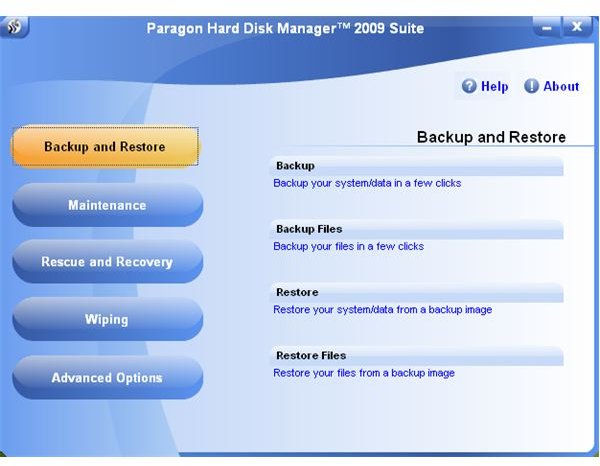
The features in HDMS 2009 can be grouped as backing up/restoring, optimization and defragmentation, disk cloning, imaging and partitioning, and disk wiping. Paragon advertises “advanced recovery” but I don’t think about this as a separate feature but rather falling under the “backing up/restoring” group.
Paragon emphasizes the backing up and restoring functions of the product. With a hard disk management program, I think it is logical to have these features. HDMS 2009 can back up all of your data including the operating system and can restore it. Plus, the back up process can run in the background so you do not need to worry about forgetting to backup. On the plus side, if you have HDMS 2009 installed, backed up your computer, and had a system crash which makes it impossible to reach your desktop, you can recover your data during boot time. That will come really handy if you are ever in serious trouble.
Plus, HDMS can back up your system at the file system level. This means that each file can be restored individually. You can also add files to your back up image without the need for creating an incremental back up – a real time-saver, I believe.
HDMS can back up to any drive: CD/DVD, USB sticks, USB disks, FireWire Disks, Blu-Ray disks. It is unlikely that your backup media will not be recognized by HDMS.
Read on for the other features, price to performance evaluation and our overall opinion.
Features - continued
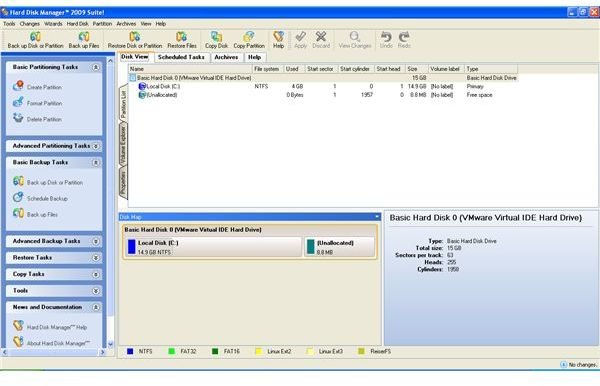
Paragon advertises that you can also tune your hard disk. The defragmentation module can optimize your file system with file size, file date and directory order parameters, can optimize page file, hibernation file and master file table. Another nice feature is that HDMS can defragment USB drives as well.
RAID users rejoice! HDMS also supports RAID.
In terms of cloning, HDMS does its job well. You can copy entire hard disks or partitions with a couple of clicks. If you are copying hard disks too much, this may be the feature that you want.
As you would expect from a Hard Disk Management Suite, Paragon’s software can create, copy, move, resize, mark active, assign drive letters, and carry data between the partitions. Additionally, you can edit your Master Boot Record (MBR), check your drive’s integrity, and test your hard disk’s surface.
HDMS can also wipe your disk. If you want your data to remain confidential, this is something you really need. But, it is not stated which method the program uses – such as Guttmann, U.S. Department of Defense or something else?
Price to Performance (1 out of 5)
Paragon Hard Disk Management Suite 2009 comes with a price tag of USD 50 from its website. I do not think the program justifies its price for the reasons I will explain in the next section.
Overall Evaluation (1 out of 5)
Paragon HDMS lacks one important feature: it does not monitor hard disk health. You can do this easily with a small program called HD Tune (628 Kilobytes of download size) and it is free for personal, non-commercial use. I can not accept a product from Paragon that does not include a hard disk monitoring utility; the download size is a big 134 Megabyte and the price is USD 50. What’s the excuse?
Plus, HDMS does not offer any functionality over and above what you can find with free software. The emphasis is on the file backup and restore, but I must say that everything the program does - except the file level back up - can be done with Acronis True Image. OK, Acronis is not free, but it is probably the best back up tool on the market. Still if you do not want to pay, you can use Microsoft XP’s own backup tool .
In terms of disk defragmentation, I know that XP’s own tool is not enough. However, the small sized Auslogics Disk Defrag does wonders. Add the free CCleaner to the equation for file system and registry optimizer, and you have everything.
With all the advertisement, HDMS has only a disk cloning feature that may be of use to you someday. Other than that, it is no more than a backup program. If you want a high-grade backup solution, then Acronis will be the one to grab. In no case can I justify spending USD 50 for this product.


