This review of Campaign Cartographer 3 shares how easily you can make fantasy or science fiction maps with a few easy clicks. These maps can be shared and viewed over the internet, between friends, and with fans. Gamers, novelists, writers, and artists will love this powerful CAD program.
Overview of Campaign Cartographer 3
Campaign Cartographer 3 is the third upgrade in a line of specialized CAD (computer assisted design) programs released by ProFantasy Software, a company based in England, that can be used to create detailed maps, floor plans, and dungeons for science fiction and fantasy enthusiasts, novelists, and game designers.
Powerful add-ons to CC3 and additional symbol sets provide graphics for creating detailed dungeons, cities, and even star scapes. Some of these include Dungeon Designer 3, City Designer 3, and Cosmographer Pro. Additionally, these supplements can be bought in a value bundle from ProFantasy, adding even more utility to an already powerful program.
Campaign Cartographer 3 has minimal requirements for excellent results:
- 350 MB hard disk space
- 256 MB memory
- Windows 98 or better
- A mouse or a tablet
- An internet connection for installation
For optimal performance and full effects, the following additional system specs are suggested:
- 1GB memory – 2GB is ideal but CC3 must be configured
- Windows 2000 or better
- A fast graphics card with decent on-board memory. (The ProFantasy site suggests that NVidia seems to work better than ATI cards for CC3.)
- A PCI Express motherboard and graphics card makes a noticeable difference.
Campaign Cartographer 3 is compatible with Windows Vista. The application can be purchased in a store or from ProFantasy Software. If purchased through Profantasy, the program can be downloaded straight from their site along with a PDF version of the manual. For a small additional fee, discs for purchased programs and add-ons can also be shipped to the purchaser.
Once CC3 is bought and registered, upgrades and patches are provided on the user’s registration page. They are easily found, downloaded and installed.
User Interface (5 out of 5)
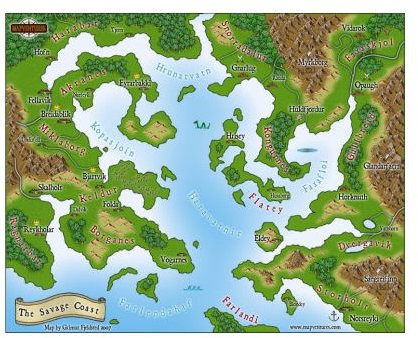
CC3’s interface resembles that of other CAD programs, such as AutoCad, and very little of the program’s maneuverability and flexibility has changed between since Campaign Cartographer 2. Even those unfamiliar with CAD drafting programs can make relatively decent maps with CC3. With a few clicks, I had the sea, my coastline, and a few sea monsters created.
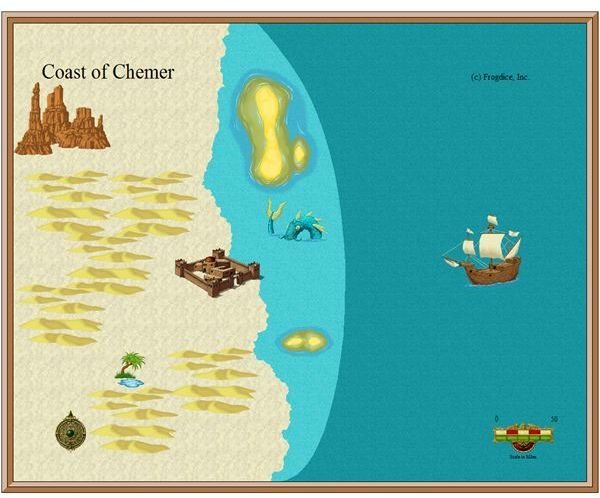
Creating the above map took approximately five minutes. While it is no great beauty, it shows the power and potential of the program. With a little time investment, even the most awkward artist can create something nice and functional.
Even with the most intuitive programs, questions do arise, and with CC3 offering so many options and complexity, I had many, many queries within the first few minutes of trying to create my map. The built-in help system, accessed via a drop down menu clearly marked “Help”, had most of my answers.
CC3’s flexibility also allows creators to freehand continents, rivers, roads, and even political boundaries. The possibilities are almost limitless.
Conversion from CC2 Pro to CC3 (5 out of 5)
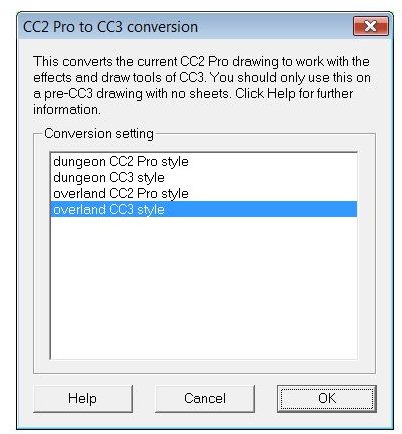
Conversions are easily accomplished between these two programs, and CC3 has a specific option in the File menu called CC2 to CC3 conversion. The most time consuming part of converting is moving all the elements to the correct sheet (or layers). If the user does not utilize sheets, conversion can be accomplished in three simple clicks.
Graphics and Symbols (5 out of 5)
One of the most noticeable upgrades between CC3 and CC2 Pro is the quality of the graphics and symbols. I immediately noticed more textures for landmasses and large bodies of water. In addition, I found choices for deserts (that I used in my sample), light plants, heavy plants, forests, fens, and even ice. For the few maps I have made with the new program, the choices in fill color and texture have been extremely positive.
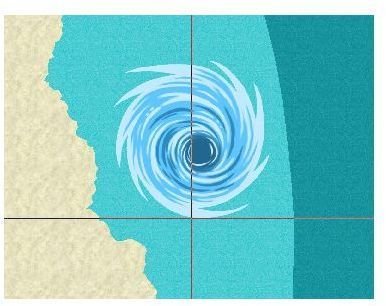
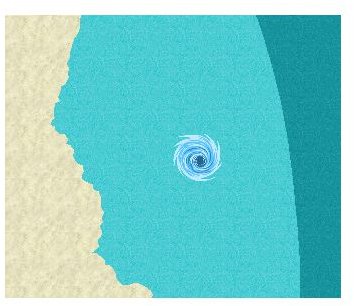
A highlight in testing out the new program came when I opened up the selection for symbols. The details of each of the new symbols were excellent, and even better, I was able to scale them to pretty much any size I wanted. I shrank a boat down to be smaller than my sea serpent so that it could have a delicious snack. To plague the residents of my coastal town even more, I created a whirlpool. Then I decided it was too small, so I increased the size using one graphic. CC3 uses enhanced metafiles which are a vector based graphic format that allow manipulation of image size without the loss of quality.
In addition, the graphics can be separated onto various sheets, which were formerly known as layers in CC2 Pro, and viewed separately from other layers. This allows the manipulation of specific sheets without affecting others as well as hiding specific layers to create several versions of a map.
Viewing and Sharing (5 out of 5)
Though CC3 maps can be saved as a .bmp, .jpeg, or .png file, many of the details and functionality of the created maps can be lost by viewing them this way. ProFantasy provides a free printer and viewer program that can be downloaded from their site that allows for users to fully view and utilize the details of created maps without purchasing the software. The viewer itself requires 70 MB of hard drive space.
Maps can also be shared within the Campaign Cartographer community via the Profantasy site. Plenty of free fantasy maps are uploaded daily for other people to download and use. The Map & Catalog Library provides a powerful search tool that allows map enthusiasts to search by genre, file type and keyword. Users can easily find star maps, fantasy maps, and several dungeon maps as well as several new symbols created by different users.
Community and Support (5 out of 5)
Campaign Cartographer 3 continues to benefit from a strong community that shares its ideas and work via mailing lists, forums, blogs, and an online User’s Tutorial. ProFantasy also links to websites that sport maps and floorplans created using the CC3 software, allowing anyone interested to find and download these maps. A quick warning to anyone who wishes to sign up for the mailing list: It is extremely active and a participant can get up to thirty or more emails a day if a hot topic is being discussed. I found the community to be extremely helpful in aiding me with my questions.
In addition, ProFantasy itself provides technical support. I am one of those people who had CC2 Pro and wanted to upgrade to CC3, and I wanted detailed instructions on how to upgrade since I had several maps that were extremely important to my business. Within twenty-fours, I received an email with detailed instructions on how to proceed and reassurances that I should not have any problems getting everything to convert, which turned out to be entirely accurate.
Overall Performance and Value (5 out of 5)
Campaign Cartographer 3 can be purchased for $44.95 from Profantasy or for as low as $39.50 from rpgshop.com. It can also be purchased from various gaming and hobbyist stores across the United States and England. (Buyer’s warning: Please make sure that you do not buy a used copy, or you may not be able to register the product. Registration allows you to download their upgrades and fixes as well as buying upgrades at a discounted price.) If you already own CC2 Pro, you can upgrade to CC3 $36.95 via the registration page.
CC3 can also be purchased in a bundle with several other programs such as Dungeon Designer 3, City Designer 3, Perspectives Pro and Cosmographer Pro. ProFantasy offers several bundles at reduced prices, though the Whole Shebang (the complete collection) weighs in at a whopping $571.00, but the purchaser receives eighteen products including a World War II Interactive Atlas, three symbol sets, and three sets of source maps.
This product is a great purchase for any novelist, artist, game designer, or hobbyist who wishes to turn their imaginary landscapes into a visual reality.


