Make Your Own Fantasy and Sci-Fi Maps with Profantasy's Campaign Cartographer Pro - Software Review
Overview and System Requirements
Computer-aided design (CAD) programs exist to aid in creating building plans, electrical wiring plans, garden layouts, and even home décor. Profantasy Software, LTD, a company based out of England, brings to fantasy enthusiasts everywhere a CAD program that helps create fantasy and science fiction maps.
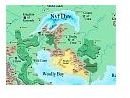
With Campaign Cartographer 2 Pro and many of its add-ons, such as City Designer Pro, Dungeon Designer Pro, and Fractral Terrains, cities and worlds that only existed in imagination come to life in a beautifull graphical representation.
CC2 is an extremely robust tool that doesn’t require a powerful computer, and the system requirements are as follows.
- any PC running Windows 95 or better
- 60 MB hard drive space
- 16 MB RAM
- CD-Rom drive
- a mouse or tablet
User Interface (4 out of 5)
Users familiar with other CAD programs or advanced graphics applications such as AutoCad or Photoshop will find CC2’s tools quite easy to handle. For those more used to the Paint program or completely new to computer-aided art, the interface requires a bit of learning, but CC2 Pro comes with a built in help system and manual, and once a user understands the basics of how the graphics manipulation tools work, CC2 becomes a walk in the park to use due to its consistent design.
Due to its power-packed features, new users may struggle with CC2 Pro when attempting to make more complicated maps. For those who are art impaired, the program comes with excellent icons of trees, towers, buildings, mountains, and even a few fantastical creatures that can be used to populate the map and give it definition.
CC2 Pro does require a mouse or a tablet with which the user places key points to aid in drawing landmasses, or the user may also use a mouse or tablet to free-hand their own landmasses, rivers, boundaries, and roads.
Graphical Symbols Library (5 out of 5)
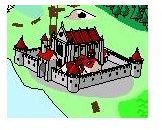
Campaign Cartographer 2 Pro comes with an extensive set of excellent graphics and symbols to enhance the maps. Each of these graphics can be manipulated in size and tilt, and they can be placed in their own layer in order for the user to make easy changes. In addition to the ease of using these graphics to suit an individual map, CC2 includes several different styles of graphics including a “hand drawn” one. The versatility of the symbol sets are amazing, and additional symbols can be bought at a relatively low price.
Symbols created by other users can also be downloaded from the Profantasy website, and instructions are also available on the site to allow users to create their own symbols. For those who are not art inclined, much like the author of this article, using Profantasy’s numerous symbols of trees, buildings, towers, ruins, mountains, and even sea serpents is the way to go.
Continue on to Part 2 of this review where we discuss the viewing and sharing of user-created maps, community support, and price of Campaign Cartographer 2 Pro.
This post is part of the series: Review of Campaign Cartographer Pro
Campaign Cartographer Pro is a CAD program geared towards people interested in making fantasy and sci-fi maps designed by Profantasy. This is a review of the user interface, graphical symbols, viewing and sharing of created maps, and the community support for Campaign Cartographer 2.
