Pros and Cons of Using Frames in Your Expression Web Site Design
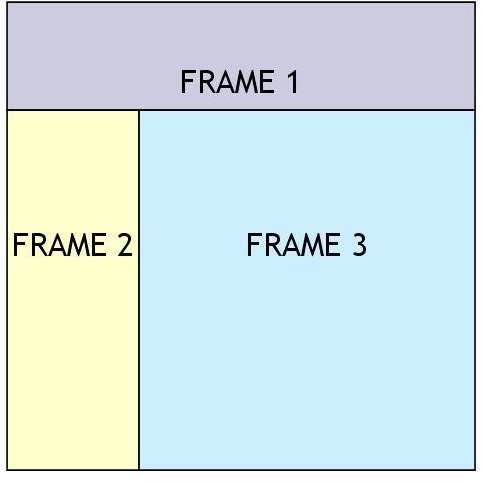
What is a Frames Page?
A frames page is basically a template used to create a web page that will be incorporating information from several other web pages. That is, each frame on a frames page is technically its own web page.
The structure of a frames page is similar to that of a web page using a layout table design in that the page is divided into segments, and each segment will contain its own content. However, it differs from a layout table since the contents of each frame will be fed from another web page that must be designed separately.
There’s a lot of controversy in the web-design world concerning the use of frames. At one time, there were few other options that could offer the same benefits as frames, but that has changed a lot over the years. Still, some people prefer using frames because they believe the technique offers a degree of flexibility that other methods don’t have.
The choice of how you decide to set up your web site is a personal one. In most cases, I prefer the use of layout tables in conjunction with dynamic web templates, but I also like having lots of options and sometimes frames have their use. Let’s take a look at the pros and cons associated with using frames in your design to help decide if this is a method that you would like to employ.
Advantages of Using Frames
Just as with dynamic web templates, frames can add to the navigational ease of your entire web site since one frame can be dedicated to containing the site’s main navigation bar. This can also be a huge timesaver for the designer when making changes and updates to the site. Changes only have to be made on the single web page that is attached to the frame rather than every page on the web site.
There are also arguments that frames increase the speed at which a viewer can navigate the web site since not every frame has to be reloaded each time a new page is visited. This is especially true if one of your frames contains graphics with large source files. Loading of the initial page may take some time, but subsequent pages will load faster.
Disadvantages of Using Frames
There are still some browsers that don’t support frames. This is becoming less and less of a problem as people switch to the latest versions of their favorite browser, but it’s still something to consider if you think your potential audience might fall within the group without browser support.
The biggest disadvantage of using frames is simply that some people don’t like them. While the same can be said about many web design components, the use of frames is among the top complaints people have about certain web pages. However, a lot of this dislike comes from very specific web pages where frames were incorporated in a cumbersome manner by the original designer.
With all these things in mind, it is still nice to have the frames option available when designing a web site. In the past, coding frames could be a bit of a nightmare, but Expression Web has several tools that make the design process much, much simpler than it used to be. In the remaining articles of this series, we’ll discuss how to create a web site based on frames in Microsoft Expression Web that uses these tools to their full advantage.
For more tips and tricks, be sure to browse through the other items in Bright Hub’s collection of Expression Web tutorials.
This post is part of the series: Frames in Expression Web
This series starts out with a general overview of frames in Expression Web and continues with several tips and tricks you can use to incorporate the use of frames in your web site design.
