What is Windows Anytime Upgrade? What Upgrade Options are Available for Windows 7?
What is Windows Anytime Upgrade
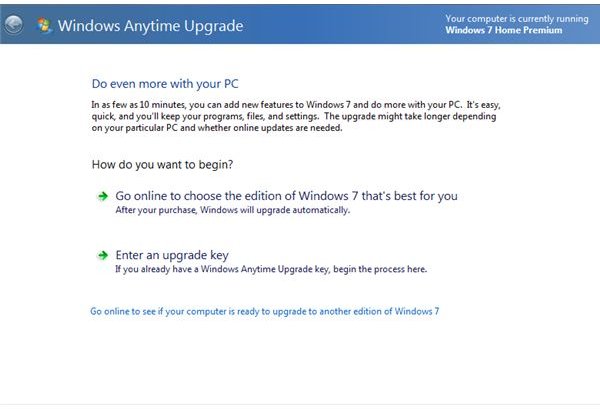
What is Windows Anytime Upgrade? Basically, Windows Anytime Upgrade is a feature within Windows that lets you upgrade to a higher edition of Windows, quickly and easily. This option is only useful for users currently running Windows 7 Home Premium and Windows 7 Professional, as there is no higher upgrade than Windows 7 Ultimate. To get started using Windows Anytime Upgrade, navigate the path Start > All Programs > Windows Anytime Upgrade.
How Does Windows Anytime Upgrade Work?
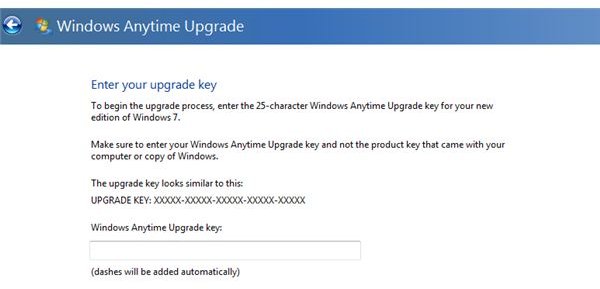
Upon launching Windows Anytime Upgrade, you will notice that the first screen presents two main options: Go online to choose the edition of Windows 7 that is best for you, and Enter an upgrade key. Click the option Enter an upgrade key. From here, you will notice that Windows asks you for a key, similar to the key that you received when you purchased your current version of Windows. If Windows came with your computer, this upgrade key would be similar to the serial key that came with your computer. This key can be found on a sticker, located on the side of your computer’s case.
Upon entering a valid Windows Anytime Upgrade key into the Enter an upgrade key screen, Windows will allow you to upgrade to your new operating system. For example, if you are currently using Windows 7 Home Premium, you can enter an upgrade key to Professional or Ultimate. If you are currently using Windows 7 Professional, you can enter an upgrade key to Ultimate.
How Long Does the Upgrade Process Take?
A Windows Anytime Upgrade is actually a very fast process, requiring 30 minutes max. Instead of completely reinstalling Windows, Anytime Upgrade simply adds the additional features to your current version of Windows, that are present in the version that you are choosing to upgrade to. When doing a Windows Anytime Upgrade, Windows will simply download the required files, install them, and restart your computer. After Windows loads back up, you will be running the upgraded operating system.
How Do You Get an Upgrade Key?
Windows 7 Upgrade keys can be purchased directly from Microsoft, which is the wisest place to buy. If you should have any unlikely problems with the upgrade, Microsoft will be much more inclined to assist you, if your purchased Windows from them. You can learn more about the costs of upgrading to different versions here. For the most part, the prices for Anytime Upgrades are merely the actual difference in price between Windows versions.
Before purchasing an upgrade key, understand that you cannot upgrade from a 32-bit version of Windows to a 64-bit version of Windows. To find out what version of Windows you are running, launch the start menu, right click on the Computer option, and select Properties from the drop down menu. This should open up the Basic Information About Your Computer Window. From this window, you should see a listing for System Type. Here, it will tell you what version of Windows you are running.
Upgrading Windows
That’s really all there is to know about using Windows Anytime Upgrade. Should you choose to use this option, make sure that you jot down and save your Windows 7 Upgrade Key. Should you ever have to do a full operating system reinstall, you will need this key to get back the higher version of Windows that you are choosing to upgrade to. What is Windows Anytime Upgrade? Simply, an easy way to upgrade Windows.
Did you know that Microsoft offers a free antivirus software? Read here to learn more.
