Protecting Excel 2007 Spreadsheets: Do I Really Need Windows Rights Management for Protection?
Protecting Excel 2007 Spreadsheets – Using Save As Dialog to Protect Workbooks
Among the most used methods for protecting Excel 2007 spreadsheets is the Save As dialog. This dialog offers you two options: a) set a password so that only authorized users can open the workbook; and b) set a password so that people cannot edit the contents of the workbook.
All three major applications under MS Office 2007 – Word, Excel, and PowerPoint – offer you the ability to protect your files using the Save As dialog. As a reference, just check how to protect Word 2007 documents using <strong>Save As</strong> dialog. The procedure is the same across all MS Office applications except that the GUI is different when it comes to the dialog where you enter the passwords.
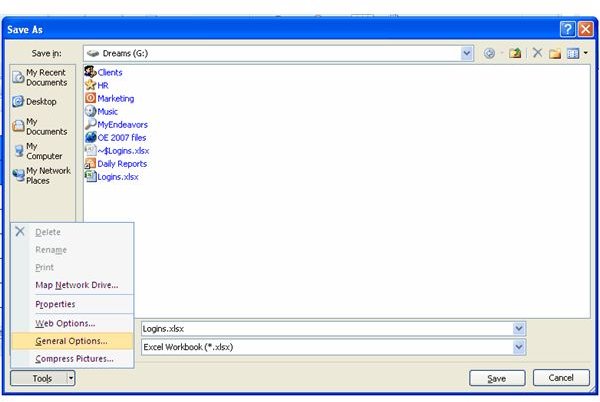
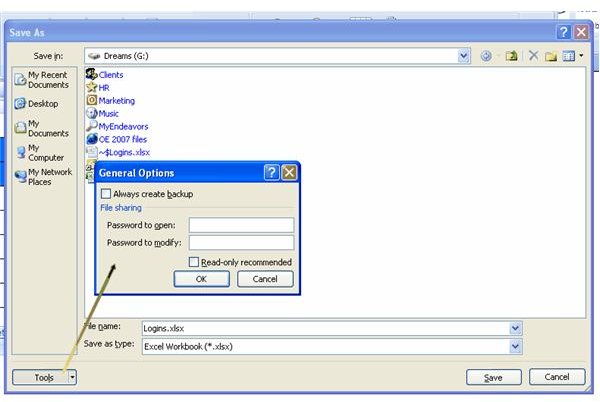
For protecting Excel 2007 spreadsheets using the Save As dialog box, press F12 (or select Save As from Office Button drop down menu). On the lower-left corner, you will find a button labeled Tools. Click on the button and select General Options (See Fig 1 below). This will open the General Options dialog (Fig 2). I recommend you select both options: Password to Open and Password to Modify. Even if you do not wish to select Password to Modify, you can make the file read-only by clicking on Read Only Recommended. When you are done, click OK.
IMPORTANT:
- The Save As dialog offers protection for the entire workbook and not for a single worksheet. If you want to protect a single worksheet, please check the next section on protecting Excel 2007 spreadsheets.
- There is no way you can recover passwords if you lose them in MS Office. Make sure your password is something hard to crack yet easy to remember.
- Finally, if you don’t not use any disk encryption software, I recommend you should use the Password to Open option. It automatically encrypts the entire workbook so that no malicious user can open the file using a method other than entering the correct password.
Image References - Section I
Protecting Excel 2007 Spreadsheets – Using Review Options and Windows Rights Management
Before covering Windows Rights Management Client, let us discuss the option of Protect Sheet for protecting Excel 2007 Spreadsheets. Excel 2007 has two options under the Review tab: Protect Sheet and Protect Workbook (Fig 3).
You can use the Protect Sheet option to make the entire spreadsheet read-only or to set up custom protection. Most people use it to create forms such as Invoices, etc. If you click on the Protect Sheet option, it will lock all the cells. Once you set the password, none can edit the worksheet without disabling the protection. You always need the password to disable protection.
I like this option as it gives you the flexibility so that you can lock the cells that you do not want others to edit and release others (so that people can fill in their name, address, and so forth). The trick is to select the rows and columns that you wish to protect. Press CTRL + A to select only the cells containing data. To select all the rows and columns, click on the block at the top-left corner – between column A and Row 1. You can identify it by the triangle symbol. When you click on that, you select the entire spreadsheet.
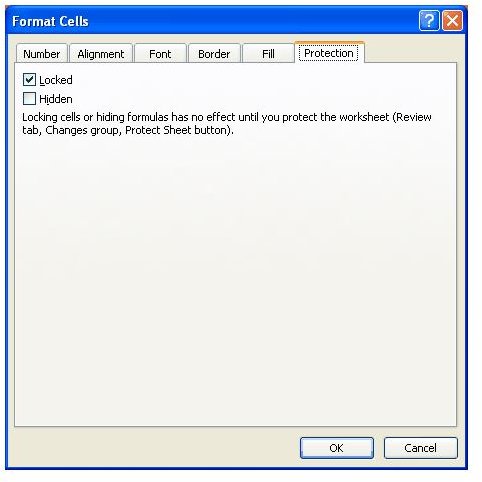
Once done, right click and in the Format Cells dialog (Fig 4), go to the Protection tab and check Locked to lock all the cells. Go ahead and click on the Protect Sheet. Later, right click on each cell that you wish others to access and uncheck the Locked check box. Remember to save the workbook once you are done. This way, you restrict people to edit only unlocked cells.
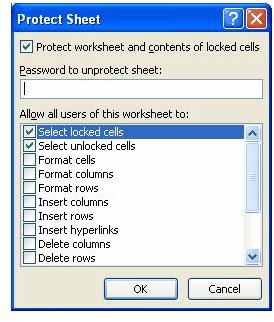
Note: The Protect Sheet option also allows you to customize the protection using a dialog wherein you specify actions you want to allow (Fig 5).
The Protect Workbook option allows you to lock the structure of a workbook and prevent users from adding/deleting worksheets. For enhanced protection of Excel 2007 spreadsheets, you can use the Windows Rights Management Client. This allows you to customize users who can view, edit, or change the workbook. Though Windows Rights Management Client offers you more flexibility, the Review tab offers almost equivalent options for protecting Excel 2007 spreadsheets - best for non client-server network models.
Image References - Section II