How to Show Hidden File Extensions in Windows 7
Windows 7, along with previous versions of Windows, hides file extensions for known file types. This means that as long as a file type is associated with a program by its file extension, Windows 7 will show only a file’s name and not its extension.
Many people find it annoying to rely only on a file’s icon to indicate with which program a file is associated. This is especially true for those users of Windows 7 who use detail or some other small view to list folders and files in Windows Explorer.
Luckily, Microsoft has built in a way for you to force Windows 7 to show hidden file extensions even when it is a known file type. Read on to learn where to find the option to show hidden file extensions.
How to Show Hidden Windows 7 File Extensions
To show hidden file extensions in Windows 7, begin by clicking on Start and opening up My Computer. Truthfully, any Windows Explorer window will do, but My Computer is an easily accessible option for most people.
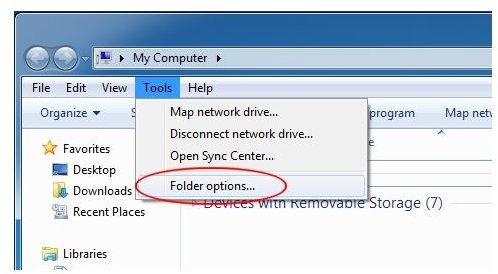
On the My Computer menu bar, click on Tools and then click on Folder Options (see Figure 1). This will open up the Folder Options window. Click on the View tab and locate the Advanced Options section of the window.
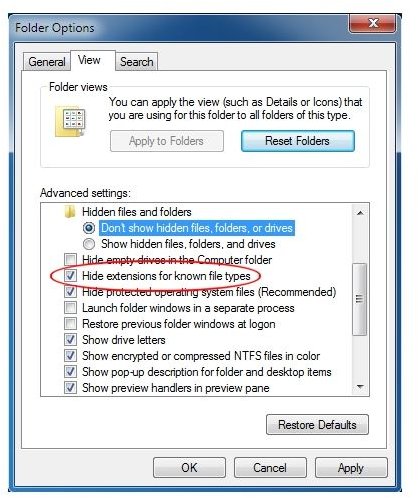
Under Files and Folder, look for an option titled Hide Extensions for Known File Types (see Figure 2). Uncheck this box and then click OK.
Why Show Hidden File Extensions
By hiding file extensions by default, Windows 7 does make things a bit easier for the average PC user. In previous versions of Windows, changing the name of a file meant that you had to work around the file extensions. Since changing the file extensions was a rare task, it makes sense to hide it unless you really need it.
Some advanced users of Windows occasionally need to change the file extension. For example, Windows memory dump files by default have a *.dmp file extension. However, there is no program in Windows 7 that uses that file designation; it is there only to alert the user of the file’s contents.
By changing the file extension to *.txt or something else, you can avoid the error window that appears when you click on the memory dump file and also avoid temporarily associating the extension with notepad or some other program.
Another reason for showing hidden file extensions has to do with program compatibility. Programs that are backward compatible can open files made in a previous version of the software. However, this doesn’t mean that older file extensions are automatically associated with the newer version. By manually changing the file extension, you can again avoid the Windows 7 error message that no program is set to open with that particular file.
Whatever you reasons, showing hidden file extensions is simply a matter of editing one option in the Folder Options window. Of course, you can choose to hide them again by re-checking the option.
