Tips to Help Organize MS Outlook Emails and Calendar - Improve Office Efficiency
Get Outlook to Work for You
Using Microsoft Outlook for just emailing is like buying a car and looking at it, never driving it – it looks good but you’ll never know the full benefit of its features until you sit down and get to grips with it.
Employing Outlook as a tool to effectively organize your time by definition means that you need to take some time out to organize MS Outlook.
This might mean sorting contacts, managing the calendar, using tasks to keep track of what needs to be done, sorting flagged emails, using the notes facility or even deciding exactly how you plan to use the powerful time management tool that Outlook is.
Organize Your Emails
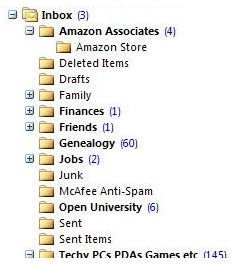
Whether you’re using POP email, IMAP or Exchange (push) email, Outlook allows you to sort emails into folders, as well as providing a set of customizable rules for you to use to automatically sort your messages.
While messages placed into folders in a POP email account (generally defined as a standard, web-based or ISP-based email account) won’t be available to you in the same folders on a second computer, IMAP and Exchange both provide folder synchronization.
If you’re expecting to receive more than a couple of emails a day that you expect to need to refer back to, setting up some folders in your email inbox is a good idea – to do this, simply right-click on your inbox and select New folder… – you can then give it a name and begin dragging emails into it.
Using The Outlook Calendar
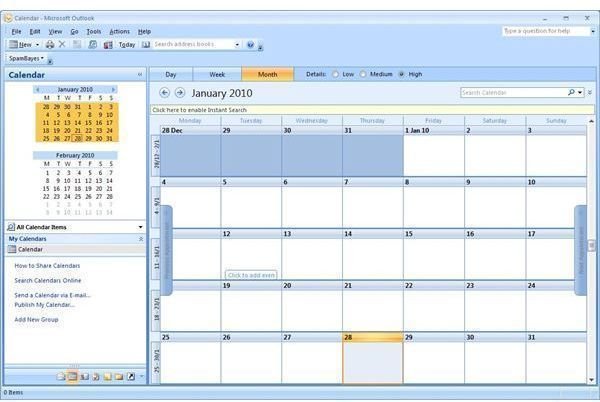
When receiving meeting requests or appointments into your email inbox you can add these to your Calendar using the Accept button at the top of the message.
When accepting these requests, you can also choose to be reminded at a particular period before the event. If a reminder is set, Outlook will alert you at the allotted time, for instance 15 minutes before the meeting takes place.
You might alternatively simply add items into the calendar yourself; particularly events and appointments that are due to take place in the future – do this in the Calendar view by clicking New or File > New > Appointment. You might instead opt to setup more immediate items as Tasks.
Contacts
You can organize MS Outlook contacts in a number of ways, depending on how you want them displayed. There are two types of Contact – a standard single person record, and a Distribution List. Each of these is available from the New button. The Distribution List contact cannot be setup without first creating standard Contact records, but it is very useful for sending out emails to a regular group of people.
A standard Outlook Contact record requires a name and email address to be used, but other data can be included, such as job title, phone numbers, addresses and even a contact photo.
Organize MS Outlook Tasks and Requests
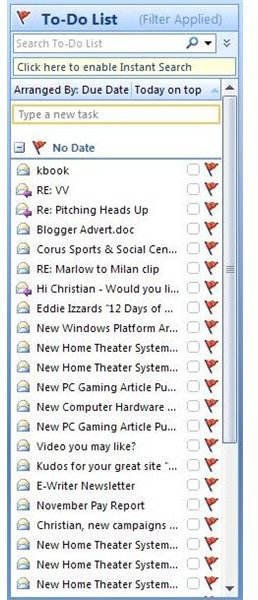
Three types of task are available in MS Outlook – the standard Task that you can create yourself (New > Task), the Task Request (New > Task Request) which is used to request that a colleague or contact acts upon a task that you have assigned, and flagged emails, which until the flag is cleared (right-click on the message and select Clear Flag) will remain in your list of Tasks.
Issuing tasks to colleagues is particularly useful if you’re working on a joint project, for instance, while you can flag emails as they come in to your Inbox if they require attention later on.
Setting up a Task for you to complete is equally as simple – once you have opened a new Task, give the item a name, a Due date, and set a Status and Priority. You can also set reminders on Tasks.
Using Microsoft Outlook Notes
Finally, you can utilize notes to organize MS Outlook information. Notes are small yellow squares within which you can type ideas, small messages to yourself, and so forth.
They’re like virtual Post-It notes, only they don’t fall off the side of your monitor after the gum gets too old.
Relatively basic compared to the other features within Microsoft Outlook, Notes can be created by going to New > Note or via the File menu. Alternatively if you’re in the Notes view, right-click in the right pane and select New Note.
As with any new or unfamiliar software, the best thing to do to get to grips with organizing Outlook is to start having a go yourself!
In the next article of this series, we’ll examine some of the top freeware add-ons for Microsoft Outlook. These tools can help you organize Outlook even more.
This post is part of the series: Understanding Microsoft Outlook
Microsoft Outlook explained - background, installation guide, how to organize emails and calendar information and add-in enhancements to get the most out of the world’s most powerful desktop organization tool.
