Windows 7 has taken the computing world (certainly the Windows computing world) somewhat by storm. One of its many enhancements is a much better Windows Media Player. We decided to review the new variant of Windows Media Player for Windows 7.
Introduction – The Interface
The new release of Windows Media Player is version 12. Some like to call it the WMP12. It is for the Windows 7 environment. The first thing you notice about Windows Media Player for Windows 7 is the new interface. In versions just prior to this the “now playing” window could be minimized to a tiny control window. WMP12 has taken that concept one step further by completely separating the “now playing” window from the rest of the interface. You now have two separate interfaces; the “now playing” window interface and the library window interface. This, in fact, may also be its best feature. The uncluttered window of the “now playing” mode makes it possibly the most usable of all versions of WMP so far. Then, if and when you need to manipulate your library, burn CDs and DVDs, download and purchase media files you can switch to the library interface.
The switch itself is easily managed by means of a tiny icon at the top right of the now-playing window and the bottom right of the library window.
Other Interface Enhancements
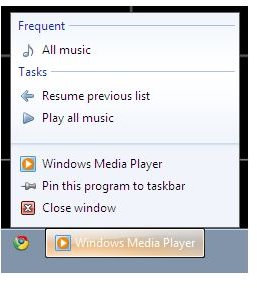
There is more streamlining of the interface that has been developed in Windows Media Player for Windows 7. Part of this is a direct result of the overall improved interface of Windows 7. Thus, the taskbar entry for WMP12 does more than it did before. Right-clicking on this brings up the recently played list (jump lists of frequently accessed files) and a list of tasks (such as “resume playlist”). As with all other programs, there is the option to “Pin this program to the taskbar,” and once clicked this will make the media player part of the task bar. Remember that in Windows 7, this is akin to making it part of the quick-launch menu. Both the task bar and quick-launch are managed by means of the unified task bar interface in Windows 7. Of course, there is the option to “unpin” as well.
Supported Formats
A problem with past versions of WMP has been the inability to play certain kinds of media files. WMP12 makes up for this somewhat by adding support for H.264, 3GP, AAC, XVID and DIVX. However, DRM issues remain, especially when playing files protected by Apple’s FairPlay DRM iTunes store tracks. These cannot be played in WMP12.
Library Functions
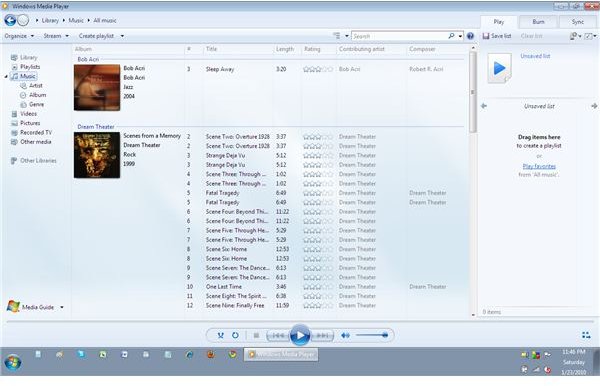
Windows Media Player for Windows 7 has built-in support for another Windows 7 enhancement, the concept of libraries. A library in Windows 7 is a virtual folder that links to files in various physically separated user directories. Thus, all music files in the user’s file system will be aggregated under the virtual folder called the music library (a similar thing will happen for video files – video library). Moreover, the files in the music library (and video library) are automatically imported into WMP12, thus avoiding the painful process of individually adding files. Even if your media files are spread out all over your local disk, they will still all be part of the library. The same remains true if and when you move or rename media files (a severe problem with most media players, including iTunes). As long as the music library is up-to-date, the library view within WMP12 will be as well.
Finally, in the library interface, there is the option of viewing the files in a folder format, which is beneficial because now you have a better sense of where individual files are located – although this is not that necessary due to the library capabilities.
A similar thing happens for photos as well and for each media type (music, video, photos), files can be browsed on the basis of metadata.
Networked Functions
WMP12 adds extensive support for networked devices. As a result, files on your home network, for example, become accessible through the library interface. This means that you can play files located on a different computer and also play through a given networked device.
Overall
Windows Media Player for Windows 7 clearly has a nice set of enhancements, mainly in the way the interface functions. This results in a richer user experience. It also adds support for additional file formats and allows for a host of networked functionality. It works with both UMS and MTP devices, and thus should serve most people’s media player syncing needs.


