This article gives readers sample objects from Microsoft Access, including a database table, report, query and data entry form.
Good Examples of MS Access Databases
When starting to learn any new project in Microsoft Office, you want to have good sample documents from which to create your own. The MS Access Samples in this article will get you started creating database objects that you can later tailor to your specific needs.
Design and create the tables
Put a lot of energy and care into table design, because all other objects and tasks in Access depend on your tables. Complete this sample exercise to learn the basics of good table design.
Open Access and select “Create>table” to begin creating a movies database. Enter the following sample data for the table:
$1.98,scifi,star wars
$2.05,adventure,excalibur
For each of the columns in the table, double-click the column’s header (“Field1”, “Field2”, etc.) and replace it with one of the following, in the order given here:
unitprice,genre,title
Also, replace the default name of the automatically-created “ID” field with this name: “movieid.” Press “control-s” to save the table, and give it the name “movies.”
Create the movie sales table
Press “Create>table” again to make another table. Fill the table with this data for just one column:
4
7
3
Double-click that column’s header and name it “qtysold.” Right-click the column and select “Insert>Field.” Give the new field’s header the name “totalsales.” Rename the “ID” field as “saleID.”
Create a column whose values will come from the “movies” table you made previously:
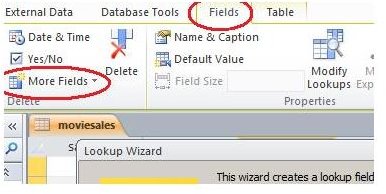
Click “Fields” on the Access toolbar, followed by “More Fields,” and then “Lookup & Relationship.”
_
Press “Next” on the Lookup Wizard’s first screen, select the “Movies” table in screen 2, select “title” in screen 3. Press “Next” in screen 4 (“What sort order…”), and then press “Finish” on the following screen. Double-click the new field’s header and rename it “title.” Save the table as “moviesales.”
The title field you just created pulls values from the movies table, saving you the effort of typing the full name of the movie for the moviesales table. This step also ensures that only predefined values get entered into moviesales. If random text were allowed into this field, the moviesales data would contain bogus transactions that would invalidate that data.
Click here for more information on creating tables in Access .
Create a query-based form
Our moviesales table lacks data for the totalsales and title fields. We could enter this missing data directly into the moviesales table, but we’ll create a form to do this instead. One reason for using a form involves data integrity: entering data into a table directly exposes many rows at once to the incoming data. Someone entering data could type into an existing row, corrupting that row’s data. By contrast, a form only shows one record at a time, preventing that corruption.
The ability of a form to easily calculate values (e.g. totalsales) from existing fields is another reason to enter data with forms and not the actual tables.
Create the query
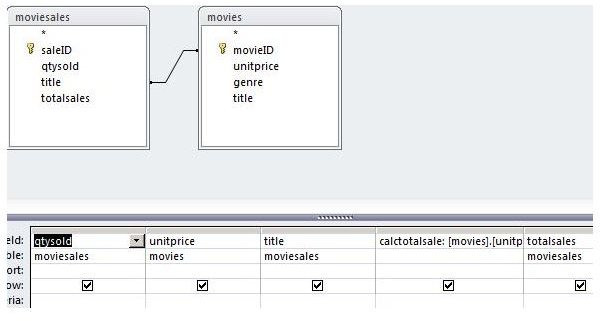
Create a sample form for moviesales as follows: select “Create>QueryDesign” and double-click both “movies” and “moviesales” tables. Notice the line between the two tables. Select that line and press the “delete” key to delete the link. Drag your mouse from the “movieid” field of the “movies” window onto the “title” field of the “moviesales” window.
Drag the following fields from the movie and moviesales tables onto the query grid: qtysold, unitprice, title (from the moviesales table), and totalsales.
Create a new field in the query grid by entering this in the “Field” row of a blank column:
calctotalsale: [movies].[unitprice]*[moviesales].[qtysold]
This new field calculates the total sale price of a movie sale, using existing data in other fields.
Press “control-s” to save the form. Give it the name “queryForForm.”
Read more about creating queries here .
Make the form based on the query
Select the “queryForForm” item in the navigation window, then select “create>Form.” The new form will appear in design view.
Notice the two “totalsales” fields. One is calculated by the query, and the other is what’s actually in the moviesales table. Our job is to copy the calculated total sales into moviesales – but only if there’s no existing number in there. Here’s how to do it:
Right-click on the tab for “queryForForm” and select “Design View.” Right-click on the “totalsales” field and select “Properties.” In the property sheet window at right, click the “Event” tab. In the “On Got Focus” row, click the dropdown box’s arrow so the field reads “[event procedure],” then click the “…” button to the right. Access will move you to the Visual Basic IDE (Integrated development environment), inside the function that Access calls when the user tabs to the “totalsales” field.
Replace that function with this one:
Private Sub totalsales_GotFocus()
If (IsNull(totalsales.Value)) Then
totalsales = calctotalsale
End If
End Sub
Notice how we’re testing to see if the totalsales field is blank and how we’re filling that field if it is.
Press “alt-F11” to return to the form.
We’ve created the code to populate the total sales field, but the form should also have a constraint on the unit price field: the data entry person should be allowed to see this price but not change it, because it’s predefined in the movies table.
Right-click on the “unitprice” textbox and select “Properties.” In the “Enabled” row of the property sheet’s “Data” tab, click “no,” then open the form for data entry: right-click the form’s tab and select “Form view.”
Entering data
Tab through the form’s fields, noticing these things: you can’t type anything into the unitprice field. But when you select a movie with the dropdown box in the “title” field, unitprice is populated automatically. Once you enter a number in the “qtysold” field, the “calctotalsale” field is filled in. If you tab down to the “totalsales” field it will be automatically filled in, if it was blank.
Learn more about Access’ form-creation features here.
A sample report
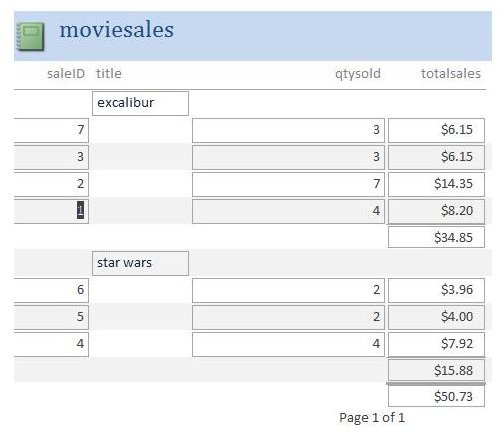
Create a report from the moviesales table: select “moviesales” in the navigation window, then click “Create>Report” on the Access toolbar. Access opens a new report in layout view.
Sales reports typically break down sales to get a subtotals for particular items or item categories. You can do that easily with the report you just made. Right-click anywhere on the “title” field and select “Group on title.” Click the “group & sort” button on the Access toolbar, then click the “More” text in the new “Group, Sort & Total” window below the report.
In the dropdown box that reads “with totalsales totaled,” choose “total on totalsales,” then check the “show subtotal in group footer” checkbox. Notice that the report now shows sales of excalibur separate from star wars. You can now save and print the report.
Learn more about Access reports here.
Other samples
There are many MS Access samples you can use to build your own database. Start your search within Access by pressing “alt-F-N” and clicking one of the existing database templates. Find other templates on Access’ home site . Look for the “templates” link in the left sidebar of the landing page just given.
References: Microsoft: Access Training


