If your Windows XP hangs up on the welcome screen or you get a blue screen during startup, this article lists the possible reasons why and helps you fix the problem
Why Windows XP Freezes Up At Startup Screen
Windows XP or any other operating system depends on a number of programs, including the device drivers to boot and present you with your desktop. During the boot process, it identifies all the devices attached to the computer and loads the device drivers accordingly. While booting, it also goes through the system BIOS to gather initial information. As Windows XP is a graphics intensive operating system, it needs the graphic card drivers in memory before it can launch the desktop.
Based on the above, the main factors that cause the problem where Windows XP hangs during boot can be one or more of the following:
- Any USB plug and play devices kept plugged in since the last shutdown
- Plugging in related peripherals into the same power outlet as the computer
- Corrupt MBR
- Missing or corrupt device drivers; or
- Invalid/Corrupt BIOS.
Is It Waiting For Response?
**
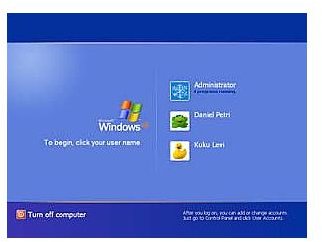
If any USB device is attached to the computer while booting, chances are that your computer is waiting for input from these devices causing Windows XP to freeze at startup. This freeze often occurs at the Welcome screen (Fig 1). It responds with a beep when you press keys. The NumLock key also seems functional but the OS is hung.
In fact, it is waiting for some response – not from the input devices but from the USB devices. Your CD Drive can also be a problem if it contains a CD while booting. Check if there is any CD in the drive.
If yes, take it out. Switch off the computer and plug out the USB devices.
If this does not solve the problem, check out the next step.
Check The Connections For Peripherals
If your computer can’t get past the Windows Boot screen to reach the Welcome screen, chances are that other peripherals such as a router plugged into the same power outlet from where the computer draws its main power is creating the problem. When you connect the peripherals being used by the computer to the same power supply, even a small electric glitch can confuse/corrupt the boot system – causing your copy of Windows XP to freeze at startup.
Switch off the power supply and remove any Ethernet cables or similar cables coming into the computer from the same power outlet. Wait for a few minutes and turn on the computer.
If you can boot successfully, the problem is your power outlet. You need to change the power outlet for peripherals, especially routers. If this did not solve the problem, we will try fixing the MBR to avoid XP freezing during startup.
Fixing the MBR
A corrupt MBR can also cause Windows XP to hang at the Welcome screen. To fix this, you need the Windows XP installation CD.
- Boot using the CD, when Windows setup prompts you, press the “R” key to run the Recovery Console.
- You will get to the command prompt.
- Type “FixMBR” at the command prompt (without quotes) and press Enter.
- After you get a message about MBR being fixed, take out the CD and boot normally.
If you are able to get to the desktop, you have successfully fixed the issue.
If the issue still persists, let us try to find out which device driver is creating problems.
Using Windows Recovery to Fix Windows XP
- While booting, press F8 to get the Windows Recovery options.
- Try to boot in safe mode.
- If you cannot boot into Safe Mode or you don’t get the Recovery options, go to next section.
- Booting in safe mode does not load any extra drivers and you should be able to get to the desktop.
- If you can access the desktop, open system partition and locate boot.ini. It is usually hidden and you may need to change the folder options to view it.
- Open the file and add “/SOS /BOOTLOG /NOBOOTGUI” (without quotes) to the boot.ini line.
- In the case of dual boot systems, make sure you are adding the above to the line pertaining to Windows XP.
- Save and reboot.
- This will disable all screens and you can see all the drivers as they load into the memory.
- You can identify the point (driver/DLL) where your computer is freezing. Often, it is the graphics driver that creates problem. Make a note of the DLL’s full name where Windows XP is stuck.
- Once you identify the driver creating the problem, restart and login again in Safe Mode with the Command Prompt.
- At the command prompt, type “REGSVR32 drivername.dll” and press Enter to re-register the DLL .
- Restart and see if you can boot into Windows XP normally.
If yes, you have fixed the issue, else proceed to the next step.
Note: The above method may not work if you are attempting recovery from a Windows XP Installation dump on any of the HDDs of the corrupt system. Often people tend to log into safe mode and use the saved Installation files. The Windows XP installation CD is more reliable.
Clean Reinstall to Avoid Windows XP Freeze During Boot
The next step is a clean install of Windows XP (Using the Installation CD and not locally stored Installation files as explained above).
If you can boot into Safe Mode, you can save your data, else there is no way you can save the data on the system partition.
Re-install Windows XP with SP2. You should be able to boot normally to your desktop. Still, if Windows XP freezes at startup, the problem may be with the BIOS, which you will need to reset.
Reset the BIOS
Resetting the BIOS should solve the problem if reinstall did not solve it.
To reset the BIOS, you need to take out the battery inside your computer for a few minutes (three to five approx) and then put it back. Make sure your computer is turned OFF while you are taking out the battery or re-inserting it.
If you feel uncomfortable with this step, you need help from a local technician to get rid of the problem where Windows XP freezes at startup.
Note: A failing RAM may also contribute to Windows XP freezing during startup. To find out if your RAM is damaged, check out the RAM shown in the BIOS and compare it with the one displayed on the General tab of the System Properties box. It appears when you right-click on My Computer icon. If the difference is significant, you may consider replacing RAM to avoid Windows XP freezing during startup.
References
Screenshot by author
Microsoft Knowledgebase, Article ID: 314503


