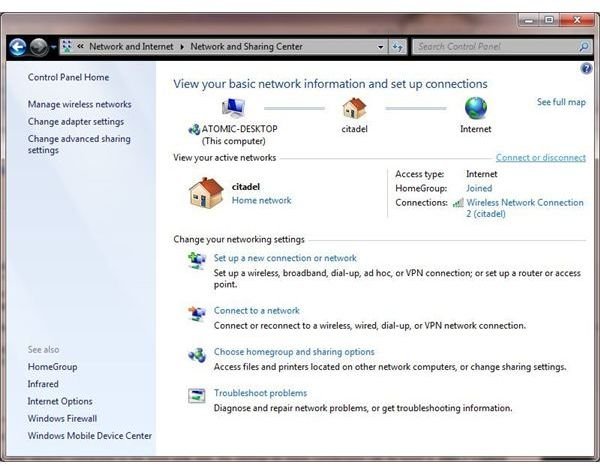
You may have a requirement to prevent access to the Internet via Internet Explorer – this can be done by restricting usage of the application.
Three Ways to Restrict Access to the Web
Restricting access to the Internet can be done for a number of reasons – from avoiding accidental domestic dial-up charges on systems with users who may not be completely familiar with using a computer to preventing users in a workplace from spending time surfing the web.
Depending on the ability of your users, there are several ways in which you can prevent them from accessing Internet Explorer.
These methods range from removing a connection from the computer, clearing the settings in Internet Explorer itself, using your firewall software to prevent access to the browser or using Windows Feature Restrictions to prevent access to the application completely.
Removing Connections
The easiest method of preventing access to Internet Explorer is by removing your connections to the Internet.
Whether you have a dial-up or LAN (local area network) connection to the world wide web, the settings for these connections can be found in Start > Control Panel > Network Connections or Start > Connect To > Show all connections.
From here, it is a simple task to select and delete (either on your keyboard or by right-clicking the icon and selecting from the context menu) the relevant network connection. Alternatively you might opt to disable the connection via the context menu or, for advanced users, alter the TCP/IP settings, while of course keeping a note of what they should be.
An alternative to this is to go to Start > Control Panel > Internet Options > Connections and either remove your Dial-up connection or in LAN settings, remove or amend the configuration.
Firewall Prevention
Using any popular firewall program you can prevent Internet Explorer from accessing the Internet.
The method for this is different for each firewall application, but generally it can be done by opening your firewall software and identifying the screen that manages your applications. Internet Explorer will have an entry here, usually pre-configured and permitted access to the web by your firewall software.
To prevent access you will then need to mark the application as restricted – until this is resolved, Internet Explorer will be prevented from connecting to the web.
Windows Feature Restrictions
The third option is to employ Microsoft SteadyState 2.5, available for download from www.microsoft.com .
Once installed, this free application can be used to adjust various settings on your computers.
To prevent access to Internet Explorer, you should install
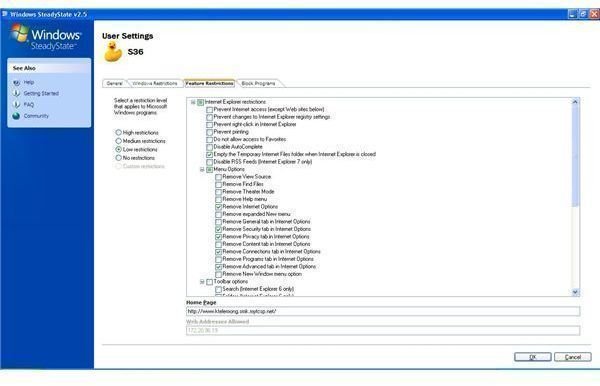
under your Administrator login.
After running the utility, go to the right-hand column and choose Add a new user – here enter the username of the person whose access you want to block.
Next, after setting up a password for this user, go to the Feature Restrictions tab. Here, you can Prevent Internet access, as well as allow the user to view only approved websites, such as a locally hosted intranet page, for instance. Once you have completed your intended changes, confirm them and restart your PC.
Microsoft SteadyState 2.5 is a powerful tool that can be used for many different user management purposes, so use with care!


