Locating Common Features in Microsoft Word 2007 and Microsoft Word 2003
A Quick Reference Guide
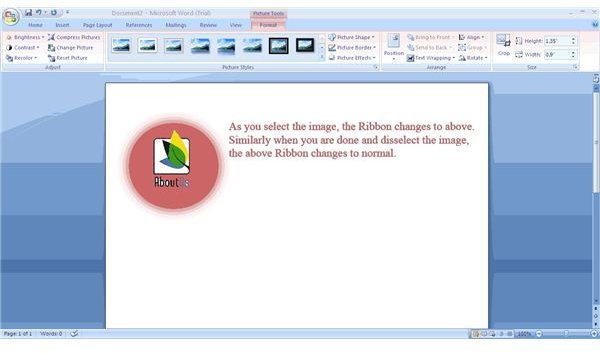
MS Word 2007 retains almost all MS Word 2003 features and presents them in a different, easily accessible manner. It also employs use of contextual menus. These menus are operation specific and do not appear until you are on a job such as using tables or pictures. This means there is no separate Table menu in Office 2007. If you are using a table, you will find contextual commands at your hand such as inserting rows and columns and formatting the table. Similarly, formatting features for an image will appear only when you are working on an image in the document.
MS Word 2007 includes some enhanced features related to sharing and publishing documents directly from the application interface. The Office button at the top left corner allows you to access these commands. You can publish your document directly to your blog, or you can email them. If you wish to share a document for research or discussion, you can again use the Office button to expand the menu where the commands are located.
If anything has really changed between MS Word 2003 and MS Word 2007, it is the application’s interface. Though it looks unfamiliar, this interface (called the Ribbon) is more convenient to use as it presents commands neatly in an uncluttered fashion. The tabs on the Ribbon interface convey what all you can expect to find under it. For instance, if you see the Insert tab, you’ll know that it is meant for adding/inserting something to your document. The Review tab conveys that you can get features for document review under the tab. These include tracking changes, comments, and comparing documents.
In short, both versions carry almost the same features. It is just that MS Word 2007 presents them in a different manner, offering a cleaner layout for quicker access of commands.
Where and How to Locate Commands
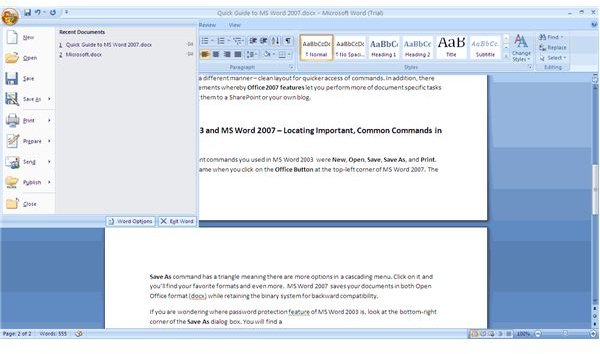
The most important commands you used in MS Word 2003 were New, Open, Save, Save As, and Print. You can find the same commands when you click on the Office Button at the top left corner of MS Word 2007 (Fig 1). The Save As command has a triangle, meaning there are more options in a cascading menu. Click on it, and you’ll find more than just your favorite formats. MS Word 2007 saves your documents in Open Office format (.docx) while retaining the binary system for backward compatibility.
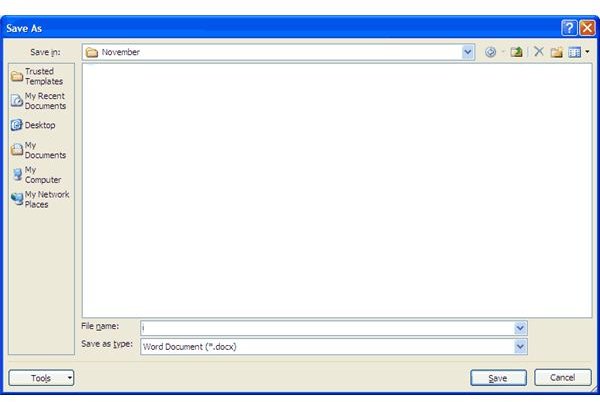
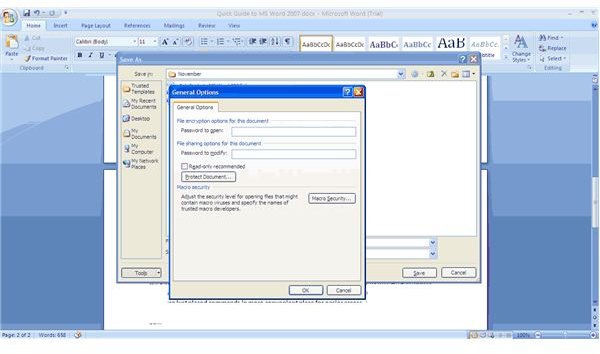
If you are wondering where the MS Word 2003 password protection feature is, look at the bottom right corner of the Save As dialog box (Fig 2). You will find a button captioned Tools. As usual, the triangular symbol means a cascading menu. Click on the symbol to open the menu and click again on General. This will give you the General Options dialog box (Fig 3) where you can set passwords to open and modify documents. You can see MS Office 2007 features did not snatch away Office 2003 features. It just placed commands in more convenient place for easier access.
Among other major MS Word 2003 features are images and tables. Though there are commands to use them, MS Word 2007 features them as contextual menus (see first section). You need not struggle with finding how to insert a table or image into your document. Select the Insert tab and you can see what all is available for using with your document. Once you select the object using this ribbon, you can see a contextual menu that helps you with formatting the object (Fig 4).
In short, there are two types of commands available in both MS Word 2003 and MS Word 2007:
-
Commands to work with objects (text, images, tables etc) in the current document
-
Commands that apply to the entire document - printing, saving, and more
The Ribbon interface is divided into several tabs that offer you commands for working with document elements. It contains commands that you can apply on the individual elements of the document.
The Office button contains commands that apply to the entire document as a whole. You can print the document, save it under a different name, or post it to your blog.
Screenshots
References
- Screenshots by Author - from MS Word 2007
- Microsoft Office Knowledgebase, https://office.microsoft.com/en-us/training/guides-to-the-ribbon-use-office-2003-menus-to-learn-the-office-2007-user-interface-HA010229584.aspx
