Troubleshoot Windows XP Slow Start-Up
Windows XP is by far the most reliable and stable of the operating system editions so far. That means there are still potentially millions of computers out there running an eight year old operating system.
While there is nothing at all wrong with this, over time, unless the system is refreshed, reformatted and rebuilt, it will become clogged up with the detritus of modern computing. There are programs that haven’t uninstalled properly, registry keys that are no longer used, fragmented files and old drivers, to name a few. All these things can conspire to make the boot time of an XP machine seem like a lifetime.
If your XP computer seems to be taking an age to boot, there are a few things you can try to speed things up a bit.
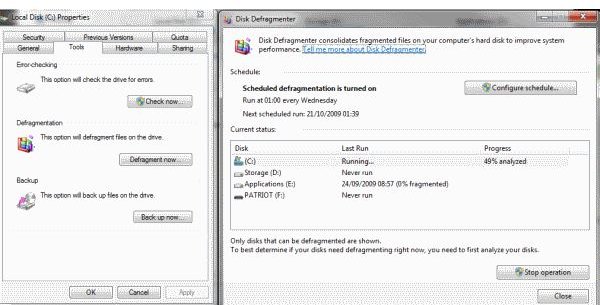
The first is to defrag the hard drive. The drive is like a bookcase. Each book is a file that the system needs to do something. When files are taken from the shelf, they aren’t always put back in the right order. This makes finding them the next time that little bit slower. Defragmenting a hard drive sorts them into order again and make them easier for Windows to find. This is always the first place to start when your Windows computer begins running slowly.
Open My Computer and right click a hard drive, then choose Properties, Tools, Defragment now. A new dialog box will appear where you can analyze your drives to see if they need defragmenting.
Defragment the drives if they need it and see if there is any improvement. There should at least be some increase in speed during normal Windows operations.
The next thing to check is how many running processes you have. Right click on the task bar and select Task Manager. Open the Processes tab and look at the bottom of the dialog box to see how many processes are running. The average system will have between 40 and 80, depending on how the system is being used.
Selecting the Services tab and clicking Services in the bottom right will open up a services configuration window. Here you can sort through running processes and shut down the ones that either don’t look familiar or you know you don’t use. Stop the processes, and switch them to manual start to begin with. Then if you have no issues the next time you reboot, you can disable the ones you don’t need.
By far the best guide on the Internet about Windows Services is the Black Viper website. Check the charts to learn more about which Windows service does what.
Shutting down services should improve the general responsiveness and boot time of your system but there are two other tricks worth trying.
The first is a freeware tool called CCleaner. This has tools that will remove unnecessary and unused registry entries, files, programs and other extraneous clutter from your system. It will also let you disable certain startup items, which is where we go next for our last trick.
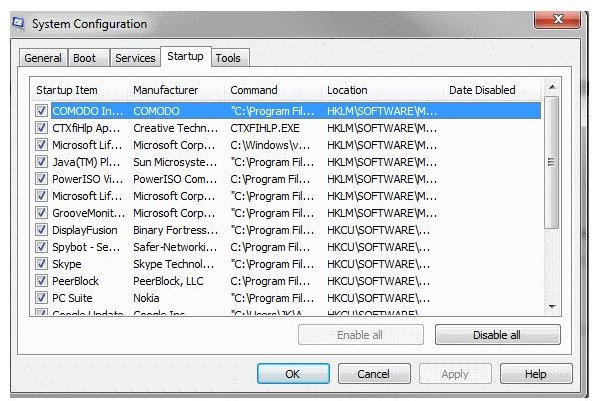
Either use the Startup tool in CCleaner or type msconfig into the run window of your computer. Select the Startup tab and deselect all those programs that aren’t necessary for your system to run. You will be amazed at the number of programs you can find in there.
Once you have slimmed down your start programs, cleaned up the registry, shut down unnecessary services and defragmented your hard drive, your Windows XP system should now boot, and work much faster.