Microsoft tries really hard to give you what you want. It doesn’t always hit the mark though, and with Windows Defender and the built-in virus protection it is still way off. Learn how to turn it off so you can use a third-party program here.
It is never advisable to run a Windows computer without some kind of anti-virus protection. There are far too many people out there who would love to be able to delve into your computer and harvest all the information stored on it.
While a router or firewall may protect you to a degree, they are only a defense against network type attacks, like someone trying to connect to your computer over the internet. Unfortunately a lot of hackers and virus programmers are much smarter than that, so we need the extra layer of defense in an anti-virus program.
This program will sit (hopefully) quietly in the background and keep an eye on what’s going on. Much like a protective parent, ready spring into action when it sees something it doesn’t like. To do this, the anti-virus program has a database of all the known viruses that is steadily updated as new ones are discovered and protected against.
Anti-virus is a reactive defense, in other words it can only do something about an attack it recognizes, it can’t seek out problems and learn how to combat them itself, not yet anyway.
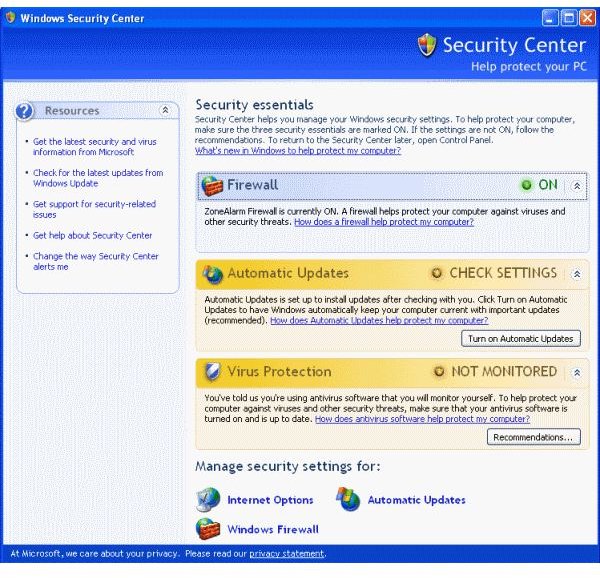
Until Windows XP Service Pack 2 came onto the scene, Microsoft seemed to ignore the virus threat and didn’t build in any protection into the operating system. Since then though, Microsoft have made great strides in protecting a system from attack in Windows Security Center.
Unfortunately, Windows Security Center isn’t very good, at least for the moment. There are many other, better anti-virus programs out there, some free, some you have to pay for. Many of them will do a much better job than Security Center in keeping your computer free of junk and viruses.
These programs can be quite demanding when they are running a scan. They require quite a lot of system resources to run, and attempt to access the same parts of the system, so Security Center doesn’t often play very nicely with a third party anti-virus program.
If you have one then it is wise to disable the built-in one and let the other program take care of business.
To only turn off the Windows anti-virus, go to the Windows Security Center via the Control Panel and click on Virus Protection. There should be an option there called “I have an antivirus program that I’ll monitor myself.” Select this and click okay.
That is all there is to it. Nice and easy for once.
If you want to go one step further and take care of all your security yourself then you could turn off Defender completely. While in the majority of cases Defender doesn’t interefere with anti-virus protection, because it is an anti-spyware product, there is a case for turning it off if you use programs like SpyBot or AdAware. To be safe doing this you should have a third party firewall as well as anti-virus for full protection.
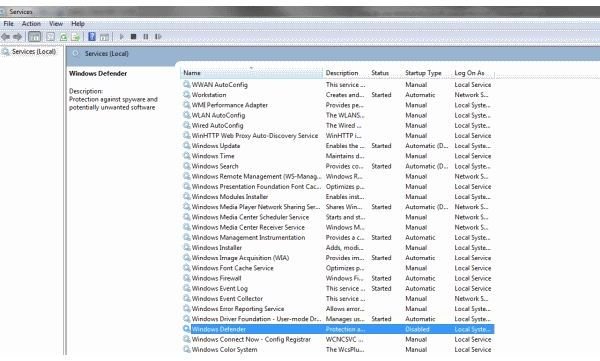
Navigate to services by right clicking the Task Bar and selecting Start Task Manager. Navigate to the Services pane, select Services in the bottom right, maximize the window and find Windows Defender in the list. Right click and select Disable then Ok. Stop the service and it won’t bother you again.