Microsoft Word is a busy application with lots of functions - some times error’s occur on start up, but how do you resolve them?
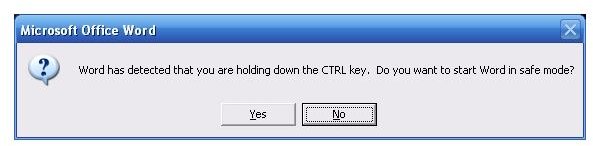
Do you want to start Word in Safe Mode?
Microsoft Word is probably the most used application of the Microsoft Office suite – and as such it is more susceptible to errors and faults as it is used in many differing environments, alongside many different applications and added to by many third party software vendors.
A common error that occurs with Microsoft Word is:
Microsoft Word has encountered a problem and needs to close. We are sorry for the inconvenience.
This is often followed by:
The information you were working on might be lost. Microsoft Word can try to recover it for you.
Do you want to start Word in Safe Mode?
If you receive this error, it is most likely because your Word installation has a corrupt file. This could either be the basic document template file (normal.dot) or if you use third party enhancements, one of these add ins isn’t functioning correctly when the application is launched.
Why it Happens
When you launch Microsoft Word, the application runs through a long list of procedures and checks. Among these checks is a search for possible problems with add-ins, extensions, registry items, templates and other components that might use macros.
If a problem is found, Word then disables these components, forcing itself to start without the user-defined options.
Should you be able to open a document in Safe Mode (and not get stuck in a loop) you will probably find that custom toolbars, autocorrect lists and recovered documents aren’t saved.
Could it be Macros?
To resolve this issue, we need to work out what is causing it.
With all Microsoft Word windows closed, browse to Start > Programs > Microsoft Office > Word and holding down your SHIFT key (or CTRL in Word 2007), open Microsoft Word.
This method launches Word without it running any “auto macros”. These are macros that feature in some templates and functions, and by featuring the word “auto” in the file name of the macro Word recognizes it as one that should be run at launch.
If Word runs successfully with the SHIFT key depressed, you should go (in Word 2007) to the Microsoft Office button > Word Options > Trust Center > Trust Center Settings and select the option to disable all macros. (In older versions of Word go to Tools > Macro > Macros and in the resulting list, delete any macro whose name begins “auto”).
Normal Template Error
Should Word still display the error message once this change has been made, it could be that an error is occurring with the default template. This can be resolved by forcing Word to create a new default normal.dot file.
To do this, first exit Microsoft Word. Then use the Search function (Start > Search) and search in All Files and Folders for normal.dot.
Use Advanced Options to search in System Folders, Hidden Files and Folders and Subfolders, and to be on the safe side search in All Hard Drives.
When the search has completed and displays your normal.dot file(s), rename each to normal.old (or normal-1.dot). There should be no file remaining with the name normal.dot – a new one will be created next time you launch Word.
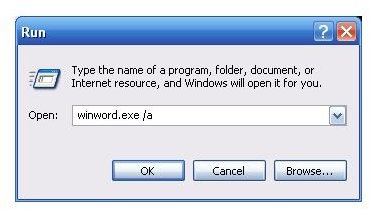
Should Word still be starting in Safe Mode at this stage, go to Start > Run and enter winword.exe /a.
Word will then launch. Close Word and try to run normally. A Safe Mode message at this point would necessitate you uninstall and reinstall the application.


