MS Access 2007 database reports can display our records in an endless variety of ways. However, there is no automatic method to navigate to a record. This article shows a quick way to go from a report directly to any of its underlying records by using a query, a macro and a command button.
Navigating Between Reports and Records
To view an individual record displayed in a Microsoft Access 2007 report, you have navigate away from the report and find the record either in its table, query or form view. If the database has many records, the process can become cumbersome. The ideal solution for finding individual records, of course, is through filtering.
Filters can be converted to queries, and queries can go directly to the record that needs to be viewed. There is a way to link up your “find” queries with your reports, and it can be made easier by the way you display your data in the report. For example, if you display a unique identifier for each record (its ID Number, for example), you can devise a query that will bring up that record and go directly to the record.
Step 1: Design the Report
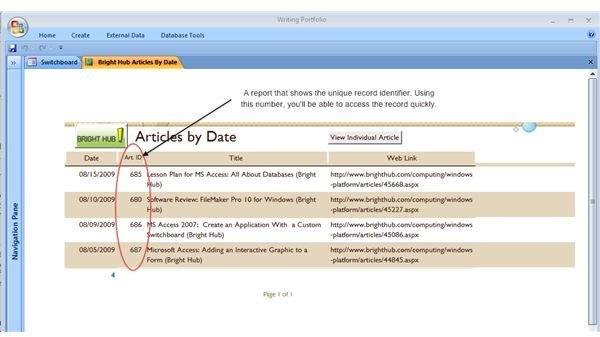
As stated previously, you need to design a report that will display a unique record identifier. For more information on report design, see the Bright Hub Article, “The Power of Database Reports .” You’ll need to know that identifier in order to enter it into the parameter query described in Step 2 below.
The screenshot below illustrates a report that displays a column of unique record identifiers.
Step 2: Design a Parameter Query
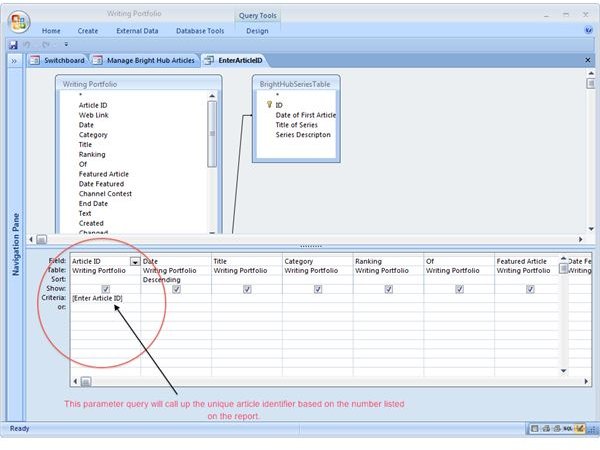
Next, design a parameter query that will display the record (ideally as an editable form). The screenshot below shows the query design used in our report example:
For more information on designing parameter queries, see the Bright Hub Article, “The Economy of Parameter Queries .”
Step 2a: Design a Macro that Executes the Query
You must design a simple macro to fetch your query, because the query cannot be called up directly on the report’s command button (unless you do some VBA programming). In other words, the button must activate the macro that activates the query. Directions on how to make simple marcros are in the Bright Hub Article “Creating and Using Macros .”
Step 3: Add a Command Button to the Report
Follow the steps in the Bright Hub Article, “Adding a Command Button to a Report ." By following these steps you will:
♦ Create a command button that executes a macro that calls up the query designed in Step 2.
♦ Enable the command button to open any individual record you wish to view, edit, or delete.
Important:
♦ The command button will only work in the Report view. The button will be show up in the report Display view, but will not work.
♦ If you navigate back to the report after changing an underlying record, any change you made on the record will not immediately show in the report. You’ll need to close the report and the record to see any changes.
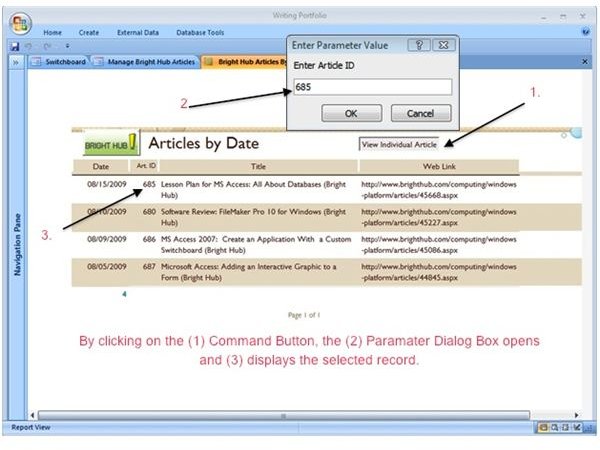
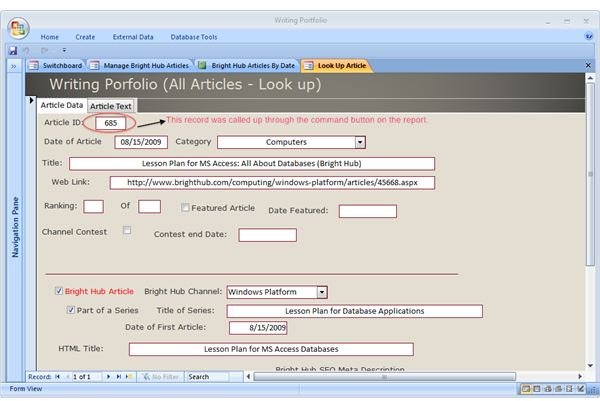
The screenshots below illustrate how a command button can call up an individual record from a report: