Vista has several performance issues which will be addressed in Windows 7, but many of those issues can be handled now.
Vista’s New Features
Windows Vista was released in 2007 and contains several new features and many changes from XP, including a modified and updated GUI and visual style theme called Aero. It also has a redesigned search function, redesigned networking, audio, display and print, and new multimedia tools including a DVD Maker.
Vista was released to much fanfare, but by all accounts it is a bust. There have even been jokes told about it: What is the name of the iceberg that sank the Titanic? Vista. What causes global warming? Vista. How do you cure alcoholism? Stop using Vista. If Beethoven composed the Ninth Symphony using Vista, it would sound instead like a combination of RAP and Country-Western.
Well, that might be a little rough. Vista comes with many new features designed to make security tighter and at the same time more flexible for users. That at least is the theory. But there are annoyances that come with the OS. That is where most of the frustration comes from. Here are some ways to lighten Vista to remove some of those annoyances and make it perform faster.
Turn off User Access Control
The purpose of user access control is to limit access to users who have valid reasons for accessing computers, systems, or data. It is a security feature that permits users with certain rights to perform operations like adding or modifying programs, or removing programs. UAC allows standard users to perform normal tasks as non-administrators, but as administrators without using the Run As feature or without switching users or logging off. A standard user account in Vista is like the user account in XP. User accounts that are members of the local Administrators group will run most applications as a standard user. UAC separates functions for users and administrators.
How To turn off UAC
Click Start ->Control Panel -> User Accounts ->Turn User Account Control on or off. If UAC is currently configured in Admin Approval Mode, the User Account Control message appears. Click Continue. Clear the Use User Account Control (UAC) to help protect your computer check box, and then click OK. Finally, click Restart Now to apply the change right away, or click Restart Later and close the User Accounts tasks window.
Disable Aero and Remove the SideBar
What is Aero? Aero is the graphical user interface and the default theme in most editions of Windows Vista. It stands for Authentic, Energetic, Reflective, and Open. Its purpose is to be a cleaner, more efficient, and more aesthetically pleasing user interface than Luna, the previously used theme. Aero’s features includes live icons, live thumbnails, translucency, and animations.
But using Aero can come with a performance cost as much as 15% of the CPU. To turn it off: Open your start menu → run, type in ’systempropertiesperformance.’ Next in the Visual Effects tab, uncheck ‘Animate windows when minimizing and maximizing.’
Remove the sidebar
Another feature that affects performance is the sidebar. It takes up resources that can easily be recovered by a simple turn off. Go to the SideBar, right click and→ delete. Or right-click in the Sidebar area and choose Properties → uncheck Start Sidebar when Windows starts.
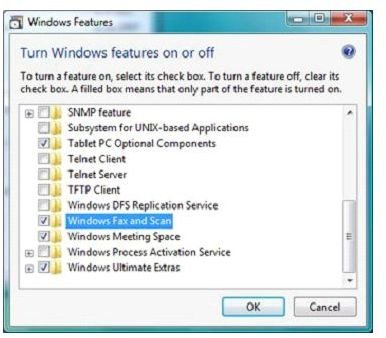
Turn off Windows Features
Turn off unneeded features by going to:
Start → Control Panel → Uninstall a Program (Under Programs) - Turn Windows Features on or off (on left Task panel)
One can then select which features should be left on or turned off.
Disable Security Center
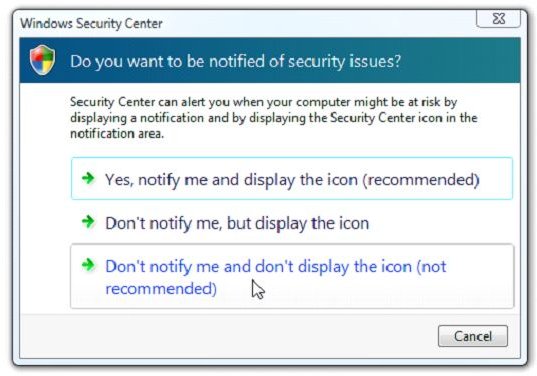
If you have security features installed such as a firewall, and antivirus software, you can disable the Security Center.
Open the Security Center from the System Tray in the bottom right. Then → Change the way Security Center alerts me on the left pane. There are three options, select the last option, → Don’t notify me and don’t display the icon (not recommended). Next you must finish disabling security center in services; follow the instructions below in services.msc.
Disable Services
Services.msc shows you all the services that can run on the computer. Services can launch automatically when Vista loads, impacting performance. To view them go to Start → services.msc.
Under the Startup Type are three categories:
· Automatic - service starts when Windows starts.
· Manual - service starts when Windows detects that something needs it.
· Disabled - service doesn’t start at all.
Right click → Properties → change the Startup Type.
Here is a list of services that one can disable:
Remote Registry
Windows Error Reporting
Computer Browser
Offline Files
Distributed Link Tracking Client
IKE and AuthIP IP Keying Modules
Tablet PC Input Service (unless you’re using a tablet PC)
Security Center (as noted above)
Secondary Logon
DFS Replication
Distributed Link Tracking Client
IP Helper
IPsec Policy Agent
KtmRm for Distributed Transaction Coordinator
SSDP Discovery
Terminal Services
Windows Defender
But Do NOT disable the following:
Multimedia Class Scheduler
Plug and Play
Superfetch
Task Scheduler
Windows Audio
Windows Driver Foundation
Remove System Tray Items
When Vista starts up, some programs will start automatically and may be running in background.They will appear in the system tray. Remove The ones that do not need to be there, i.e., the ones that one may need but only occasionally.
These suggestions may take the sting out of the poor performance that has so far defined Vista. While one is waiting for the next upgrade, Windows 7, making Vista more performance friendly can make it tolerable, maybe even worth having.
References
https://windowshelp.microsoft.com/Windows/en-US/Help/1e62706b-ef53-4ecd-a217-0e7bcf82009b1033.mspx
https://windowshelp.microsoft.com/Windows/en-US/help/c33fe91a-9e6f-41f4-ae82-3ed2d5fa2fbf1033.mspx
https://windowshelp.microsoft.com/Windows/en-US/Help/47456a74-2765-4d7f-858c-781a9d901bf71033.mspx
https://windowshelp.microsoft.com/Windows/en-US/Help/58bc79b0-6b79-411d-9e95-629e9904f0581033.mspx


