Boosting Windows XP Hard Disk Performance - Disk Cleanup
Is Windows XP Slow?
After several months of regular use, Windows XP can seem to slow down. Your hard drive might whirr a bit longer than usual, programs will take longer to open and Windows might also take longer to load. The reason for this however is not the operating system, but the hard disk drive in your computer.
Whether you’ve been downloading videos and music, installing new applications and games, or simply browsing the web, regular use of your hard disk leads to several issues that can cause it to run less efficiently than when it was empty.
In this guide we’ll take a look at some of the causes for decreased hard disk performance under Windows XP and how they can be resolved.
Perform a Backup
Improving the efficiency of your hard disk drive almost always means making extra space for Windows to use - and making extra space means deleting files.
Therefore it is best to approach the task of restoring the efficiency of your hard disk drives in a methodical manner - and the first thing to do when approaching the matter of deleting any files is to consider performing a full system backup, just in case anything untoward occurs.
Once you’ve done this, it’s time to look at the tools you’ll be using. Although not industry-leading, Windows XP includes some useful tools to manage both unwanted files and the organization of your hard disk file structure:
- Disk Cleanup features several disk management tools
- Disk Defragmenter can be used to “reshuffle” the organization of files and folders on your hard disk
Using Disk Cleanup
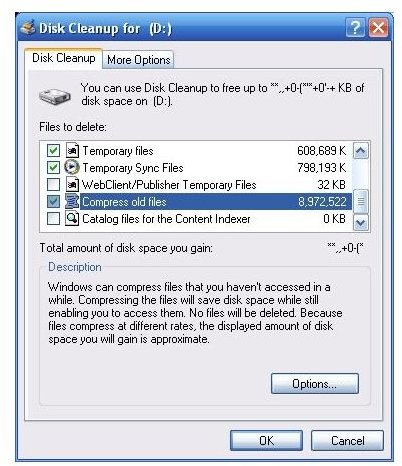
Disk Cleanup can be accessed via Start > Programs > Accessories > System Tools. Once opened, Disk Cleanup spends some time indexing a list of files that can be removed or compressed, and after a short time will display a list of file types to delete such as Temporary Internet files, contents of the Recycle Bin, and others.
To remove these, simply tick the box beside each entry.
The More Options tab takes things further - this gives the opportunity to generate more space by removing Windows Components and historical System Restore points. These are generally more advanced tasks that should only be used under certain circumstances.
Are You Using Everything?
It’s probably worth taking a good look at what you have installed on your PC at this stage, in order to see if there are any applications installed that you can do without.
Many users use Belarc Advisor for this task - it is a small 2 MB file that can be downloaded for free and run on your PC to provide an audit of both hardware and software installed on your system.
Once you’ve identified software to remove, go to Start > Control Panel > Add or Remove Programs, identify the program to be removed and uninstall it.
This additional space that has been freed up can then be used by the Disk Defragmenter.
Using Disk Defragmenter
Using Disk Defragmenter allows your hard disk to be brought fully back in shape after the data deletion that has taken place with the Disk Cleanup tool and any program removal you might have performed.
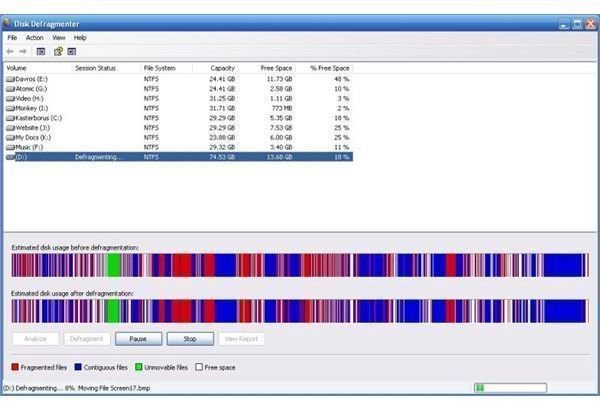
When Windows XP saves data on your hard disk drive, it does so in the most effiecient manner there is - it saves it in the next free available sectors. This can cause problems with performance as data can end up being placed all across the hard disk drive when in reality it needs to be stored together.
Disk Defragmenter resolves this problem, reorganising the data across your hard disk to make it more efficient and speed up Windows XP. It takes advantage of all of the now empty areas freed up by Disk Cleanup and uninstalling applications improve both the programs that are still installed and Windows XP itself.
To defragment your hard disk drive, first of all exit all Windows programs, then go to Start > Programs > Accessories > Disk Defragmenter.
Next, select the disk to be defragmented, and select the Analyze button in the lower left corner - this will confirm that the drive needs to be defragged. The process can take some time, and is best left as an overnight task for larger disk drives.
Faster and Efficient Windows XP!
With each of these tools utilised, your PC should suddenly start working faster! Windows XP will appear faster and you might notice the gentle clicking of your hard disk drive becomes less constant as it finds the files it needs are found more easily than before.
If you have successfully improved your hard disk performance, it might also be worth adding a new partition to the drive - this will prevent data spreading unnecessary (avoiding frequent defrags) as well as providing a new drive letter for saving particular rarely used data to. Go to Start > Control Panel > Administrative Tools > Computer Management > Disk Management to see what current partitions you have and whether or not more partitions are possible.
You might also consider reducing the upper limit of your Temporary Internet files (Start > Control Panel > Internet Options) - go to Settings on the General tab and alter the Disk Space to use total in order to do this.
All of the steps in this article require nothing more than the tools that come supplied with Windows XP - note however that not every cause of hardware inefficiency is software based. If the steps outlined here fail to resolve performance issues on a new PC or new hard disk, your problem could be hardware based.
