A Review of Bing Maps as a Replacement for Google Earth and Yahoo Maps
In response to other search engines such as Google and Yahoo, Microsoft’s newly-launched Bing Search Engine is set to compete head to head with the giants of the Internet search engine market. Like its competitors, Bing includes a variety of online applications ready to steal market share away from the larger and more popular search engines.
Bing Maps is an online mapping application allowing users to find businesses, get directions, and explore locations all over the globe. Some of its more prominent features include ease of use, practical navigation, and surprisingly fast load times. These features alone make it worth a look.
What are Bing Maps Main Features?
What strikes most first-time users about Bing Maps is its intuitive layout and navigation. Unlike Google Earth which has far more features than any casual user could possibly use, Bing Maps keeps it simple and accessible. An unassuming menu along the top and left of the main screen accomplishes navigation. Those familiar with other mapping programs should be able to jump right into using Bing Maps without the need for a long introduction or the need to consult support documents to learn and understand its features.
Users can switch instantly between 2D and 3D views although 3D views requires a quick download to get the full functionality of the application. At the touch of a button, users can also switch among Road, Aerial, and Bird’s Eye views and can choose to see such features as Labels and Traffic details.
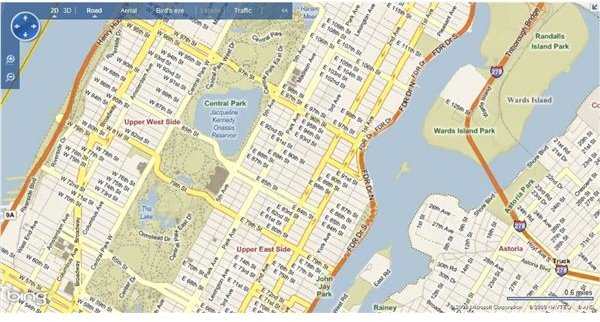
Road View is your typical atlas-type view giving users a clearly labeled roadmap to find destinations manually. Like many road-mapping programs, Bing Maps allows navigation with the mouse. Users can click and drag the map to move from location to location and double click to center the map on a certain area.
Aerial View shows what appear to be satellite images until you zoom in to a certain level where the images switch to actual aerial photographs. At those levels, the clarity is quite good allowing users to see accurate representations of locations. At this stage, the images are black and white only but may have been a good choice on Microsoft’s part. Restricting the images to monochrome decreases load times from the Bing Maps server so much so that users often think images are installed directly on their computers rather than being streamed over a network. Some may balk at the choice to use monochrome but since color at this level would provide little practical information to the user, the faster load times are a good trade-off.
Bird’s Eye view allows users to experience amazing clarity that may surpass Google Earth’s level of detail. By restricting how much of an area is rendered at one time, Bing Maps is once again able to deliver the image with amazing speed. Many users find that they can spend hours exploring the earth in Bird’s Eye View, seeing the world from a view normally reserved for those flying above the ground in an airplane.
The pictures below show examples of the three views available in Bing Maps. The first is a Road View of New York City’s Central Park. Notice the convenient and clear labeling of major streets. The second picture is the same location in Aerial View. Notice the satellite-like imagery and the clearly-labeled landmarks. The third picture is a Bird’s Eye View of Central Park’s softball diamonds. Notice the amazing clarity; without zooming in any farther it is already possible to see individual people milling around the park.
Images from Bing Maps


Conclusion
In response to the big Search Engine giants such as Google and Yahoo, Bing Maps offers users a competitive product that delivers both quality images and fast load times. An easy-to-use and intuitive interface ensures that Bing Maps can position itself as a player among its better-known competitors. Backed by Microsoft, Bing Maps may possibly be the free mapping application of choice. Perhaps in the future, Microsoft may integrate its online mapping program with its other application such as Outlook, Word, Excel, and Access.
