As soon as I got my hands on Windows 7, I had to install it. I was using a Vista Business edition with a huge amount of software installed. I used the upgrade option even knowing of my not so great past experiences. Here we discuss a successful Windows 7 upgrade from Vista.
Backup! Backup! Backup!
I can’t stress t
his enough. Backup your data. All of it. If possible make a image of your entire system (take a look at Acronis True Image for that… a great tool). Upgrading from an OS to another is always a delicate procedure and there are enough things that can go wrong that makes it mandatory to make backups. If you have Windows Home Server you will be in good hands also.
Check for compatibility problems
Download the Windows 7 Upgrade Advisor. Get the tool here . It’s great to be able to run it stand alone so you can start preparing for your upgrade even before you have Windows 7.
This is an incredibly useful tool that saved me quite a bit of time. It informs you of potential problems and warns of possible conflicts. This tool is run also during Windows 7 setup, and if a blocking error is found, it does not even let you proceed with the setup.
Follow the
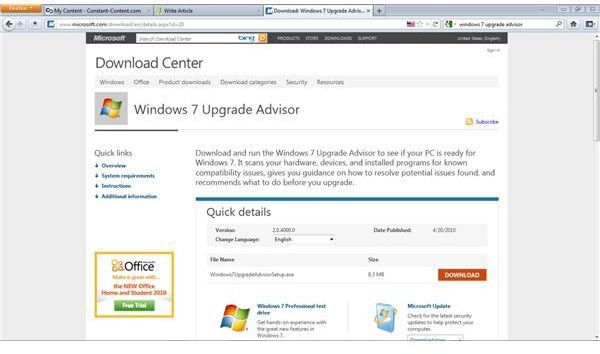
instructions to the letter. If the upgrade advisor tells you that there is something that won’t work, remove it.
Also if you got your copy as I did from MSDN, you are probably a developer (or from TechNet if an IT professional). In that case, make absolutely sure that you don’t have Visual Studio 2010 beta 1 installed in Vista. If you do have, remove it and all its components, including the .NET Framework 4.0.
The drivers for most external devices, such as printers and scanners, that ship with the operating system normally work fine. The problem usually lies with AC97 compatible internal devices, such as modems and sound cards. I recommend checking with the maker of your computer to see if they have updated drivers for Windows 7. If not, you may have to edit the driver files by hand, especially if you’re upgrading to a 64-bit version of Windows 7.
Time for a clean up
If any time’s the right time to make a clean up on the hard drives, it’s now.
Remove old software that you don’t use anymore and make a cleanup of any temporary files that you may have. In summation, remove anything that it’s not important to you or that you don’t need.
Make as much free space available as possible. For the upgrade I would recommend having at least 10-15 GB of free space - the more the better. Also by removing software that you no longer use, you are reducing the chance of potential compatibility issues also.
Let’s do it!
Ok so you are ready to proceed with the upgrade right?
Cool, but a word of advice: be sure that you have spare time to do it. Windows Upgrade from Vista to Windows 7 can take 5 hours or more. It took me 5:30 hours.
Probably a good strategy is to start the installation process at the end of the day and leave the workstation running the upgrade during the night. Most of the steps are done in one go and you don’t even need to do anything.
To start the process just load your media to the DVD drive, and run the setup. Follow the onscreen instructions, get some sleep, and that’s it.
Welcome to Windows 7.
My experience
So far, after my Windows 7 upgrade from Vista, I only had an issue with Cisco VPN Client. Other than that, I had no problems whatsoever. My machine feels faster, if boots faster, it shutdowns faster. In general the applications work better and its stable.
For an alternative to Cisco VPN Client try VPNC . It works for me.
Personally I see Windows 7 as what Longhorn was supposed to be all along. Microsoft did a great job on W7. They included a huge amount of feedback from users, and Windows 7 is, as a result, a stable, fast, and enjoyable system to use.
Windows 7 is by far the best OS I ever used from MS. (And I’ve been using Microsoft OS since MS-DOS 3.x :)
References
- Screenshot supplied by author.
- Image: Windows7case courtesy wikimedia commons by Modamoda and is in the Public Domain .


