Which Version of Microsoft Office 2007 Should I Buy?
Microsoft’s popular Office 2007 Suite of Software is one of the most recognized software packages next to only Microsoft’s own Windows and Internet Explorer. First introduced in office environments, MS Office is now found in the homes of many computer users. This fact alone makes many consumers wonder why Microsoft continues to market the software under the name “Office.”
As in many cases with big software companies, Microsoft offers its Office 2007 suite under a variety of package names including Home and Student, Small Business, Standard, and Professional. Each suite includes some combination of the following programs: Word 2007, Excel 2007, PowerPoint 2007, OneNote 2007, Outlook 2007, Publisher 2007, and Access 2007.
Which package to choose is a function of what you need the software to do.
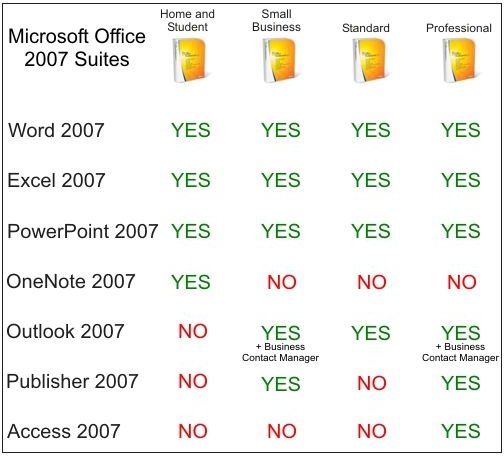
Figure: Which Office 2007 is Right for You?
The Programs in the Microsoft Office 2007 Suite
Word 2007 in the newest version in the Word series of word processors offering everything you need to write letters, create letterheads, share content, and just about anything else to do with writing. Excel 2007 is Microsoft’s spreadsheet application that allows convenient data organization, calculation, and analysis.
You can use PowerPoint 2007 to create electronic slides for presentations for both face-to-face meetings and for the web. OneNote 2007 is a relatively recent addition to Microsoft’s Office lineup. OneNote is digital note-taking software allowing you to gather unstructured information (such as when taking notes, brainstorming ideas, etc.) into one place for storage, retrieval, collation, and sharing. Outlook 2007 is an electronic organizer that allows you to collect e-mails, schedule meetings, and store business and personal contacts in one program. In comparison, Outlook’s younger brother Outlook Express is only capable of e-mail and a few other functions such as newsgroup and RSS organization.
Publisher 2007 is a program that never became a major contender in the desktop publishing market. As a desktop publisher, it is aimed more for home rather than office user. Its main competitors are such giants as Adobe PageMaker and Corel Draw. Access 2007 is Microsoft’s main desktop database program allowing you to create and query simple or complex database relationships. Often, small websites use a version of Access to serve dynamic content to visitors to its page content.
Which Suite Version of Microsoft Office 2007 is Right for You?
Word 2007, Excel 2007, and PowerPoint 2007 are common to each of the four Office suites including Home and Student, Small Business, Standard, and Professional. These three programs are the core of the Office 2007 family of software; any suite of Office you buy will have these programs included. However, the remaining version of Office 2007 come with a variety of combinations of the remaining Office software titles including OneNote 2007, Outlook 2007, Publisher 2007, and Access 2007. See the Figure for a summary of each suite.
Each of the software titles that make up Office 2007 are available separately so you are not stuck having to buy a software title in one suite just so you can get the ones you want. The best advice is for you to buy the suite that has the software titles you want and then buy any remaining titles separately. However, buying a suite of Office 2007 is much less expensive than buying each application on its own. Be sure to do the math before making a final decision. Also, do not get caught up in the marketing categories Microsoft has created (Home and Student, Small Business, etc.); Word 2007 and the rest of the applications are identical in all of the packages regardless of which suite it comes from.
Microsoft Office 2007 Home and Student
As its name implies, the software titles in the Home and Student suite are supposed to appeal to home users and (college) students. This suite is perhaps the best all around value as its price is normally quite low in comparison to buying each title separately. Along with the core applications (Word 2007, Excel 2007, PowerPoint 2007), the Home and Student version comes with OneNote 2007. In fact, this version of Office is the only suite that comes with OneNote.
Microsoft Office 2007 Small Business
The Small Business suite of Office 2007 is aimed at people working in a small or home office. Besides the core applications, the Small Business suite comes with Outlook 2007 and Publisher 2007. In addition, Outlook ships with the Outlook 2007 Business Contact Manager, a minor upgrade to the standard version of Outlook.
Microsoft Office 2007 Standard
Office 2007 Standard is indeed Microsoft’s “standard” Office package. Other than the three core applications, it also ships with Outlook 2007. There is nothing special about this package as it contains the most popular applications in the Office suite of software.
Microsoft Office 2007 Professional
The Professional version of Office 2007 is identical to the Small Business edition except that it also includes Access 2007. You will most likely not find Access a useful program unless you know before you purchase an Office suite that you have need of a database program. In other words, it is rare for someone who has never had need for a database to discover a need after he/she purchases Access. Unless you know you need Access, save some money and go for the Small Business suite. As with the Small Business suite, the Office 2007 Professional also ships with the Business Contact Manager in Outlook.
Conclusion
It is interesting to note that no suite offered by Microsoft contains all of the Office applications. The Professional version comes close offering six of the seven possible titles. However, even the Professional version lacks OneNote 2007, available only in the Home and Student suite.
Remember that you are not stuck buying an Office suite in order to get the software you want; each title is available as a stand-alone application. However, most people find that buying a suite−even if it contains a program they do not want−is cheaper than buying the programs separately.
