Your user profile storage space holds all your settings, My Documents and sub folders therein, and much more. Shortage of profile space creates several problems that may even prevent you from logging into the computer. The article explains how to increase profile storage space in Windows XP.
User Profile Storage Space – An Introduction
Whenever a new user is created on a computer with Windows XP, some space is set apart for usage by that user profile. The minimum storage space for user profiles is 2MB. By default, Windows XP does not enable quota management, but your computer administrator can.
A significant portion of your user profile storage space is used up by the custom settings you apply. These include your desktop and display settings, the screensavers, and the task bar settings. The way you set up your Start Menu and other components using the display dialog (appearance tab) also consumes the storage space. The files you store in My Documents and the subfolders therein (My pictures, My Video, and any other custom folder) also consume a significant part of your user profile storage space. Other than this, your CD image files and favorites are also stored in the storage pertaining to your profile.
If the free space in your profile storage goes below 1MB, you will not be able to login. Windows XP will present you with a message that you can’t login due to low disk space. You have two options: 1) login into another profile using admin credentials and clean up all the unwanted files and settings; and 2) increase your user profile storage space.
Recommendation: It is good to keep tweaks and settings to a minimum while regularly cleaning up your system (especially the C:\Documents and Settings folder) using a good computer cleaner. You can always use other partitions for storing important files. In addition, whenever you burn a CD using Windows XP CD burning feature , make sure you delete the CD image file. For example, I don’t have wallpaper as I work on full screen applications that hide the wallpaper. My screen saver is “Starfield” that consumes minimum memory (good for laptops running on battery as it also increases battery life). I don’t have menu animations. I do not store anything in My Documents and all my bookmarks are stored in the Google toolbar. All this contributes to savings on my user profile storage space while also increasing the overall system speed.
While the first method is to use the profile storage space wisely, the second method is to increase user profile storage space.
How to Increase User Profile Storage Space
The method to increase your profile space is quite easy provided you are logged in as an administrator. The steps to increase user profile storage space are given below:
- 1. Open My Computer and look for the system partition. It is the partition where your Windows folder resides, usually the C drive.
- 2. Right Click on the icon representing the system partition and select Properties.
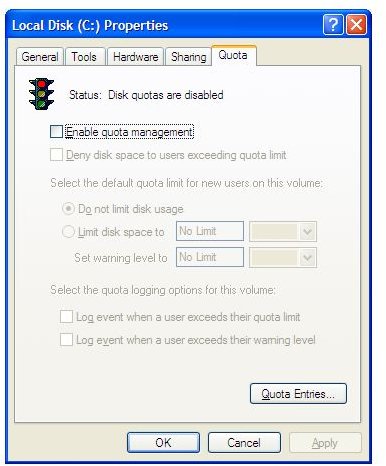
- 3. You get a dialog box with several tabs. Click on the tab named Quota.
- 4. You can disable quota management by unchecking Enable Quota Management or by selecting the radio button Do Not Limit Disk Usage.
- 5. Alternatively, you can increase the user profile storage space using the radio button against Limit Disk Space To.
- 6. You may also set the Warning Level under Limit Disk Space To, if you wish.
- 7. The next two check boxes allow you to log events when the users exceed their quotas or warning levels. It is better to leave these unchecked as when checked, these logs will consume unnecessary space on your system partition.
- 8. Click OK to close the dialog box**.**
Once you increase profile storage space or disable quota management in Windows XP, the computer scans the entire system partition and updates the system registry to reflect the changes.


