Managed applications designed in Access 97 can still be edited under Windows XP and Vista thanks to the use of a System.MDW file.
Access 97 Compatibility
If you’re running bespoke applications written with Access 97 and finding that you need to upgrade to a later version of the Microsoft database management software, compatibility issues are more than likely at the forefront of your mind.
In most cases this shouldn’t be too much of an issue - however if you require direct access to the database - meaning that you need to occasionally open it in Access 97 - then your compatibility issues will be considerable once you install a later version.
It is possible however to circumvent these issues to an extent and continue running and editing an Access 97 database while still running Access 2003 or 2007 on the same PC.
Missing Workgroup Information File (MDW) Error Message
Workgroup Information File
Maintaining a level of compatibility with your older Microsoft Access application centers around the System.MDW file that should have been created as part of the original design of the application.
System.MDW is a workgroup information file that manages the security of your application, containing information about usernames and passwords of authorized users. Usually it is configured to read the local username and password from Windows.
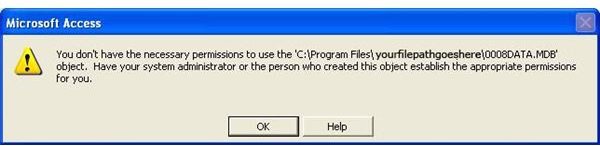
All versions of Microsoft Access utilize the System.MDW file that also includes details about the workgroup in which the PC is included. This is an important element of this solution - opening an Access 97 database when Access 2007 is installed will result in an error as seen here.
Finding The System.MDW File
Thankfully, it is a relatively straightforward task to resolve the error.
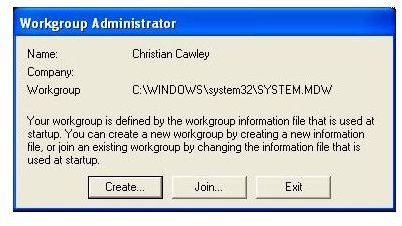
Simply click on OK to close the error dialogue box and find your Join a Workgroup icon. This is usually found in the X folder, although it is a good idea to send a shortcut to your desktop for future use. You can do this by finding the icon, right-clicking and selecting Send To > Desktop (Create Shortcut).
To join a workgroup - which is applying the information stored in your System.MDW file - click on Join…. You are then required to browse for your System.MDW file, which can be typically be found in the same directory as your Access 97 application database.
You should then be able to open your Access 97 database without any further problem.
Note however that the Join… process must be followed whenever you open Access 97 following use of a later version of Access. Later versions of Access retain and read their System.MDW files in a different way to old versions, thereby resetting the process.
For more help with Microsoft Access, check out the Access User Guides and Help collection here at Bright Hub. New and updated articles are added all the time, so check back often.


