
If you have the Windows Live suite and want to completely remove it, but are having a difficult time finding out where it is, this guide will help you locate Windows Live applications and get rid of them.
Windows Live
Windows Live contains a suite of useful programs, such as photo organization, instant messaging, blogging tools, family safety, e-mail clients and more. While these programs are useful, if you have other programs to do these functions or just do not like the Windows Live components you may want to get rid of them. Removing Windows Live has been tricky for some users, so if you are getting frustrated know that you are not the only one. This guide will help you uninstall your Windows Live suite.
Control Panel
When browsing through your applications through your Start menu, you will find that some programs include options to uninstall the program right from its folder. However, for Windows Live, this is not the case. There is another way to remove those programs, and that is by accessing your Control Panel.
From the Start menu click on Control Panel.
Next Step
In Windows XP, you will choose Add or Remove Programs; for Vista users, under the category Programs, select the sub-category Uninstall a Program.
Wait for Windows to gather all programs installed on your computer.
Uninstall
As soon as your list has finished populating, scroll down until you find the program entitled Windows Live Essentials. Every program is listed alphabetically, so it could be close towards the bottom of your installed programs.
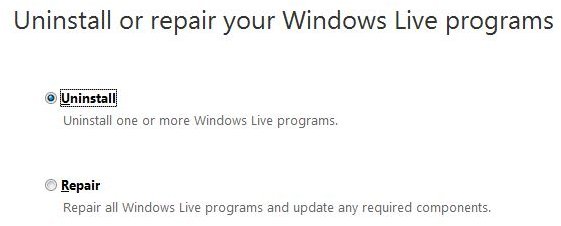
At this point, you will be given the option to Repair or to Uninstall. As we are looking to completely remove all of Windows Live, click Uninstall.
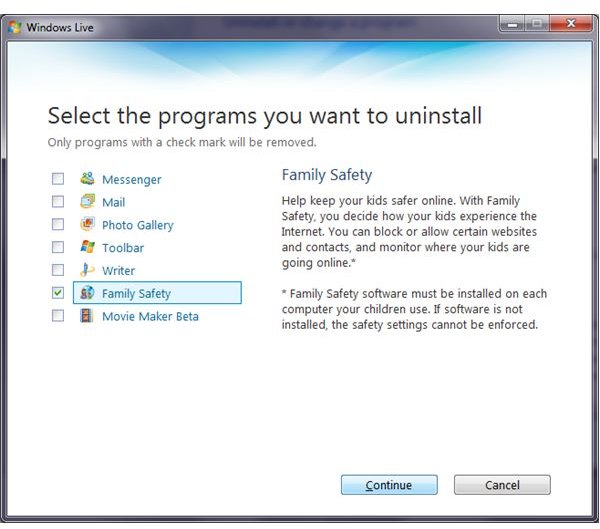
Next, you will be given a list of the Windows Live components. Be sure to check them all if you want to get rid of all those programs. Click Continue to uninstall the programs. The time it takes to uninstall the Windows Live suite will depend on how many components you have installed.
Confirmation
After your files have been removed, you will receive a confirmation message stating that your Windows Live programs have been uninstalled. You may be prompted to restart your computer. If so, restart it to complete the process and get rid of the Windows Live suite.
Related Articles
For more help with Windows Live applications, read Completely Uninstalling Windows Live Messenger and check out the Bright Hub Collection of Windows Live Tips, Tricks and Tutorials .


