Uploading Files in Windows XP: Troubleshoot FTP Connections With Windows XP Built In FTP Clients
Built In FTP Solutions
Third party FTP programs are popular on the Windows platform - the open source solution FileZilla is a particularly good example.
It might surprise you to learn however that Windows XP comes with two FTP clients, but due to the slightly secretive nature of the operating system they can both be difficult to track down, especially if you have no experience with the older versions of the operating system.
Below we’ll look at each of the methods in turn. While neither can claim to be a complete replacement for a solution such as FileZilla or CuteFTP, each method has more than the basic functionality, and familiarity with each can prove useful in troubleshooting FTP client connections.
Windows XP FTP Method 1 - Explorer
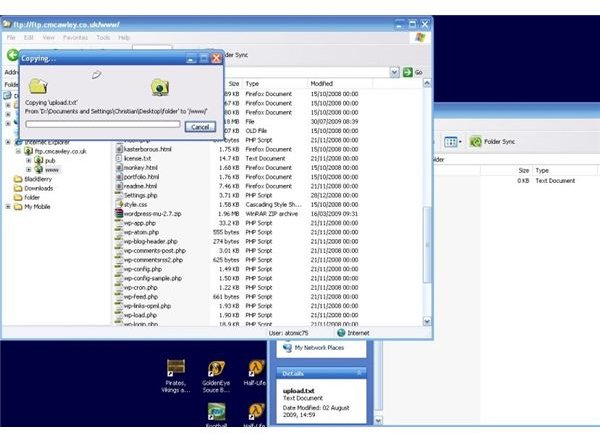
This first method is based purely within the parts of the Windows XP operating system that everyone is familiar with. Using either Internet Explorer or Windows Explorer (making sure the Address Bar is visible - if not, right-click on the toolbar and click Address Bar) remove whatever address is currently displayed and type in the name of your FTP server, making sure to indicate that the FTP protocol is in use:
This should establish that the address is correct - however you haven’t yet logged in.
To proceed, re-enter the address with your username and password between the ftp:// and the ftp, separated by a single colon as below:
ftp://username:password@ftp.myserver.com
At this stage, if you’re using Internet Explorer, you’ll be shown a list of files and folders in plain text, as well as a notice to view the site in Windows Explorer by going to the Page menu in Internet Explorer and clicking Open FTP Site in Windows Explorer.
With your FTP site open in Windows Explorer, simply open a new explorer window, navigate to your files and drag and drop or copy and paste as required!
Windows XP FTP Method 2 - Command Line
Although on the face of things this is a more intimidating route to take, it is also a more reliable method - the command line method has been been with Windows unchanged since the early days of the operating system.
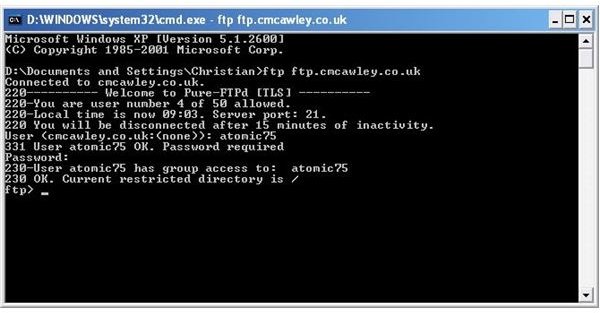
To send or receive files from your FTP server using this method, launch the command line shell by going to Start > Run and entering cmd.
Next, type ftp along with your ftp server name, for example:
ftp ftp.mysite.com
The command line will inform you that it has connected (look out for any prompts from your firewall software, or Windows XP asking you to Block or Unblock the software) and request first a username, then a password.
Once successfully connected, you can then begin utilising the text-based ftp commands such as get and send. Type help in order to find a full list of commands.
Simple And Effective
Two simple and effective methods to upload and download files to your FTP site or connection - no additional software is required!
However simple these methods might be, note that there are several more advanced tasks that cannot be easily done via either command line or Windows Explorer.
For advanced FTP tasks a specialised application - such as those mentioned earlier - should be employed in order for you to maintain the integrity of your server. For straightforward file uploads however, these two methods are great!
