When we import (or “dump”) database records into a new MS Access database, so-called “migration” issues arise. Bearing in mind the old “GI-GO” (garbage-in, garbage-out) principle, the MS Access user must take great care and be on the lookout for potential data conversion problems.
First, the “Big Picture”
Migrating data between huge mainframe applications is the stuff of professional database consultants, planning, and frequently months of arduous data conversion, with a better than even chance that the data conversion project will fail.
According to Informatica, a company that specializes in data migration:
- 84 percent of data migration projects fail to meet expectations
- 37 percent experience budget overruns
- 67 percent are not delivered on time
Why is that? Again, according to Informatica:
- Lack of methodology
- Unrealistic scope
- Improper understanding and use of tools
- Inattention to data quality
- Lack of experience
(See the link to Informatica at the end of this article.)
Scope of This Article
This article, on the other hand, covers more manageable data conversion techniques and problems involved in importing outside data direct into MS Access 2007. The data could be anything from an Access data base table in an external data base, an MS Excel spreadsheet table, or a text file downloaded from an existing mainframe.
Importing Data from Another MS Access Database
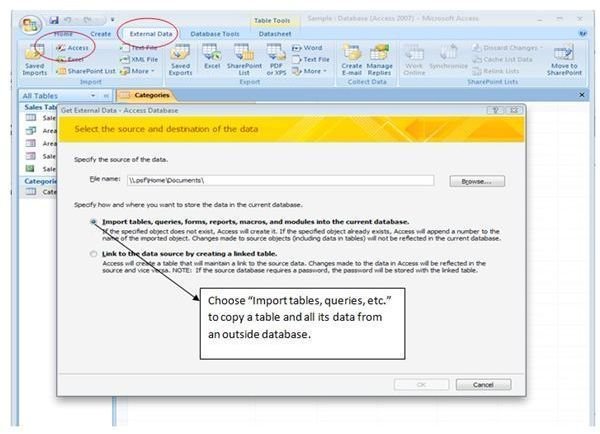
Microsoft Access allows us to either link to or import another Access database table. Linking allows two databases to share the same table. Each time the “master” database is updated, the database where the link was established reflects any changes. When we import a table, we simply copy a table from one database to another.
Migration Issue: None. Imported data will be compatible and ready to use in the new database.
The screenshot below shows the steps for importing tables to an existing database.
Importing Data from an Excel Spreadsheet
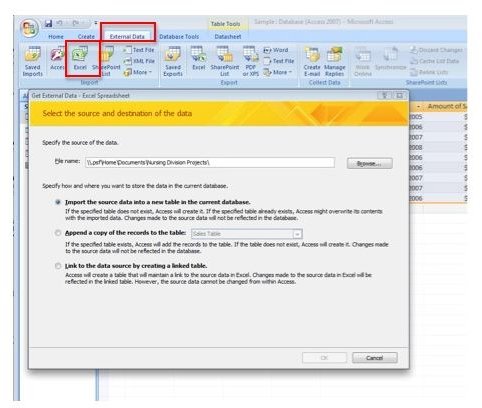
Similar to importing (or linking) to another Access database table, bringing in a spreadsheet table from Excel is a fairly easy process.
Migration Issues:
♦ Large spreadsheet tables can be problematic when importing into MS Access. As the import procedure progresses, incompatible data is rejected and put into a separate “errors” table.
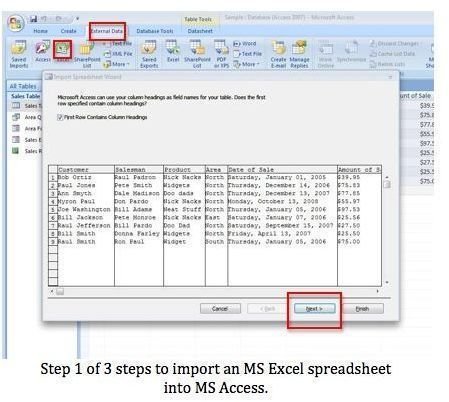
♦ Before importing large spreadsheets into MS Access, it is advisable to thoroughly “clean” the data to be imported. Make sure data in each spreadsheet column is consistent in style and format. Otherwise, the row (record) in which the incompatible data is located will be rejected and placed into a special “errors” table.
The screenshots below show the steps for importing MS Access spreadsheets into an Access database, as well as the intermediate data design steps.
Importing Data from a Text File
Sometimes when importing data from a mainframe the only thing we have to work with is a text file. The file can be in the form of tab delimited, comma-separated values (CSV Files), or any text file with separate lines and field data separated by tabs, commas, semicolons, etc. The “separators” between the text determine the placement of the data in the fields that will make up our new database table.
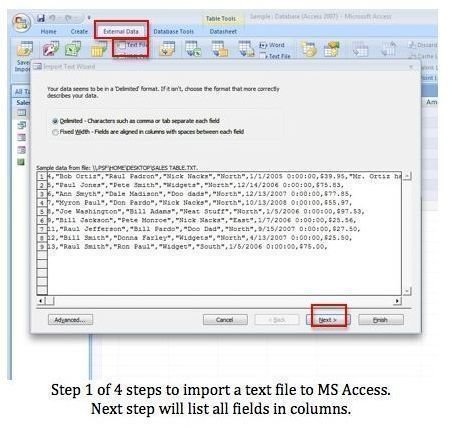
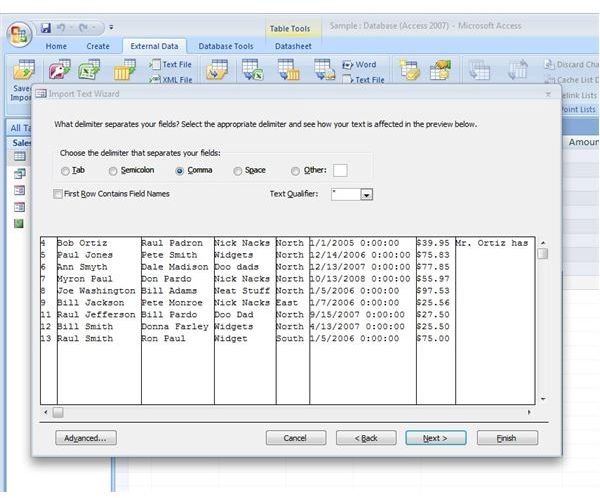
This method of importing to MS Access can be the most problematical, but is commonly the only recourse in sharing data between legacy applications and mainframes, merging of companies, etc. As in importing Excel Spreadsheets, MS Access has an intermediate step where the user can verify data type and format, etc. The screenshots below show the steps for importing text files, as well as the intermediate data design steps.
Migration issue: Large comma or tab separated data files can pose huge compatibility problems for importing to MS Access. Issues such as blank fields, inconsistent data entry, etc., can mean hours of data cleanup before the data is usable. For that reason it is usually advisable to import text files into MS Excel spreadsheets first. A spreadsheet is easier to edit “on the fly” than a database table.
The screenshots below show the intermediate data design steps when importing a text file to MS Access.
More Information on Database Migration Issues
Access: Import a table from another database in Access 2007
Informatica: Problems in Data Migration


