You may know that you have a 160GB hard drive in your computer, but when you go to “My Computer” in Windows XP, it may report less than 160GB. This article will discuss possible reasons for this.
Advertised Capacity versus Reality
You may have noticed in “My Computer” that the amount of disk space available to Windows is less than what you know your hard drive capacity is. For example, if you know you have a 160GB hard drive, Windows may report only 149GB of usable space. Why is this?
Computers are built off ones and zeros – the binary language. When making calculations based on computers, everything is calculated in Base 2. As a human, we’re used to counting in Base 10. This is part of the problem – the other being that manufacturers make faulty assumptions to make it “easier” on us humans.
Manufacturers make the assumption that one Gigabyte of hard drive space is 1,000,000,000 bytes , but in Base 2, one Gigabyte is 1,073,741,824 bytes. Thus for every Gigabyte the manufacturer advertises, the real capacity is about 73,000,000 bytes or 73MB less.
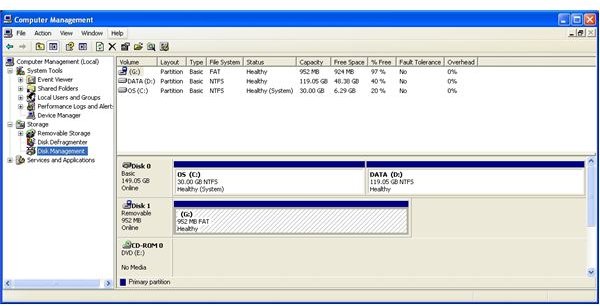
In our example, we’ve got a 160GB hard drive. If we multiply 160GB by 73MB (160x.073) we’ll get 11.6GB. Take 160GB minus 11.6GB and you have roughly 149GB – the size of the hard drive shown in XP (Figure 1). Unfortunately, there isn’t much you can do about this other than being aware of this “trickery” and purchasing a bigger hard drive if you need it.
Other Possibilities
There are a few other possibilities that may be gobbling up or “hiding” your space.
Hidden partitions are popular with computer manufactures to store information without allowing you to directly interact with or accidentally delete it. For example, Dell often sets up their computers with a small hidden partition that houses diagnostic utilities. Some manufacturers will use up a significant portion of the hard drive to hold a copy of your computer’s original configuration in a hidden partition.
Another possible reason for missing space is “unallocated space”. When you first install Windows XP, you have the option of setting up your partitions – including how big they should be. It’s possible to set up a single partition that is smaller than your hard drive size. When you go into Windows, you will see any space that is unallocated.
To allocate space, you can go to Computer Management, Disk Management, right click on the Unallocated Space and select New Partition while following the prompts.


