Add Images to an Access 2007 Table - New Data Types to Improve Your Database
Introduction
There are several occasions when the ability to add an image to a database record can be really useful. For example, a database record of all employees needs to have a means to attach the photograph of the employee. An inventory database could use images of products for easy identification. You might even want to organize your photographs in a database that has a record for each photograph describing various metadata about it. In general, adding images to the database enhances reliability. It also reduces the probability of errors.
What we really need is something as simple as the ability to define one of the field that holds the image. We should be able to retrieve the specific record and view the image. The only way images could be included in Access databases until the 2007 version was to use the OLE data type for that field. This size of the field could be large enough to hold a substantially sized image. Another indirect way would be to just have a field for links to the images. You retrieve the links first when required and then get the images.
The OLE Bloat
There was a problem with this process though. The OLE data type allowed adding images as well as documents as attachments to the records of the database. The attachments would be converted to maps and stored. With text documents - which typically occupy one storage location (byte) per character - needed much more storage now. Each pixel in the document was now represented by a 1 or a zero depending on if that particular pixel on the document was black or white because of the presence of the text on it. Compressed images also needed more storage, a byte for each pixel of the displayed image. This bloated storage requirement for OLE items could be as large as 10 to 100 times the original aggregate file size. The other difficulty with the documents being in bitmap is that they could not be searched or edited, which was a vital functionality. You also needed additional software - OLE servers - to function properly. These were required to be present on all machines that were expected to use the database.
Access 2007 Methods
Access 2007 introduces a data type called “attachment”. The complete list of data types available to define a field in a table in Access 2007 now include text, memo, numbers, date/time, etc. The hyperlink data type allows for storage of hyperlinks and the field can be a solution for the indirect method discussed previously. The OLE data type is still available, and you can use it the old manner. The new data type attachment however, is the right type for storing images. It can store documents, including all kinds of Office files and binary objects. A field created with this data type can have up to 2 GB storage allocated. Individual files cannot be more than 256 MB though. You can have more than one file attached to a record.
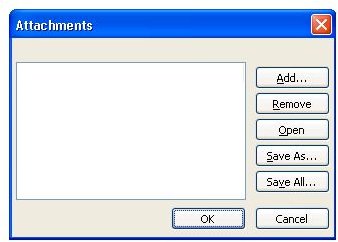
Whenever you need a field that can hold images and other attachments, remember to create a field for the same, name it and set the data type as “attachment”. To add attachments to a table, you do not need a data entry form. Instead open the table in the datasheet view. Double click the attachments field and the attachments dialog box appears. The dialog box lets you look through your directory for the file to be attached. Viewing attachments also does not need the use of a form. Simply open the table, go to the right record, and double click the specific icon of the attachment (as there can be multiple attachments in a attachment field). The document will open in the associated program. For example, a .DOC file will open in Word.
Fig 1: Attachment Dialog Box
Read this article for more details on Access tables in general.
Issues with Images in MS Access 2007
In general, it is better not to store images, BLOBs (binary large object) or graphics in an Access database. As the total data increases, the database gets sluggish. These image attachments or even the documents are not indexed and thus not searchable or directly reachable. You can find them only through the primary key. If you need to do anything with the images or the other documents, you need to work in the specific applications that can handle that type of file.
