Preferring to put the purchased version of Windows on the hard drive, few manufacturers include physical installation media anymore. This is fine if the recovery partition doesn’t go down with the hard drive. Then we need a backup way to start the PC, and Windows 7 actually makes this possible.
The non-Home versions of Windows Vista - Ultimate, Professional, and Enterprise - have the ability to create whole-disk images saved to external media such as an external hard drive or DVD media. It did not, however, include a method for creating a bootable recovery disc to access this stored data. This depended first on the hope that enough of Vista was startable to actually reach the recovery environment. If the hard drive was significantly damaged and unable to reach that environment, the scheme relied on the user being able somehow to reinstall Vista from a DVD and then run the recovery inside Windows itself.
To make matters even worse, the early beta versions of Vista included a program called “recdisc.exe” that, along with a Vista DVD, could create a bootable CD or DVD that could access a recovery environment. If the user had a full disk image saved, a perfect recovery could be obtained without going through the extra step of first reinstalling Vista. This program was left out of shipping Vista, though. Yes, it appears in the Windows directory, but it’s a dummy version that is non-functional.
Thus there is a lot of interest in making bootable disks that worked with Vista and mount a recovery environment. It is possible to create bootable disks in Vista , however.
The great news is that not only is recdisc.exe included with Windows 7 (Release to Manufacturing version or later) and functional, it also now works without needing a real Windows 7 installation DVD. This is because Windows 7 includes a hidden, system, and read-only disk image file in the C:/Recovery directory. More specifically, this is a RAMDISK image file - one that can be mounted in main memory like a real DVD. This also suggests that in a memory constrained environment, the program may need to ask for the Windows 7 install disc in order to create the recovery disc. (We tested with 2 GB and 3 GB computers, and neither required the install disc.)
Let’s look at how it works.
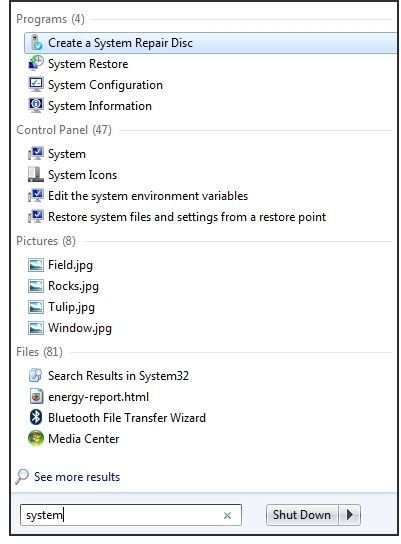
First, let’s find out if it’s showing in the Start menu. Press the Windows button or click the Start button/orb and enter “system” in the search field. Do you see “Create a System Repair Disc” in the list? If so, the program can be started from the menu.
Some beta users and users of the Release Candidate version have reported that the program did not appear in their Start menu until after they’d run the program once. If you don’t see it in your Windows 7 Start Menu, click Start → All Programs → Accessories. Right-click “Run as administrator” and then clear the UAC prompt, if you have it active.
To start the program you’ll be entering
cd \
and
recdisc.exe
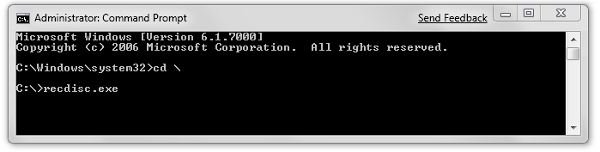
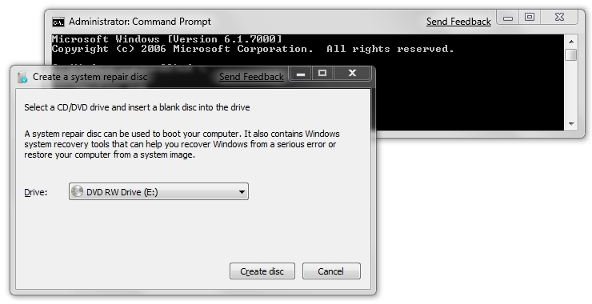
But first, of course, let’s put a recordable CD or DVD - either can be used for the bootable disc - in the tray in preparation of writing to it. Note that this apparently must be an internal optical drive. When I tried using an external drive with my laptop, recdisc.exe produced an error message. This cleared up when I pulled the second hard drive out of the drive bay and reinstalled the original CDRW-DVD drive. Actually, it makes sense that this policy is enforced. It keeps us from mass-producing bootable disks from our laptop. (As if we’d want to.)
This is what the program looks like through the entire cycle of processing the image and writing it to a DVD or CD.
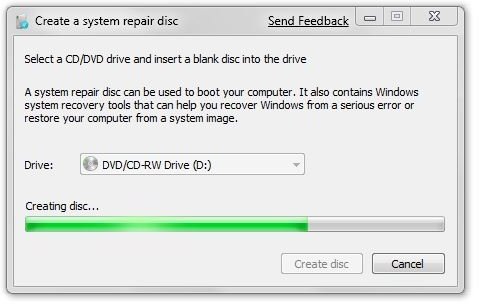
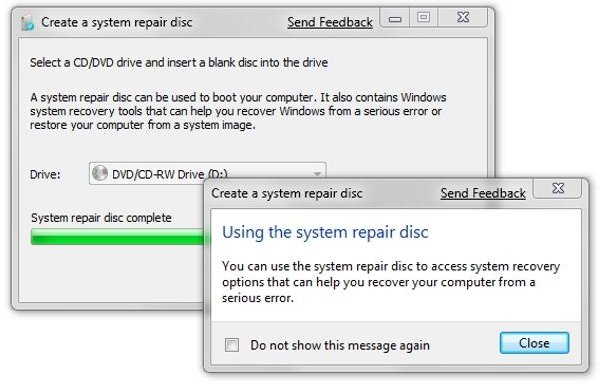
And what do we get for our efforts? We get a disc that can start our computer. In fact, it starts out like a Windows 7 installation, except even more slowly (if you created a CD rather than DVD). It asks you to select a currency, time format, and keyboard layout. Then it goes looking for Windows installations to repair. If the disk image is on an external hard drive, it might not be noticed unless you click the “Load Drivers” button.
This will then take you to recovery options screen, where you’ll have your choice of performing startup repair, system restore, system image recovery (from the source you’ve previously saved), Windows memory diagnostics, or a command prompt.
So we who pay extra to get a version of Windows 7 that can produce a hard drive image can now create bootable media that mounts a recovery environment that allows us to access and restore our externally saved image. That’s much needed and a significant improvement over Vista. This will particularly give laptop users an alternative to doing a default recovery of the manufacturer’s out-of-the-box environment, with copious bloat ware, no updates or customizations, and no user’s data.


