Find Your Windows Files in Ubuntu
What differences will I notice?
Generally you will find Ubuntu looks and feels very similar to Windows. Some of the main changes you should look out for are as follows:
Pressing the Windows + D buttons will no longer minimize your windows and show you your desktop. However, you can do this by clicking on the square logo in the bottom-left corner of the screen.
When a program experiences a problem, the relevant window will turn grey. If this happens, you should leave it alone and not click on it any further: it will usually rectify the problem in a few seconds and return to full color. This system helps avoid the Windows problem of a program freezing up and the user clicking on it repeatedly to try to get a response but only making things worse.
The Add/Remove function, found in the Applications Window, works similar to that in the Windows Control Panel. However, it also allows you to add new software from a large directory of programs. This will greatly reduce the number of times you need to download a program from a website and then install it.
If a program is not playing sounds, check that you have closed any other programs which play audio as this can cause conflicts.
If you transfer files to a removable storage device such as a USB stick, you must select the “Unmount” option in the file browser before removing it, otherwise your files will not be copied across.
Where are my files?
Ubuntu has its own set of folders for storing files. They are organized in a similar way to Windows: the main folder is known as Home, there are folders for Documents, Music, Video and Pictures which work in the same way as My Documents, and there is a Desktop.
The important thing to remember is that files you save in Ubuntu’s folders cannot be accessed in Windows when you have installed it through Wubi. However, files you save in Windows can be accessed in Ubuntu.
For this reason, I’d recommend storing all your documents in the Windows folder system while you are running both systems. In Ubuntu you can find your Windows documents and files by going into the folder marked Filesystem (which you can find under “Computer”).
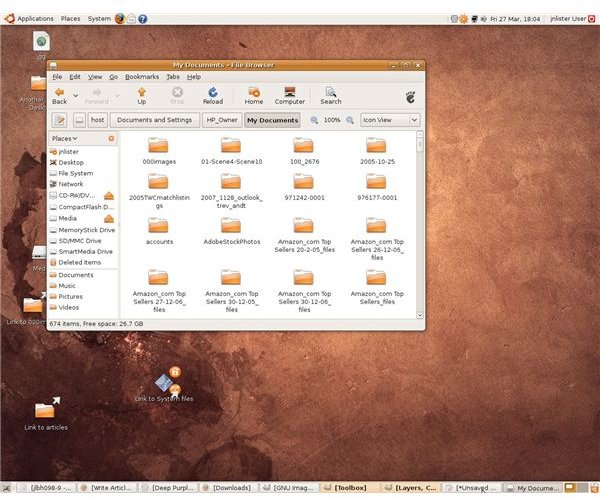
The folder marked Host in here will “contain” your main hard drive. “My Documents” can be found inside Host in the Documents and Settings folder (see screenshot below). Any documents you save within Host will be accessible in Windows.
To save time, it’s worth creating a shortcut for the Windows folders you use most often: right click on them in the file browser, choose “Make Link,” then drag the resulting link onto your Ubuntu desktop.
Images
This post is part of the series: How to Run Windows and Linux on the same PC
Looking at the options available to you the end user when deciding whether to run with Linux and/or Windows as your operating system of choice.
