Microsoft Excel Help: Create A Report Showing Count, Min, Max, Average, Etc.
Page content
Strategy:
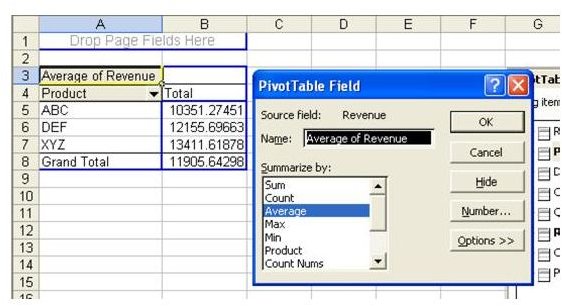
Pivot tables offer a variety of calculation options. Double-click the Sum of Revenue button to change the calculation from Sum to any other calculation, as shown in Fig. 915.
**
Additional Information:
There is no built-in way to create a median for a pivot table. I’ve heard this question a few times. If you absolutely need to create a median in a pivot table, contact MrExcel Consulting – we’ve custom written pivot-table-like reports that do medians.
Summary:
Pivot tables can create averages; find the smallest sale, largest sale, and the number of sales. Use the Summarize By field in the PivotTable Field dialog.
Commands Discussed:
PivotTable
**
